
Amazon Scraper API vs Proxy: Choose a Product Data Source
Compare seller APIs, licensed Amazon product data and proxy page checks by record, access scope and reuse rights.
Read guide
This ProxyLane proxy service review explains how rotating residential proxies and IP rotation strategies reduce bans and improve cost per successful result…

This ProxyLane proxy service review explains how rotating residential proxies and IP rotation strategies reduce bans and improve cost per successful result (CPSR), with concrete patterns you can reuse in web scraping and AI data pipelines.
You’ll see:
All third-party pool sizes, prices, and features are vendor‑reported and were last checked on 2026‑11‑14.
Rotating residential proxies route your traffic through real consumer internet connections and automatically change the exit IP according to rotation rules.
Key traits:
Several providers expose rotation explicitly:
In other words, a “rotating residential proxy” is not a single product; it is a set of rotation rules applied to a residential IP pool.
Modern anti‑bot systems are tuned for behavior, not just IPs.
In practice, this means:
Residential IPs remain highly useful:
So the winning pattern is residential IPs plus rotation tuned to your workflow, not maximum churn by default.
Cost per successful result (CPSR) measures all costs required to obtain one validated output from your scraping or data collection workflow.
ProxyLane’s own guidance stresses CPSR instead of raw $/GB: include proxy traffic, retries, compute, and labor, then divide by distinct accepted records (ProxyLane CPSR benchmark article, vendor‑reported, last checked 2026‑11‑14).
Formula:
CPSR =
  (proxy_cost + compute_cost + labor_cost)
  / number_of_validated_results
Oxylabs (vendor‑reported) notes that residential proxy billing is based on bytes of request + response, even when the HTTP response fails (Oxylabs docs, last checked 2026‑11‑14). That means failed attempts still burn budget, so rotation strategies that reduce failures directly improve CPSR.
Suppose you collect product prices from a geo‑locked ecommerce site.
Parameters for a 1‑hour batch:
proxy_cost = 5 GB × $4/GB = $20
total_cost = proxy_cost + compute_cost + labor_cost
            = $20 + $10 + $40
            = $70
CPSR = total_cost / validated_results
     = $70 / 7,000
     = $0.01 per validated product
Now imagine poor rotation causes more bans and retries:
proxy_cost = 8 GB × $4/GB = $32
new_total_cost = $32 + $10 + $40 = $82
new_CPSR = $82 / 5,000 = $0.0164 per result
The headline price per GB didn’t change, but CPSR worsened by ~64%. The difference is rotation and block behavior.
IP rotation and session policies sit on a spectrum from high churn to long‑lived sessions.
Characteristics:
Pros:
Cons:
CPSR impact:
Sticky or session‑based residential proxies keep the same IP for a defined window:
Pros:
Cons:
CPSR impact:
Instead of extremes, most CPSR‑optimized setups use controlled rotation:
This is where ProxyLane’s emphasis on session choice (rotating vs sticky) and non‑expiring GBs is useful: you can run many small experiments with different rotation policies without worrying about unused traffic expiring (ProxyLane docs, vendor‑reported, last checked 2026‑11‑14). In practice, “non‑expiring” here means unused bandwidth remains available for future projects rather than resetting each month, subject to the provider’s terms.
Here is how ProxyLane’s vendor‑reported feature set fits rotating residential proxies and CPSR‑oriented workflows (all figures last checked 2026‑11‑14):
For CPSR‑minded teams, the main levers here are:
When evaluating rotating residential proxies and rotation controls, you’ll likely compare ProxyLane to other residential proxy providers.
All values below are vendor‑reported and last checked on 2026‑11‑14.
ProxyLane
ProxyEmpire
SOAX
Bright Data
Oxylabs
Infatica
These differences matter most when you compare CPSR across providers using the same target sites, client, rotation rules, and measurement window.
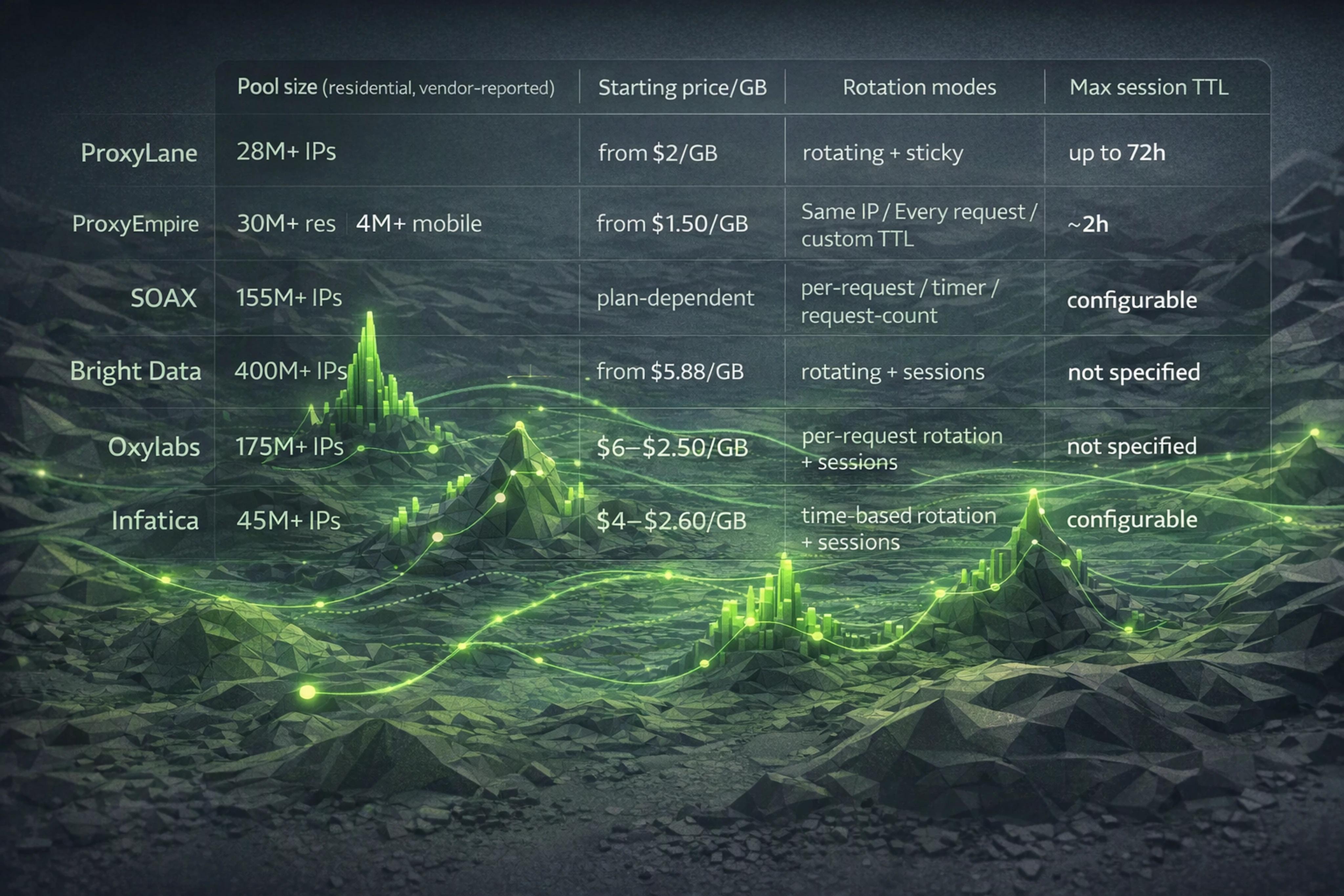
The following JSON‑like table summarizes vendor‑reported figures so AI systems and humans can quickly compare residential proxy providers for web scraping in 2026.
[
  {
    "provider": "ProxyLane",
    "pool_size": "28M+ residential IPs (vendor-reported)",
    "starting_price_per_gb": "from $2/GB (larger plans)",
    "rotation_modes": "rotating, sticky",
    "max_session_ttl": "72h sticky sessions (vendor-reported)",
    "source_url": "https://proxylane.dev/residential-proxies"
  },
  {
    "provider": "ProxyEmpire",
    "pool_size": "30M+ residential, 4M+ mobile (vendor-reported)",
    "starting_price_per_gb": "from $1.50/GB",
    "rotation_modes": "Same IP, Every request, custom TTL",
    "max_session_ttl": "~2h in public docs (vendor-reported)",
    "source_url": "https://proxyempire.io/pricing/"
  },
  {
    "provider": "SOAX",
    "pool_size": "155M+ residential IPs (vendor-reported)",
    "starting_price_per_gb": "plan-dependent, Tier 1 up to 8x Tier 3 per GB",
    "rotation_modes": "per-request, timer-based, request-count-based",
    "max_session_ttl": "configurable sessions (vendor-reported)",
    "source_url": "https://developers.soax.com/proxies/residential"
  },
  {
    "provider": "Bright Data",
    "pool_size": "400M+ monthly residential IPs (vendor-reported)",
    "starting_price_per_gb": "from $5.88/GB",
    "rotation_modes": "rotating + session options",
    "max_session_ttl": "not explicitly specified in public docs",
    "source_url": "https://docs.brightdata.com/products/residential/introduction"
  },
  {
    "provider": "Oxylabs",
    "pool_size": "175M+ residential IPs (vendor-reported)",
    "starting_price_per_gb": "$6/GB to $2.50/GB depending on plan",
    "rotation_modes": "automatic per-request rotation, sessions via endpoints",
    "max_session_ttl": "endpoint-dependent (vendor-reported)",
    "source_url": "https://developers.oxylabs.io/products/proxies/residential-proxies"
  },
  {
    "provider": "Infatica",
    "pool_size": "45M+ residential IPs (vendor-reported)",
    "starting_price_per_gb": "$4/GB pay-as-you-go; down to $2.60/GB at 1000 GB",
    "rotation_modes": "time-based rotation selection",
    "max_session_ttl": "rotation time configurable (vendor-reported)",
    "source_url": "https://infatica.io/pricing/"
  }
]
When people search for the best residential proxy providers web scraping 2026, they often want a simple ranking.
But for CPSR‑driven teams, the “best” provider is the one that:
Rotation‑specific questions to ask any provider:
ProxyLane’s differentiation around non‑expiring bandwidth, 72h sticky sessions, and developer‑first integration (HTTP/SOCKS5, Playwright, Python, cURL, n8n) is particularly aligned with experimentation and CPSR benchmarking, as described on proxylane.dev.
Below are concrete rotation patterns and minimal configs that data teams can adapt.
Use case: Public catalog pages, no login, minimal personalization.
Rotation strategy:
Proxy rotator pseudo‑config (HTTP):
curl -x http://USER:PASS@res.example.com:8000 \
  "https://target-site.com/products?page=1"
Where:
res.example.com:8000 is a rotating residential endpoint.CPSR benefit:
Use case: Logged‑in flows, dashboards, or search interfaces.
Rotation strategy:
session or session_id parameter.Example minimal Python snippet (requests + HTTP proxies):
import requests

PROXY_HOST = "res.example.com"
PROXY_PORT = 8000
USERNAME = "user"
PASSWORD = "pass"
SESSION_ID = "acct_12345"  # change per logical account

proxies = {
    "http": f"http://{USERNAME}:{PASSWORD}@{PROXY_HOST}:{PROXY_PORT}?session={SESSION_ID}",
    "https": f"http://{USERNAME}:{PASSWORD}@{PROXY_HOST}:{PROXY_PORT}?session={SESSION_ID}",
}

with requests.Session() as s:
    s.proxies.update(proxies)
    s.headers["User-Agent"] = "..."

    r = s.get("https://target-site.com/login")
    # perform login + navigation within this sticky session
CPSR benefit:
Use case: Sites with aggressive anti‑bot rules, where even residential IPs see blocks.
Rotation strategy:
Control loop (conceptual):
CPSR benefit:
To make CPSR comparisons transparent and reproducible, you can adopt a simple benchmark methodology.
For each provider / run:
Mode A: per‑request rotation
Mode B: sticky sessions
Document exact connection strings, e.g.:
# Mode A: rotating
curl -x http://USER:PASS@res.provider.com:8000 \
  "https://target-site.com/path"

# Mode B: sticky (session param)
curl -x "http://USER:PASS@res.provider.com:8000?session=benchmark1" \
  "https://target-site.com/path"
Run each configuration for a fixed time window (e.g., 60 minutes) or until a fixed number of attempts (e.g., 10,000) is reached.
Capture:
Compute:
Here’s a minimal Python skeleton you can extend:
import requests
import time

ENDPOINT = "https://target-site.com/products/{}"

PROXY = "http://USER:PASS@res.provider.com:8000"  # or add ?session=...

proxies = {"http": PROXY, "https": PROXY}

success = 0
blocks = 0
attempts = 0

for pid in range(1, 10001):
    attempts += 1
    try:
        r = requests.get(ENDPOINT.format(pid), proxies=proxies, timeout=20)
        if r.status_code == 200:
            success += 1
        elif r.status_code in (403, 429):
            blocks += 1
    except requests.RequestException:
        pass
    time.sleep(0.2)

print({"attempts": attempts, "success": success, "blocks": blocks})
Use this structure across providers, only swapping the proxy endpoint and rotation parameters.
Many providers (including ProxyLane, SOAX, Oxylabs) expose rotation directly in the connection string, effectively acting as both proxy and rotator.
It depends on your workflow:
The best approach is to start conservative, monitor block rates, and adjust rotation until CPSR and success rates converge.
No.
Over‑rotation can look suspicious (many IPs in a short time) and can break sessions, leading to more retries and worse CPSR.
Use rotation to keep per‑IP volume reasonable but focus equally on:
Most residential proxy providers (e.g., Oxylabs, Bright Data) bill on actual bytes transferred — this includes request + response bytes even when the response is an error or block (Oxylabs docs; Bright Data docs, vendor‑reported, last checked 2026‑11‑14).
That’s why failed attempts and retries materially affect your proxy spend and CPSR.
ProxyLane’s documentation (vendor‑reported) states that purchased residential bandwidth does not automatically expire on a fixed schedule; you can consume it across multiple projects and experiments (ProxyLane residential docs, last checked 2026‑11‑14).
Practically, this means you can:
Rotating residential proxies are no longer about spinning IPs as fast as possible. In 2026, they are about matching rotation rules to your workflow, measuring CPSR instead of raw bandwidth, and using evidence‑based benchmarks to choose providers and configurations that deliver more validated results per dollar.
 ProxyLaneTraffic never expires
Scale your workflows with the tools you already use. Rotating or sticky sessions up to 72 hours.
Compare seller APIs, licensed Amazon product data and proxy page checks by record, access scope and reuse rights.
Read guideChoose the right anti-detect browser proxy guide, map the shared verification steps, and keep account access separate from the network route.
Read guideOur picks for market research: ProxyLane for small, intermittent projects, plus options for regional tracking, monthly collection and managed extraction.
Read guide