

Amazon Scraper API vs Proxy: Choose a Product Data Source
Compare seller APIs, licensed Amazon product data and proxy page checks by record, access scope and reuse rights.
Read guide
Configure GNU Wget with proxy authentication, protect credentials, and check the response. Diagnose connection, TLS, and target failures.
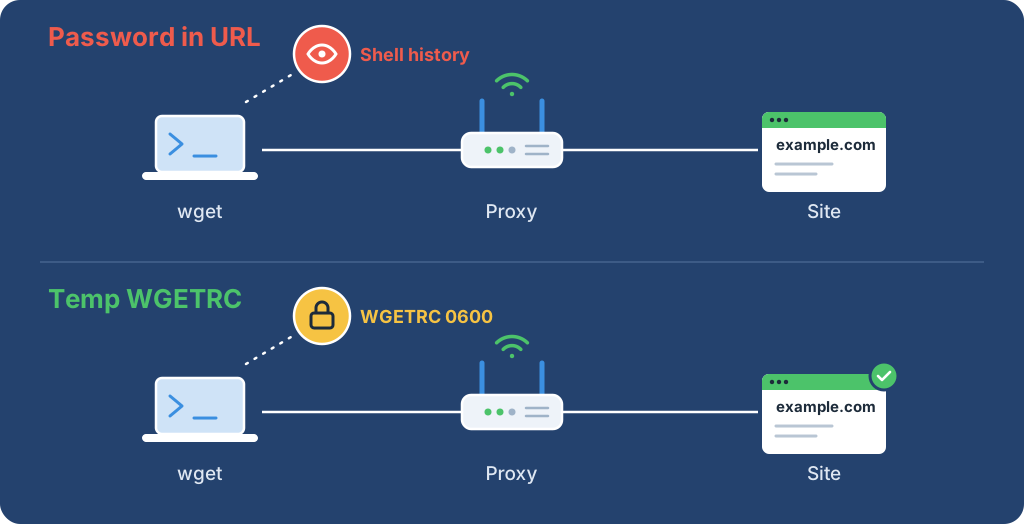
GNU Wget reads its proxy from https_proxy and http_proxy, either as environment variables or as lines in a wgetrc file. For a proxy that needs no password, one command is enough: https_proxy=http://<PROXY_HOST>:<PROXY_PORT> wget <TARGET_URL>. For an authenticated proxy, write proxy_user and proxy_password into a temporary wgetrc with mode 0600 and point WGETRC at it, so the password never appears in the command line or shell history.
Then confirm two things: the downloaded body contains an expected marker, and an IP check through the same settings returns an address. The complete script below does both.
Audience: developers comfortable running a shell script and new to Wget proxy settings. The commands use a POSIX-compatible shell on macOS or Linux; Windows syntax is outside this guide.
Replace <PROXY_HOST> and <PROXY_PORT> with an unauthenticated or IP-allowlisted endpoint, and <TARGET_URL> with a permitted HTTPS page:
https_proxy=http://<PROXY_HOST>:<PROXY_PORT> wget --quiet --output-document=- <TARGET_URL>
The same route as Wget -e commands, with no environment variable:
wget --quiet -e use_proxy=on -e https_proxy=http://<PROXY_HOST>:<PROXY_PORT> --output-document=- <TARGET_URL>
--no-proxy sends one request directly even when the variables are set. In a local test, both proxied commands appeared in the test proxy's connection log and the --no-proxy request did not. The proxy log, not the printed IP, proved the route there, because the local test proxy shared the machine's own exit.
Warning: Do not put a proxy password in these commands or in a user:password@ URL. Command arguments can appear in shell history and process listings. Use the script below for authenticated proxies.
Tested with GNU Wget 1.21.4 and Python 3.12.0, from the GNU Wget downloads and Python downloads. Python's standard library validates the IP response; no package installation is needed.
Obtain an HTTP proxy's host, port, and authentication instructions. http:// describes the connection to the proxy; Wget uses CONNECT for HTTPS targets. This guide does not configure SOCKS endpoints.
Warning: Run with an authorized test target and a small traffic allocation, because proxy requests can incur charges. The script overwrites OUTPUT_FILE, by default proxy-check.out, so use a disposable working directory. Its size checks run after the download and do not cap network traffic or disk use.
HTTP proxy authentication crosses an unencrypted client-to-proxy link, so use a trusted network. Rotate exposed credentials and stop the worker if request counts or charges are unexpected.
Set the credential-free endpoint:
export PROXY_URL='http://<PROXY_HOST>:<PROXY_PORT>'
For authentication, inject PROXY_USER and PROXY_PASSWORD together through the runtime's secret manager. Omit both for an unauthenticated proxy. Do not paste a password into an export command.
| Binding | Default or purpose |
|---|---|
TARGET_URL |
https://example.com/; replace with an authorized HTTPS page |
EXPECTED_MARKER |
Example Domain; exact text required in the target body |
IP_CHECK_URL |
ipify's HTTPS JSON endpoint; must return an ip field without redirecting |
OUTPUT_FILE |
proxy-check.out; overwritten by the download |
NO_PROXY |
Empty by default; a matching destination bypasses the proxy |
Keep NO_PROXY empty for a proxy-only check. A match sends that destination directly, and the check stops testing the proxy.
Save the program as fetch-through-proxy.sh. The adjustable values sit in one block at the top. The WGETRC environment variable points Wget at a temporary startup file. Single-line checks stop an endpoint or secret from injecting another configuration directive.
#!/bin/sh
set -eu

# Adjustable values: change these or set the matching environment variables.
timeout_seconds=15
max_redirects=5
max_body_bytes=1048576
max_ip_bytes=4096

: "${PROXY_URL:?Set PROXY_URL to an HTTP proxy URL without credentials}"
line_feed=$(printf '\nX')
line_feed=${line_feed%X}
carriage_return=$(printf '\rX')
carriage_return=${carriage_return%X}
check_single_line() {
  case "$1" in
    *"$line_feed"*|*"$carriage_return"*) printf '%s\n' 'proxy settings must not contain newlines' >&2; exit 2 ;;
  esac
}
check_single_line "$PROXY_URL"
check_single_line "${PROXY_USER:-}"
check_single_line "${PROXY_PASSWORD:-}"
check_single_line "${NO_PROXY:-}"
case "$PROXY_URL" in
  http://*@*) printf '%s\n' 'PROXY_URL must not contain userinfo' >&2; exit 2 ;;
  http://*) ;;
  *) printf '%s\n' 'PROXY_URL must be an HTTP proxy URL' >&2; exit 2 ;;
esac

target_url=${TARGET_URL:-https://example.com/}
ip_check_url=${IP_CHECK_URL:-https://api.ipify.org?format=json}
expected_marker=${EXPECTED_MARKER:-Example Domain}
output_file=${OUTPUT_FILE:-proxy-check.out}
check_single_line "$target_url"
check_single_line "$output_file"
check_single_line "$ip_check_url"
check_single_line "$expected_marker"
umask 077
if [ -n "${PROXY_USER:-}" ] || [ -n "${PROXY_PASSWORD:-}" ]; then
  if [ -z "${PROXY_USER:-}" ] || [ -z "${PROXY_PASSWORD:-}" ]; then
    printf '%s\n' 'PROXY_USER and PROXY_PASSWORD must be supplied together' >&2
    exit 2
  fi
fi
config_file=$(mktemp "${TMPDIR:-/tmp}/wgetrc.XXXXXX")
trace_file=$(mktemp "${TMPDIR:-/tmp}/wget-trace.XXXXXX")
ip_file=$(mktemp "${TMPDIR:-/tmp}/wget-ip.XXXXXX")
cleanup() {
  rm -f "$config_file" "$trace_file" "$ip_file"
}
trap cleanup EXIT
trap 'exit 129' HUP
trap 'exit 130' INT
trap 'exit 143' TERM

{
  printf 'http_proxy = %s\n' "$PROXY_URL"
  printf 'https_proxy = %s\n' "$PROXY_URL"
  printf 'no_proxy = %s\n' "${NO_PROXY:-}"
  if [ -n "${PROXY_USER:-}" ]; then
    printf 'proxy_user = %s\n' "$PROXY_USER"
  fi
  if [ -n "${PROXY_PASSWORD:-}" ]; then
    printf 'proxy_password = %s\n' "$PROXY_PASSWORD"
  fi
  printf '%s\n' 'use_proxy = on' 'tries = 1' 'waitretry = 0'
  printf 'timeout = %s\n' "$timeout_seconds"
} > "$config_file"

if ! WGETRC="$config_file" wget \
  --server-response \
  --max-redirect="$max_redirects" \
  --output-document="$output_file" \
  -- "$target_url" 2>"$trace_file"; then
  if grep -Eq 'HTTP/[0-9.]+ 407' "$trace_file"; then
    printf '%s\n' 'request failed at proxy authentication or CONNECT negotiation' >&2
  else
    printf '%s\n' 'request failed before an accepted target response' >&2
  fi
  exit 1
fi

if grep -Eq 'HTTP/[0-9.]+ 407' "$trace_file"; then
  printf '%s\n' 'proxy authentication or CONNECT negotiation returned HTTP 407' >&2
  exit 1
fi
if grep -Eq 'HTTP/[0-9.]+ (401|403)' "$trace_file"; then
  printf '%s\n' 'target returned an authentication or permission response' >&2
  exit 1
fi
if ! grep -Fq -- "$expected_marker" "$output_file"; then
  printf '%s\n' 'target marker was absent' >&2
  exit 1
fi

body_bytes=$(wc -c < "$output_file" | tr -d '[:space:]')
if [ "$body_bytes" -gt "$max_body_bytes" ]; then
  printf '%s\n' 'download exceeded the 1 MiB acceptance limit' >&2
  exit 1
fi
printf 'status=accepted body_bytes=%s\n' "$body_bytes"
if ! WGETRC="$config_file" wget --quiet --max-redirect=0 \
  --output-document="$ip_file" -- "$ip_check_url"; then
  printf '%s\n' 'IP-check transfer failed; inspect endpoint and proxy settings' >&2
  exit 1
fi
python3 - "$ip_file" "$max_ip_bytes" <<'PYTHON'
import ipaddress
import json
import sys

try:
    limit = int(sys.argv[2])
    with open(sys.argv[1], "rb") as stream:
        raw = stream.read(limit + 1)
    if len(raw) > limit:
        raise ValueError("IP response too large")
    value = json.loads(raw)["ip"]
    if not isinstance(value, str):
        raise ValueError("IP field must be a string")
    address = ipaddress.ip_address(value)
except (OSError, ValueError, TypeError, KeyError):
    print("IP check did not return valid JSON with an IP address", file=sys.stderr)
    raise SystemExit(1) from None
print(f"Observed exit address: {address}")
PYTHON
Run it from the shell that holds the endpoint and any secret bindings:
chmod 700 fetch-through-proxy.sh
./fetch-through-proxy.sh
Expected output. The byte count depends on the target, and the address is a documentation example:
status=accepted body_bytes=528
Observed exit address: 203.0.113.10
A run through a local authenticated test proxy printed both lines with exit status 0. Success needs both lines and exit status 0. The first line confirms the marker and the 1 MiB acceptance rule; the second confirms a parseable IP from the same configured route, subject to NO_PROXY.
The IP line does not prove geography, anonymity, or the download's exit under rotation. A transfer can still return a challenge or sign-in page, which the marker check rejects.
The temporary configuration, response trace, and IP file are created with mode 0600. The EXIT trap removes them on normal exit and after the trapped HUP, INT, or TERM signals. A forced kill or host crash cannot run traps, so point TMPDIR at a per-job directory with mode 0700 and remove stale job directories at worker startup.
The target download stays in OUTPUT_FILE, including a partial or rejected response. Check the exit status before using that file.
| Limit | Value | What it does not cover |
|---|---|---|
| Attempts | tries = 1, no application retries |
Redirects and proxy authentication can add HTTP exchanges |
| Redirects | Up to 5 for the target, none for the IP check | Redirect destinations still need permission |
| Timeout | timeout 15 seconds for network operations |
Not a total deadline; a steadily arriving body can run longer |
| Size | 1 MiB target and 4 KiB IP response, checked after download | Wget does not stop at that size during the transfer |
If a workflow adds retries, repeat only operations that are safe to repeat, honor the target's Retry-After, and never repeat rejected proxy credentials unchanged.
Wget's --spider checks availability without keeping the page. It adds a separate request and cannot prove the later download's content:
# Partial snippet: requires config_file and target_url from the full script.
WGETRC="$config_file" wget --spider --server-response --max-redirect=5 -- "$target_url"
| Observation | Boundary | Next check |
|---|---|---|
| Configuration rejected | Local input | Scheme, host, port, paired credentials, and line breaks |
| HTTP 407 in the private trace | Proxy authentication or CONNECT |
Repair credentials or entitlement before another attempt |
| Target 401 or 403 | Target authorization | Target credentials, permission, and policy |
| No status or timeout | Client, proxy, or network | Endpoint reachability and protocol |
| Request missing from the proxy log | Route bypass | NO_PROXY, --no-proxy, and use_proxy |
| TLS or certificate error | TLS with the target through CONNECT |
Keep verification on; check the system CA store, the target certificate name, and any approved intercepting CA |
| Marker absent | Target content | Reject the saved response and inspect it safely |
| Size rule failed | Application acceptance | Reject the file; use a streaming limit if required |
| Invalid IP JSON | Verification endpoint | Endpoint and response format |
The script prints a short failure without the private trace or secret values. Keep certificate verification enabled. The curl proxy guide covers a TLS-capable proxy hop and CONNECT diagnostics, and proxy client settings explains bypass rules.
 ProxyLaneTraffic never expires
Scale your workflows with the tools you already use. Rotating or sticky sessions up to 72 hours.
Compare seller APIs, licensed Amazon product data and proxy page checks by record, access scope and reuse rights.
Read guideChoose the right anti-detect browser proxy guide, map the shared verification steps, and keep account access separate from the network route.
Read guideOur picks for market research: ProxyLane for small, intermittent projects, plus options for regional tracking, monthly collection and managed extraction.
Read guide
