

Amazon Scraper API vs Proxy: Choose a Product Data Source
Compare seller APIs, licensed Amazon product data and proxy page checks by record, access scope and reuse rights.
Read guide
Add a proxy to a GoLogin profile in four ways, then prove it in the running browser: exit IP, target page, and the fixes for red indicators and 407.
GoLogin stores the proxy inside each browser profile. Add it from the profile's Location column, the Proxies page, a bulk selection, or Settings → Proxy → Your proxy. GoLogin then checks the connection and shows a green or red indicator. Green is only the first check: start the profile, confirm the exit IP in that browser, and confirm that the target page shows the expected content.
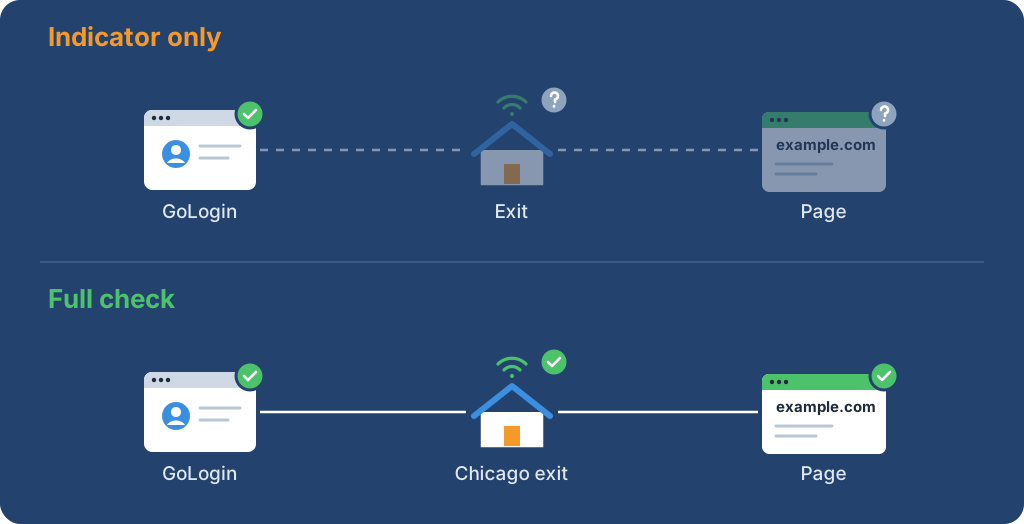
The city and ISP in the diagram are examples. The point is the order: a profile can pass GoLogin's check and still land on a login page, a challenge, or the wrong market.
The add paths below follow GoLogin's help center, checked on 2026-10-27; ProxyLane did not run them in a specific GoLogin desktop version, so match labels against the installed build.
For the decision tree across profile tools, start with the antidetect browser proxy setup guide. For the Multilogin path, use the Multilogin proxy guide.
Warning: The proxy password and the GoLogin API token both grant access: one to paid proxy traffic, the other to the GoLogin account through its API. Keep them in a secret manager, out of profile names, notes, screenshots, and logs, and rotate them if they are exposed.
Write down the provider's values before opening GoLogin. Keep the password in a secret store, not in this record:
| Value | What to enter or verify |
|---|---|
| Protocol | HTTP, HTTPS, or SOCKS5, as supplied |
| Host | Proxy IP address or hostname |
| Port | The provider's numeric port |
| Authentication | Proxy username and password, or the provider's IP allowlist |
| Expected exit | The country, city, or address to compare after the profile starts |
| Target check | A title, element, or record value that proves the page is right |
GoLogin's help page documents paste formats such as 192.168.0.1:8000:login:password, http://192.168.0.1:8000:login:password:name, and socks5://login:password@192.168.0.1:8000:name. Replace the sample values with the assigned endpoint, and use the format the current build shows; another profile tool's format may not parse the same way.
Check the protocol before debugging the profile. GoLogin selects HTTP or SOCKS automatically based on availability, and the choice can be changed later.
GoLogin documents SOCKS5 support, including the authenticated socks5:// string above, so enter authenticated SOCKS5 endpoints through GoLogin's own proxy fields or import. The Chromium proxy documentation states that no authentication methods are supported for SOCKSv5 in Chrome itself, so credentials in a generic Chrome proxy setting are not proof that authentication works. For an HTTP endpoint, the curl proxy guide separates endpoint reachability from profile settings.
GoLogin's help center documents four paths:
All profiles, find the Location column, click + on the profile, click the computer icon, enter IP, port, username, and password, and click Connect.Proxies in the left menu, click Import proxies, paste one or more lines, and click Import proxies again.Proxy in the bulk actions row, enter the proxies, and click Update proxy.Settings → Proxy → Your proxy.Lines can also be pasted into the Location column one at a time or in bulk with the Paste proxies button.
The profile settings also offer Gologin proxy and Without proxy. Without proxy uses the device connection, so treat it as a comparison state, not a working external route. If timezone or geolocation follow the proxy, inspect them after the route check; an IP country alone does not prove that a page shows the expected locale.
Use a fresh profile, or one whose approved workflow is safe to test. In that same browser:
expected_country, observed_exit, target_final_url, content_check, and timestamp.Keep route success and content success as separate fields in the run record. A proxy changes transport; it does not grant permission to access a target or lift its limits.
The GoLogin API is a separate credential and control plane.
The official proxy reference documents GET https://api.gologin.com/proxy/<PROXY_ID> with Authorization: Bearer <API_TOKEN>, where <PROXY_ID> is the stored proxy record and <API_TOKEN> is the GoLogin API token, returning fields such as id, mode, host, port, username, password, status, country, city, checkDate, and linked profiles. The response includes the stored proxy password, so keep the token and the response on the server, never in page JavaScript, a profile note, or a shared export. The API shows the stored proxy record; it does not replace the live browser check.
Cloud Browser is another boundary. GoLogin documents https://cloudbrowser.gologin.com/connect?token=<API_TOKEN>&profile=<PROFILE_ID> with a required token and an optional profile ID. The token sits in the URL, so keep that URL out of logs and shared traces. Configure the profile and proxy through the API first, close the connection in a finally block, and accept the run only after the connected browser passes the exit and target checks.
| Observation | Inspect first | Next action |
|---|---|---|
| GoLogin rejects the value | Protocol spelling, host, port, paste format | Re-enter the fields or use the current documented format |
| Red indicator | Endpoint reachability, expiry, balance, credentials | Test the endpoint outside GoLogin, then retry with the same protocol |
| 407 or an authentication prompt | Username, password, and authentication mode | Confirm password auth or IP allowlist with the provider; see the proxy error 407 guide |
| SOCKS5 fails only with a password | Where the credentials were entered, and whether the provider supports SOCKS5 authentication | Enter them in GoLogin's proxy fields or import string; confirm SOCKS5 auth support with the provider |
| Profile starts but HTTPS fails | TLS mode, target handshake, browser runtime | Compare with a trusted HTTPS page; classify TLS separately from target policy |
| Exit is right but the page is wrong | Final URL, account state, locale, required field | Inspect the page; an IP check does not prove content |
| Exit changes between related pages | Provider rotation or session policy | Use a sticky session for related pages, or treat each page as independent |
Keep only redacted evidence for authorized work: profile identifier, phase, target host, status, check result, and timestamp. Remove a temporary proxy record only when the workflow created it and the provider's retention rules allow it.
 ProxyLaneTraffic never expires
Scale your workflows with the tools you already use. Rotating or sticky sessions up to 72 hours.
Compare seller APIs, licensed Amazon product data and proxy page checks by record, access scope and reuse rights.
Read guideChoose the right anti-detect browser proxy guide, map the shared verification steps, and keep account access separate from the network route.
Read guideOur picks for market research: ProxyLane for small, intermittent projects, plus options for regional tracking, monthly collection and managed extraction.
Read guide
