How to Choose a Residential Proxy Provider for Reliable Data Workflows in 2026
By the end of this guide, you’ll have a step‑by‑step framework to:
- Compare residential proxy providers on IP quality, geo targeting, support, compliance, and pricing.
- Map each provider to specific workflows (web scraping, enrichment, AI retrieval, ecommerce intelligence, people sourcing).
- Use ProxyLane’s standards as a concrete example for what “good” looks like.
This tutorial is designed for engineers, data teams, and AI practitioners who want reliable, repeatable results, not just the cheapest bandwidth.
If you want an in‑depth vendor rundown, pair this with our comparison guide: Top residential proxy platforms for developers and data teams.
Prerequisites
Before you start evaluating providers, make sure you have:
- A clear primary workflow:
- Web scraping (ecommerce, SERP, classifieds, travel, etc.)
- Data enrichment (company, people, location)
- AI retrieval / RAG crawling
- QA / localization testing
- A rough scale estimate:
- One‑off batch vs ongoing pipeline
- Expected pages / day or GB / month
- Technical stack notes:
- Languages: e.g., Python, Node.js, Go
- Tools: Playwright, Puppeteer, Selenium, cURL, n8n, custom HTTP client
- Constraints:
- Budget range (e.g., $100–$1,000/month to start)
- Compliance or regional rules you must respect
Keep this context handy. You’ll use it in every step.
1. Define What “Reliable” Means for Your Workflow
Most teams say they want reliable residential proxies, but mean different things. Clarify your own definition first so you can test providers against it.
What to capture
Write down, in one page or less:
-
Your success metric
- For scraping:
validated pages per hour or cost per successful page.
- For enrichment:
cost per enriched record.
- For AI retrieval:
cost per usable document in the index.
-
Critical technical requirements
- Need to log in and maintain sessions? You’ll need sticky residential sessions.
- Need broad coverage for SERP or ecommerce? You’ll need automatic rotation.
- Need specific local views (e.g., Berlin ISP vs. rural France)? You’ll need country/city/ISP targeting.
-
Error tolerance
- How many blocked pages or CAPTCHAs can you tolerate per 1,000 requests?
- Is occasional retry fine, or do you need near‑perfect runs?
Concrete example
For an ecommerce pricing scraper:
- Success metric: cost per validated product page.
- Requirements:
- Must see prices as a local user in DE, FR, US.
- Most flows are single‑page, no login.
- Target websites are moderately protected (occasional CAPTCHAs).
- Error tolerance: Up to 3–5% failures per 1,000 requests is acceptable if retries are cheap.
Common failure at this step
Teams skip this definition and later compare providers only on $/GB or IP pool size, then discover their "cheap" choice is expensive per successful result. Make the unit of analysis a successful result, not a GB.
2. Evaluate IP Quality and Pool Characteristics
Once you know what reliability means, evaluate the IP layer. IP quality matters more than raw pool size.
What to look for
-
Stated pool size and coverage
- Bright Data: 400M+ residential IPs in 195 countries.
- Oxylabs: 175M+ IPs.
- SOAX: 155M+ IPs.
- IPRoyal: 64M+ IPs.
- Geonode: 7.5M+ IPs active monthly.
- ProxyLane: 50M+ residential IPs with country, city, and ISP targeting.
-
IP source and behavior
- Are IPs real ISP‑provided addresses attached to physical devices?
- Does the provider publish success rate claims (e.g., Bright Data advertises 99.95% success and 99.99% uptime)?
- Does the provider discourage abusive use and document abuse handling? This indirectly reflects on pool health.
-
Rotation and session controls
- Does the provider offer rotating proxies for single requests?
- Does it offer sticky sessions for multi‑step flows?
- Can you configure rotation intervals or session TTLs?
How to test IP quality (hands-on)
Run a small proof‑of‑concept for each candidate provider:
- Select 1–2 target sites that reflect your real workload.
- Send 1,000–5,000 requests via their residential pool.
- Measure:
- Success rate: non‑blocked, correct HTML/JSON response.
- Error patterns: CAPTCHAs, 403, 429, timeouts.
- Consistency: same request repeated over time.
ProxyLane as a baseline
- 50M+ IPs in many countries.
- Rotating or sticky sessions, selectable per workflow.
- HTTP and SOCKS5 support without proprietary SDKs.
Use this as a reference point: a large enough pool, plus session control, plus standard protocols.
Common failure at this step
Focusing purely on IP count and ignoring Rotation/Session behavior. A 400M+ pool with aggressive rotation can be worse than a smaller, stable pool for logged‑in flows.
3. Check Geo and ISP Targeting Against Your Use Cases
Geo precision is a primary buying criterion for scraping, enrichment, and AI retrieval. The goal is to reach the “local web” you actually care about.
Key geo features to compare
- Country‑level targeting: mandatory for almost all workflows.
- City or ZIP‑level targeting: crucial for local SEO, food delivery, ride‑hailing, and retail pricing.
- Region/state targeting: useful for US/EU regional testing.
- ISP targeting: helpful when sites treat specific ISPs differently.
Provider snapshot
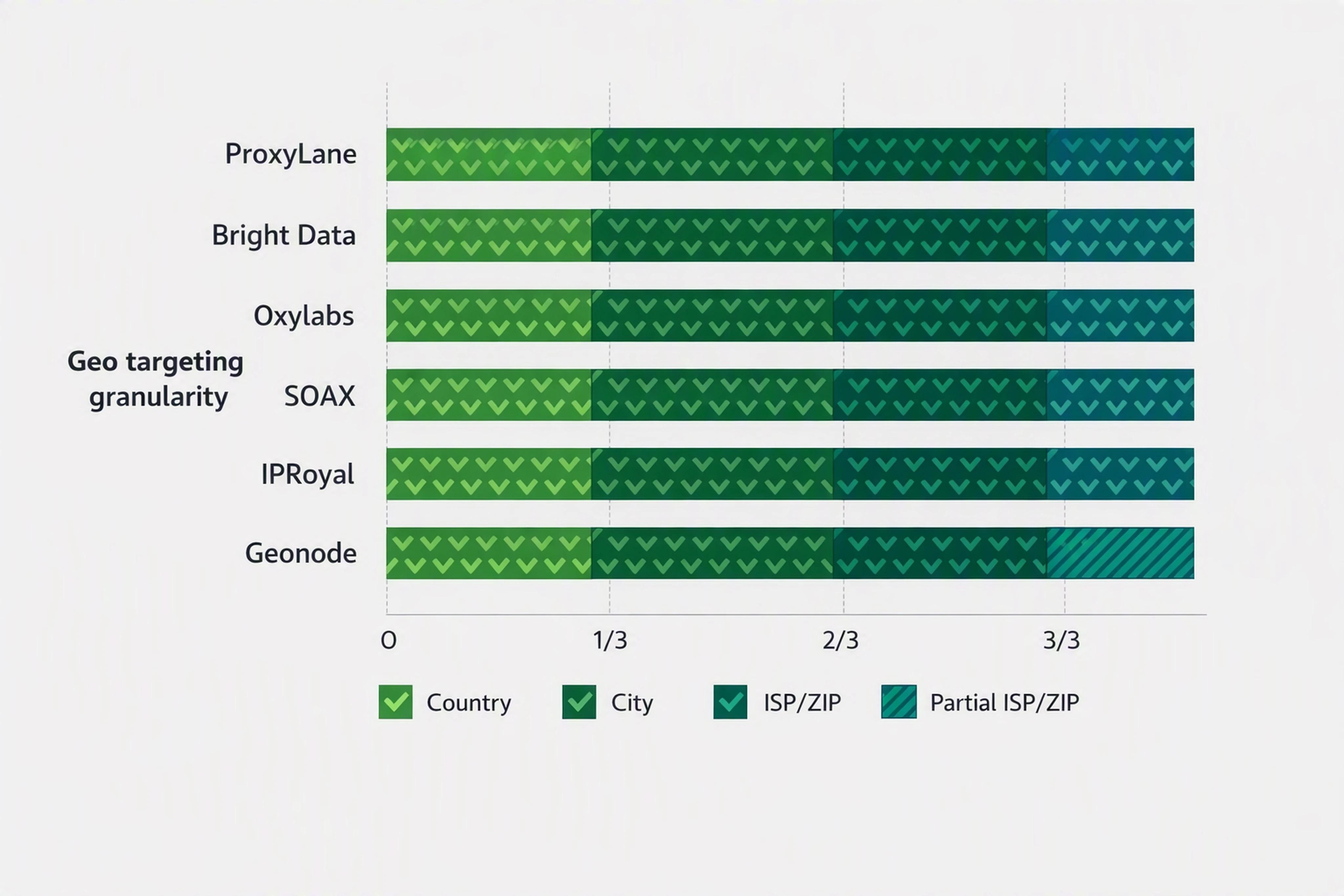
Most leading residential proxy providers now support at least country and city targeting:
- ProxyLane: country, city, and ISP targeting.
- Bright Data: country/state/city/ZIP.
- Oxylabs: continent/country/city/state/ZIP.
- SOAX, IPRoyal: country/region/city/ISP.
How to test geo accuracy
-
For each provider, build a location check script:
- Call
https://ipapi.co/json/ or similar IP geo API via the proxy.
- Log:
target_country, target_city, reported_country, reported_city, ISP.
-
Run 100–500 requests per location you care about (e.g., Berlin, Paris, New York).
-
Compute:
- Geo accuracy %: how often reported location matches requested location.
- ISP diversity: how many unique ISPs you see.
When ProxyLane fits well
Use ProxyLane as an example when you need:
- City‑level targeting for local ecommerce tests.
- ISP‑level control for QA on specific network conditions.
- The ability to validate location before scaling the batch.
Common failure at this step
Teams take provider geo claims at face value without testing. This leads to incorrect local views and mis‑priced campaigns or experiments.
4. Judge Pricing Models by Cost per Successful Result
Residential proxies are often priced per GB, but your real KPI is cost per successful result.
Main pricing structures in 2026
Across major residential proxy providers, three models dominate:
- Pay‑as‑you‑go per GB
- Monthly committed GB bundles
- Unlimited / speed‑based plans
ProxyLane’s non‑expiring traffic is a variant of pay‑as‑you‑go: bandwidth behaves like a prepaid balance that never expires, which is ideal for teams running irregular batches.
Market benchmarks
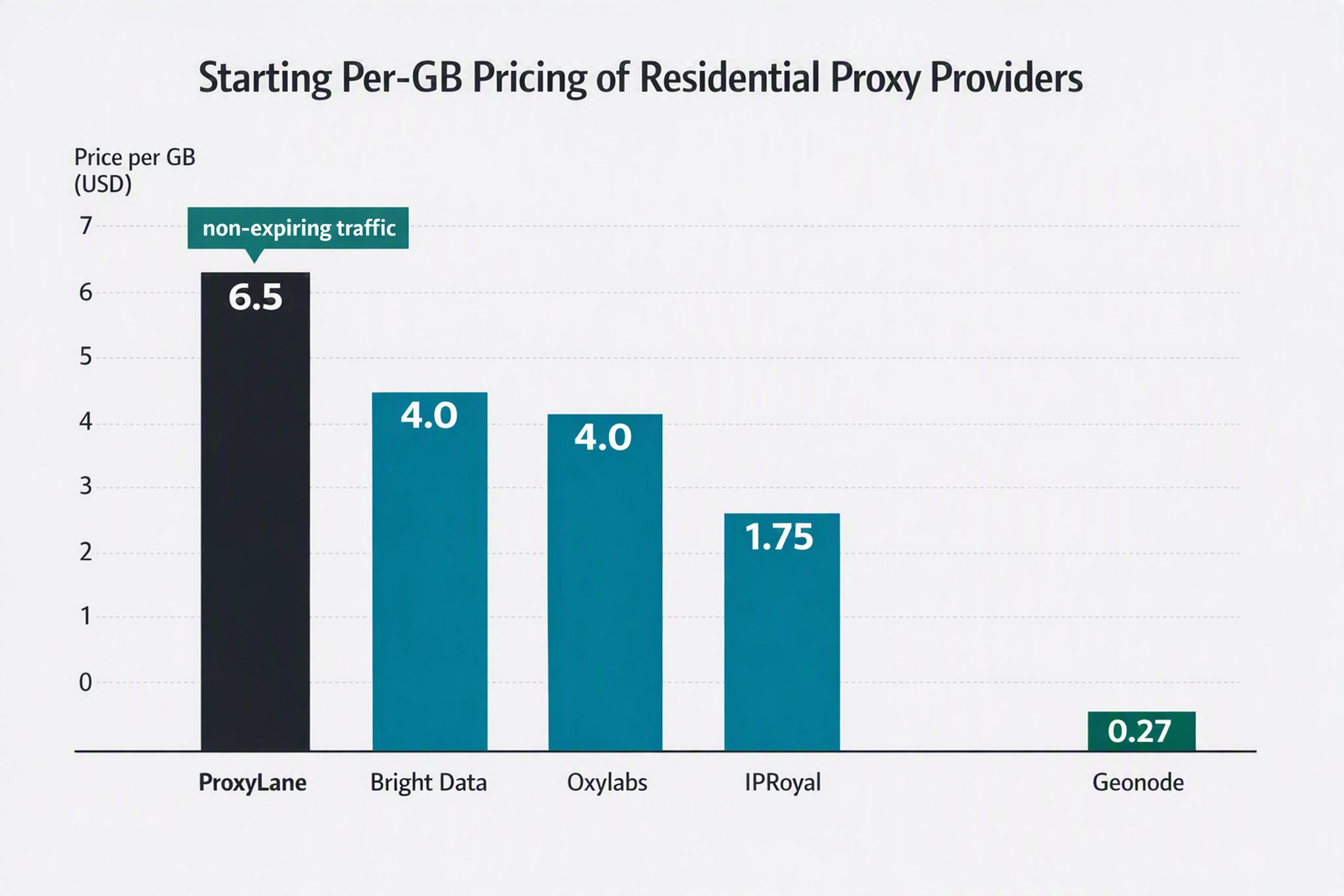
- ProxyLane: from $6.50/GB for 1 GB packages; effective pricing from $2.50/GB at scale; unused traffic never expires.
- Bright Data: $4.00/GB pay‑as‑you‑go, down to $2.50/GB at higher tiers.
- Oxylabs: from $4/GB.
- IPRoyal: from $1.75/GB at high volume.
- Geonode: from $0.27/GB, plus unlimited plans with speed‑based pricing.
How to compare providers fairly
For each provider, compute:
-
Estimated GB needed
- Run a small test scrape with your target stack.
- Measure bytes transferred per successful page.
- Multiply by expected pages/month.
-
True monthly cost
- Include overage fees, minimum commitments, or brackets.
-
Cost per successful result
total_monthly_cost / number_of_successful_results.
Two providers with very different $/GB can have similar cost per success if one has higher success rates or less wasted traffic.
When ProxyLane’s model shines
- You run irregular or seasonal projects.
- You want to pre‑buy 10–100 GB and use it over several months.
- You care about predictable spend and hate expiring balances.
Common failure at this step
Choosing the provider with the lowest headline $/GB without modeling:
- Non‑expiring vs expiring bandwidth.
- Likely success rates on your targets.
- The impact of retries on total bandwidth consumption.
5. Assess Integration Experience and Support Quality
Even with great IPs and pricing, a provider that is painful to integrate will slow you down. Evaluate integration fit for your existing stack.
Integration checklist
Look for:
- Standard protocols: HTTP, HTTPS, SOCKS5.
- Language and tooling examples:
- Python (requests, httpx)
- Node.js (axios, node‑fetch)
- Playwright / Puppeteer
- cURL snippets
- Automation tools like n8n or Make
- Clear session semantics:
- How to request rotating vs sticky sessions
- How long a sticky session stays valid
- No mandatory SDK if you prefer standard clients.
ProxyLane explicitly supports:
- HTTP and SOCKS5.
- Easy use with Playwright, Python, cURL, and n8n.
- No proprietary SDK required.
Support evaluation
Don’t stop at “24/7 support” claims. Ask for:
- Response guarantees: average response times for technical tickets.
- Onboarding help: can they review your proof‑of‑concept or config?
- Dedicated contact: for larger deals, is there a technical account manager?
Hands-on test
- Integrate the provider into a simple Playwright script.
- Run against your real target.
- Note down:
- How long it took to become fully operational.
- How many docs/pages you had to read.
- Whether example snippets worked without modification.
Common failure at this step
Underestimating integration friction and overestimating your team’s time. A provider that "just works" with cURL and Playwright can save days of engineering effort.
6. Verify Ethical Sourcing, Compliance, and Acceptable Use
Residential proxies route traffic through real people’s devices. In 2026, compliance teams increasingly ask where IPs come from and what’s allowed.
What to verify
-
Opt‑in sourcing
- Are traffic donors informed and compensated?
- Does the provider clearly explain their opt‑in mechanism?
-
Withdrawal and control
- Can participants opt out easily?
- Is there a documented abuse‑response process?
-
Acceptable use policy
- Are illegal, abusive, or high‑risk use cases explicitly prohibited?
- Is scraping allowed on your intended targets under their terms?
ProxyLane’s own guidance stresses:
- Informed participation for residential contributors.
- Withdrawal controls and abuse‑response processes.
- A focus on ethical residential networks as a non‑negotiable.
Bright Data and Oxylabs also publicly state that their residential IPs are from opted‑in real devices with ISP‑provided addresses.
How to document compliance
For your procurement file or internal wiki, capture:
- Provider’s sourcing statement (URL and quote).
- Acceptable use URL and date accessed.
- Any data processing agreements or DPA addenda you sign.
Common failure at this step
Teams delay compliance review until after rolling a proxy into production, then have to switch providers under time pressure when legal steps in.
7. Run a Structured Pilot Before Committing
Once you’ve narrowed down providers, run a small structured pilot instead of jumping straight into annual commitments.
Pilot design
For each candidate provider:
-
Scope
- 5,000–50,000 requests depending on your use case.
- At least three geos you care about.
-
Metrics to capture
- Successful responses vs total requests.
- Average latency per request.
- Bandwidth used per successful result.
- Number of retries or CAPTCHAs.
-
Operational notes
- Integration effort.
- Stability over several days.
- Behavior during error spikes (e.g., temporary blocks).
Evaluate with a simple scorecard
Score each provider 1–5 on:
- IP quality and success rate
- Geo accuracy
- Integration and support
- Compliance comfort
- Pricing / cost per success
ProxyLane is built to perform strongly in:
- Outcome‑based economics (non‑expiring traffic + guidance on cost per result).
- Geo precision (country, city, ISP) for localized tests.
- Developer‑first integration with standard tools.
Common failure at this step
Skipping the pilot and trusting marketing claims alone. A week‑long pilot usually reveals issues that wouldn’t be obvious from documentation.
Putting It All Together: Quick Evaluation Checklist
Use this condensed checklist when shortlisting residential proxy providers:
If a provider looks good on paper but fails in the pilot, trust the pilot.
FAQ: Troubleshooting Residential Proxy Provider Selection
1. How many IPs do I really need for web scraping?
You rarely need the largest advertised pool. For most scraping projects, what matters more is:
- Diversity of subnets and ISPs in your target region.
- Rotation policy and how often IPs change.
A provider like ProxyLane with 50M+ IPs is ample for most SMB and mid‑market workloads if geo targeting and session behavior match your use case.
2. What’s the difference between rotating and sticky residential proxies?
- Rotating proxies: Each request (or small batch) uses a different IP. Best for:
- Anonymous, single‑page scraping.
- Avoiding rate‑limits on public pages.
- Sticky proxies: One IP stays the same across many requests for a set time. Best for:
- Logged‑in flows.
- Multi‑step checkouts or dashboards.
- Any workflow that needs session continuity.
ProxyLane lets you choose rotating or sticky per workflow.
3. How can I tell if a pricing plan is actually cost‑effective?
Calculate cost per successful result:
- Run a pilot with the provider.
- Note total traffic consumed (GB) and billed cost.
- Count successful results (pages, records, or documents retrieved).
- Compute
total_cost / successful_results.
Compare that number across providers, and factor in whether traffic expires or not (ProxyLane’s traffic does not).
4. What if my legal team is nervous about residential proxies?
Share with them:
- The provider’s sourcing and opt‑in documentation.
- A summary of your intended use cases and targets.
- Any DPA or compliance certifications available.
Choose providers (like ProxyLane and other reputable vendors) that:
- Explain how participants opt in and can withdraw.
- Have a clear abuse‑response policy.
- Explicitly forbid illegal and high‑risk uses.
5. Can I use the same residential proxy provider for AI retrieval and classic scraping?
Yes, as long as the provider supports:
- Stable sticky sessions for deep crawls and logged‑in data.
- High‑throughput rotation for broad discovery crawls.
- Fine‑grained geo targeting when your RAG index needs local context.
ProxyLane publishes examples for AI retrieval and RAG workflows, making it easier to reuse the same residential pool for both classic scraping and modern AI agents.
Choosing a residential proxy provider in 2026 is less about chasing the largest IP pool and lowest $/GB, and more about building measurable, compliant, and repeatable data workflows. Use this framework, run a disciplined pilot, and pick the provider that gives you the lowest cost per successful result with the least operational friction.
 ProxyLaneEnterprise · 5 TB+
Premium residential proxies
From $2/GB
Scale your workflows with the tools you already use. Choose rotating or sticky sessions. Traffic never expires.