

Amazon Scraper API vs Proxy: Choose a Product Data Source
Compare seller APIs, licensed Amazon product data and proxy page checks by record, access scope and reuse rights.
Read guide
Route Python Requests through an authenticated proxy, keep HTTPS_PROXY from silently changing the route, and prove the result with a body check and an exit IP.

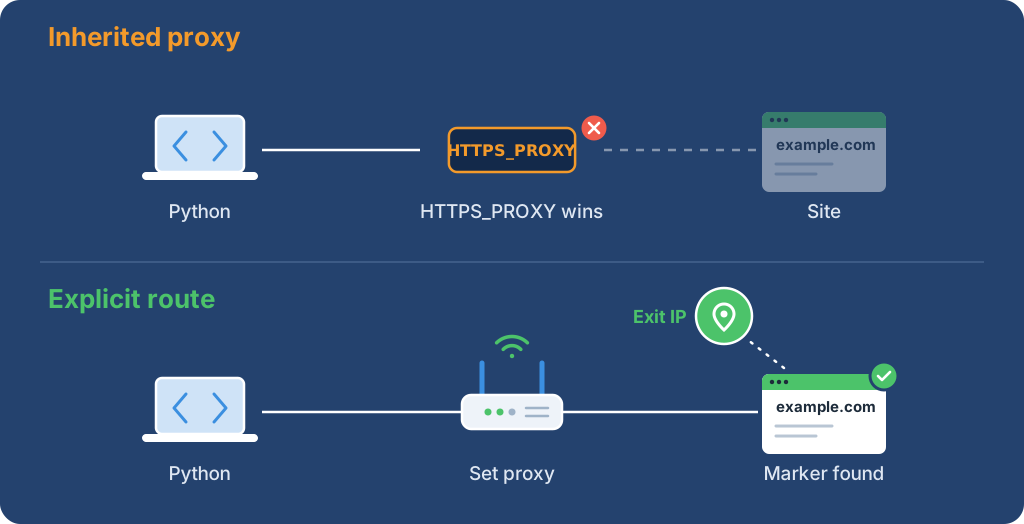
Pass a proxies mapping with both http and https keys to each Requests call, and set Session.trust_env to False so inherited proxy variables cannot fill in or replace parts of the route. Accept the run only when two checks pass through the same session: the target body contains an expected marker, and an IP endpoint returns an address.
The complete script below does both checks in one run and stops on proxy authentication, timeout, redirect, or empty-page failures. Two printed lines mean the route and the response were both checked.
Audience: Python developers who can run a script and edit a response validator. For browser traffic, use the Playwright proxy guide.
Three silent failures make a Requests proxy look configured while the data is wrong:
HTTP_PROXY, HTTPS_PROXY, ALL_PROXY, and NO_PROXY from the environment. In a local test with HTTPS_PROXY pointing at a closed port, a working proxy set on Session.proxies was replaced and the request failed with ProxyError. A per-call mapping with only an http key also fell back to the variable for an HTTPS target. A per-call mapping with both keys kept its route, and trust_env = False removed the variables from every case.Warning: Run the first check in a disposable worker with a test allocation and an authorized, non-sensitive target. The script can make up to six proxy requests and consume paid traffic. Check the quota first and stop if volume or charges look unexpected.
Warning: Keep passwords out of source, shell arguments, committed files, and logs. The script prompts for the password without echoing it; use an approved secret manager for unattended work. Rotate any credential that appears in output or shell history.
The shell commands use Bash or Zsh on macOS or Linux. In Windows PowerShell, adapt export and unset, and use the virtual environment's Windows interpreter path.
python3 -m venv .venv
.venv/bin/python -m pip install 'requests==2.34.2' 'urllib3==2.5.0'
Set PROXY_SERVER to a credential-free proxy URL with protocol, host, and port. Replace <PROXY_HOST> and <PROXY_PORT> with the assigned values:
export PROXY_SERVER='http://<PROXY_HOST>:<PROXY_PORT>'
For proxy authentication, replace <PROXY_USERNAME> with the assigned username:
export PROXY_USER='<PROXY_USERNAME>'
For an IP-allowlisted proxy without a username, run unset PROXY_USER. The script asks for the password only when PROXY_USER is set, then percent-encodes both values, so a password with @, :, or / does not break the URL.
Use the protocol the proxy operator assigned, even when it differs from the example's http:// scheme. If a value is missing, request the connection instructions before running.
Save the complete program as requests-proxy-check.py in the directory that contains .venv. Keep TARGET_URL, EXPECTED_MARKER, and IP_CHECK_URL for the first run; change them only to an authorized target and a trusted IP service.
import ipaddress
import json
import os
import time
from getpass import getpass
from urllib.parse import quote, urlsplit, urlunsplit

import requests
from requests.adapters import HTTPAdapter
from urllib3.util import Retry

# Change these values for an authorized target and trusted IP service.
TARGET_URL = "https://example.com/"
EXPECTED_MARKER = "Example Domain"
IP_CHECK_URL = "https://api.ipify.org?format=json"
MAX_ATTEMPTS = 3
CONNECT_TIMEOUT = 5
READ_TIMEOUT = 15
MAX_BACKOFF_SECONDS = 2
RETRY_STATUSES = (502, 503, 504)


def make_proxy_url():
    server = os.environ["PROXY_SERVER"]
    try:
        parts = urlsplit(server)
        port = parts.port
    except ValueError:
        raise ValueError("PROXY_SERVER needs a valid proxy host and port") from None
    if (parts.scheme not in {"http", "https"} or not parts.hostname or not port
            or parts.username is not None or parts.password is not None
            or parts.path not in {"", "/"} or parts.query or parts.fragment):
        raise ValueError("PROXY_SERVER needs a credential-free HTTP(S) host and port")
    username = os.environ.get("PROXY_USER")
    if not username:
        return urlunsplit((parts.scheme, parts.netloc, "", "", ""))
    password = getpass("Proxy password: ")
    if not password:
        raise ValueError("A proxy password is required")
    authority = f"{quote(username, safe='')}:{quote(password, safe='')}@{parts.netloc}"
    return urlunsplit((parts.scheme, authority, "", "", ""))


def fetch(session, url, proxy_url):
    proxies = {"http": proxy_url, "https": proxy_url}
    for attempt in range(MAX_ATTEMPTS):
        try:
            response = session.get(url, proxies=proxies,
                                   timeout=(CONNECT_TIMEOUT, READ_TIMEOUT),
                                   allow_redirects=False)
        except (requests.exceptions.ConnectTimeout, requests.exceptions.ReadTimeout):
            if attempt + 1 == MAX_ATTEMPTS:
                raise RuntimeError("request timed out after configured attempts") from None
            time.sleep(min(0.5 * 2**attempt, MAX_BACKOFF_SECONDS))
            continue
        except requests.exceptions.ProxyError:
            raise RuntimeError("proxy negotiation failed; check protocol and credentials") from None
        except requests.exceptions.RequestException:
            raise RuntimeError("request failed; check proxy, target, and network") from None
        if response.status_code in RETRY_STATUSES and attempt + 1 < MAX_ATTEMPTS:
            if "Retry-After" in response.headers:
                return response
            response.close()
            time.sleep(min(0.5 * 2**attempt, MAX_BACKOFF_SECONDS))
            continue
        return response
    raise RuntimeError("request ended without a response")


def require_ok(response, label):
    if 300 <= response.status_code < 400:
        raise RuntimeError(f"{label} redirected; redirects are disabled")
    if response.status_code != 200:
        raise RuntimeError(f"{label} returned HTTP {response.status_code}")


def main():
    proxy_url = make_proxy_url()
    try:
        with requests.Session() as session:
            session.trust_env = False
            no_retry = HTTPAdapter(max_retries=Retry(total=0, connect=0, read=0,
                                                      status=0, redirect=0, other=0))
            session.mount("http://", no_retry)
            session.mount("https://", no_retry)
            with fetch(session, TARGET_URL, proxy_url) as target:
                require_ok(target, "target")
                if EXPECTED_MARKER not in target.text:
                    raise RuntimeError("target body did not contain expected marker")
                print(f"Target accepted: HTTP {target.status_code}; marker found")
            # The IP request uses the same session and explicit route.
            with fetch(session, IP_CHECK_URL, proxy_url) as check:
                require_ok(check, "IP check")
                try:
                    address = ipaddress.ip_address(check.json()["ip"])
                except (ValueError, KeyError, json.JSONDecodeError, TypeError):
                    raise RuntimeError("IP check returned an invalid JSON address") from None
                print(f"Observed exit address: {address}")
    finally:
        # Drop this local reference; Python does not guarantee memory erasure.
        proxy_url = ""


if __name__ == "__main__":
    try:
        main()
    except (KeyError, RuntimeError, ValueError) as error:
        print(f"Check failed: {error}")
        raise SystemExit(1) from None
Run it from the terminal that holds the environment values:
.venv/bin/python requests-proxy-check.py
Expected output on success. The address is a documentation example, not a captured exit:
Target accepted: HTTP 200; marker found
Observed exit address: 203.0.113.10
A run against a local test proxy printed both lines with exit status 0. That run proves the script and its validation logic, not a provider's authentication, residential origin, or location.
| Check | Passes when | Does not prove |
|---|---|---|
| Target | HTTP 200 and EXPECTED_MARKER in the body |
That a JavaScript-driven page rendered |
| Exit IP | The IP service returns a parseable address through the same session | Location, anonymity, or target acceptance |
| Route | trust_env = False and an explicit proxies mapping on each call |
That a later rotating request uses the same exit |
The proxy URL describes the connection to the intermediary. The mapping keys describe the destination scheme, so an HTTPS target still uses the https key when the proxy URL starts with http://. HTTP proxies carry HTTPS targets through a CONNECT tunnel.
Connect and read timeouts limit socket waits, not total run time. The loop makes at most three attempts per URL for timeouts and 502, 503, or 504 responses, with backoff capped at two seconds. A response with Retry-After stops automatic retries so a scheduler can respect it.
Retry only idempotent work. The script does not retry 407, other statuses, or generic connection errors, and it keeps TLS verification enabled. For an authorized intercepting proxy, configure its approved CA bundle instead of turning verification off.
A wrong proxy password does not reach the target. In a local test, Requests raised ProxyError with this message:
HTTPSConnectionPool(host='example.com', port=443): Max retries exceeded with url: / (Caused by ProxyError('Unable to connect to proxy', OSError('Tunnel connection failed: 407 Proxy Authentication Required')))
The 407 came from the proxy during CONNECT, so the script reports a proxy negotiation failure and stops. Check the username, password, and authentication mode with the operator; repeating the same credentials adds load without changing the result. The proxy error 407 guide covers allowlist and entitlement causes.
| Symptom | First check |
|---|---|
| Input error before any request | Proxy scheme, host, and port; no credentials or path inside PROXY_SERVER |
| Connection error or timeout | Proxy DNS, host, port, firewall, and protocol |
ProxyError with 407 |
Proxy username, password, or allowlist; not the target |
| TLS error | Keep verification on; configure the approved CA bundle |
| 3xx, 401, 403, or 429 | Redirect policy, origin credentials, target rules, and rate limits; do not retry automatically |
| HTTP 200 but the marker is missing | Inspect the body safely; a challenge or empty page is not accepted data |
| Invalid IP response | The endpoint must return a JSON ip field without redirecting |
Do not log the proxy URL, raw exception, headers, or full body. Log a redacted failure phase, the target host, the status when available, and a stable job key.
To make a request without a proxy while ignoring inherited settings, keep trust_env = False and omit proxies:
# Partial snippet: reuse the imports and target/timeout constants from the complete program.
with requests.Session() as session:
    session.trust_env = False
    response = session.get(TARGET_URL, timeout=(CONNECT_TIMEOUT, READ_TIMEOUT))
For SOCKS, install the optional extra with python -m pip install 'requests[socks]' and use the assigned socks5:// or socks5h:// endpoint. socks5 resolves the target name on the client; socks5h sends it to the proxy, as the SOCKS5 vs SOCKS5h guide explains. Adapt the parser above to accept the SOCKS scheme first; the HTTP(S) check does not verify SOCKS authentication.
Related guides: HTTPX proxy setup, aiohttp proxy setup, and curl proxy setup.
 ProxyLaneTraffic never expires
Scale your workflows with the tools you already use. Rotating or sticky sessions up to 72 hours.
Compare seller APIs, licensed Amazon product data and proxy page checks by record, access scope and reuse rights.
Read guideChoose the right anti-detect browser proxy guide, map the shared verification steps, and keep account access separate from the network route.
Read guideOur picks for market research: ProxyLane for small, intermittent projects, plus options for regional tracking, monthly collection and managed extraction.
Read guide
