

Amazon Scraper API vs Proxy: Choose a Product Data Source
Compare seller APIs, licensed Amazon product data and proxy page checks by record, access scope and reuse rights.
Read guide
Choose when to rotate IPs and when to keep a sticky session. Preserve browser task identity and recover safely if the exit changes.

A rotating proxy chooses an exit by the provider's rotation rule; a sticky session requests continuity for related requests. Give each independent profile or job a distinct session name. Record its observed exit and result at each checkpoint.
ProxyLane's published offer summary states that sticky sessions can last up to 7 days while the residential device stays online; availability changes can end one sooner. Separate session names do not guarantee separate or exclusive Internet Protocol (IP) addresses.
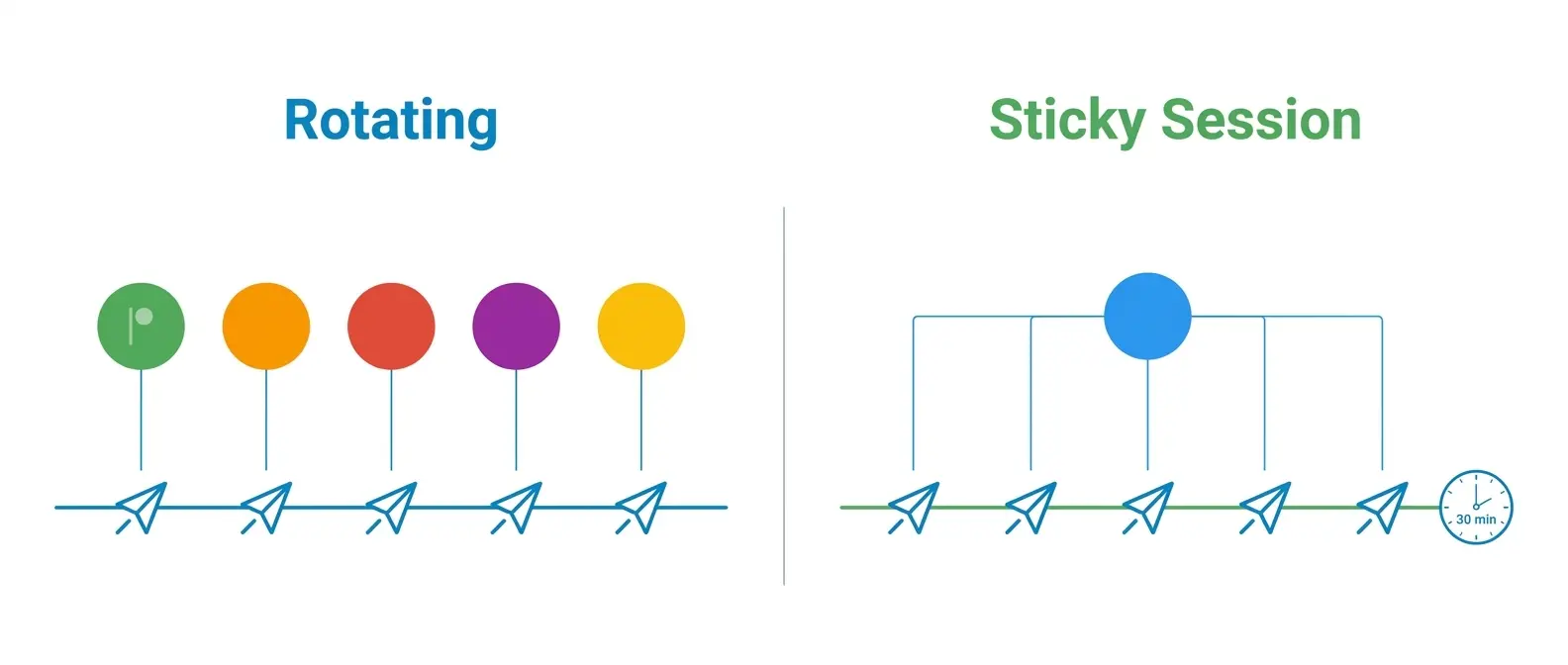
The 30-minute session shown is an example, not a ProxyLane limit. Rotation can repeat an IP, and a sticky session can end when the residential device goes offline.
Define one complete operation before assigning a session. For an agency, it may be one client profile completing a review queue. For a media team, it may be an approved browser workflow in a target market.
For an agent, the operation runs from opening the source through saving a validated result. A proxy session controls the route; it does not preserve browser cookies, account state, or the task's checkpoint.
| Work unit | Session choice to test | Keep with the result |
|---|---|---|
| One public page or independent market observation | Rotate per request or bounded job | Target, intended market, timestamp, observed exit, validated fields |
| Paginated catalog or multi-page price check | Keep one named session through the snapshot | Session name, cursor, market, exit at checkpoints, duplicates, gaps |
| Authorized account or client-profile workflow | Keep one named session through the complete operation | Profile owner, task ID, last completed action, exit, outcome |
| Separate client or browser-agent task | Give it a separate session name | Parent job, session name, target, market, checkpoint, recovery owner |
Crawlee's session manager treats IP and session state as separate properties. Browser context persistence is separate too: stored cookies can survive a restart while the proxy exit changes. Do not use an IP check as proof that the account state or task checkpoint survived.
ProxyLane's session guide uses Keep the same IP and a session name when generating a sticky connection. The name can contain letters and numbers, up to 64 characters. Reuse that connection for related steps.
Generate a separate connection for an independent task; its name identifies the task, not a new or unused IP.
For a team handoff, write down the non-secret fields before starting:
| Handoff field | Record |
|---|---|
| Work owner | Client or internal team, operator, and recovery contact |
| Browser identity | MoreLogin or other profile manager, profile label, and approved account reference |
| Route | Market, protocol, session name, and when the session was created |
| Checkpoint | Last completed step, next safe step, and expected page or record field |
| Recovery rule | How to recheck the exit, restore the authorized account state, and avoid repeating a side effect |
Keep passwords and full proxy credentials in the approved secret store or the profile manager's credential field. Never put them in a profile name, shared note, screenshot, or run log.
Cookies and login state are separate secrets; share access through the profile manager's permissions instead of exporting them into the handoff.
Warning: Proxy credentials and browser account state can grant access to a client profile. Store them only in approved credential controls, restrict profile access to assigned operators, and revoke access when the task ends.
A sticky session is not a dedicated static address. The published maximum is up to 7 days while the residential device remains online. If the device disconnects or becomes unavailable, the session may end earlier.
Treat a return to the same session name as a reconnect attempt, not a guarantee that the old exit will return. If the workflow requires a permanently assigned or exclusive IP, qualify that requirement before the pilot.
Rotation is useful when separate requests should sample separate exits, such as independent public checks across markets. It can damage a multi-step operation if the account, cart, cursor, or browser state expects continuity.
Conversely, pinning every independent data request to one sticky identity may reduce the route variety the job was meant to observe.
Keep the target, parser, headers, timeout, concurrency, and pacing fixed when comparing the policies. Use the same number of jobs. Record distinct observed exits, accepted records, failed attempts, response bytes, retries, and billed units.
Separate the result by market; a new exit does not establish that the target returned the intended locale or offer.
| Check before choosing | Why it matters |
|---|---|
| What event changes the exit: request, timer, new session name, or unavailable peer? | Providers implement rotation differently |
| Does the client reuse one connection for the full workflow? | A browser or connection pool can change the effective boundary |
| What state must survive a restart? | Proxy continuity cannot restore cookies, cursors, or completed actions |
| What happens after an exit disappears? | A gateway may reconnect, change exits, or return an error |
| Which unit is billed? | Gigabytes (GB), requests, time, reserved IPs, and credits have different denominators |
An IP echo endpoint confirms which address answered that check. It cannot prove a usable target response, a correct market, or a complete account workflow. Measure exit continuity beside the accepted record.
At the start of a task, save its profile label, session name, market, and first observed exit in the run record. After a meaningful step, write the task checkpoint and the result required to continue.
Keep the session identifier in a protected run record if it embeds access credentials; otherwise retain only the identifier needed for diagnosis.
If a task stops, do not immediately rotate or refresh the route. First classify the failure and inspect the last accepted checkpoint:
A 407 Proxy Authentication Required is a proxy authentication challenge; check credentials and entitlement before changing exits.
A 403 Forbidden means the request was understood and refused, so inspect target policy, account permission, and request behavior.
A 429 Too Many Requests signals rate limiting and may include Retry-After; honor it and reduce or stop the workload.
Respect robots.txt and target terms. A different exit does not create permission.
Keep the validation rule beside each run. A 200 response containing a challenge page, an empty table, or the wrong market is not an accepted result.
Count completed profile or agent tasks, valid records, exit changes, retries, bytes, and spend separately. If unique market coverage is the outcome, validate the market field and the content together.
For a runnable Requests example with setup, secret handling, and output checks, use the Requests proxy guide. Keep the same accepted-record rule when comparing session policies.
For browser automation, record the exit from that same profile, then validate the required page or fields there. Playwright documents proxy settings at browser or context scope; proxy scope does not preserve application state after the profile closes.
cost per accepted result = (traffic charges + fixed fees + compute charges + recovery labor cost) / validated results
Ask whether failed attempts and retries are billable. Compare traffic in gigabytes separately from requests, session time, reserved addresses, or managed-result credits.
“Unlimited” needs a fair-use, concurrency, target, and expiry review. For package and procurement questions, see the residential proxy buying guide.
Choose the session boundary that matches the operation, then run a small permitted pilot. Record completed work, interruptions, recovery, and repeat usage by profile and market; those results can show whether the route fits the team's workload.
 ProxyLaneTraffic never expires
Scale your workflows with the tools you already use. Rotating or sticky sessions up to 72 hours.
Compare seller APIs, licensed Amazon product data and proxy page checks by record, access scope and reuse rights.
Read guideChoose the right anti-detect browser proxy guide, map the shared verification steps, and keep account access separate from the network route.
Read guideOur picks for market research: ProxyLane for small, intermittent projects, plus options for regional tracking, monthly collection and managed extraction.
Read guide
