

Amazon Scraper API vs Proxy: Choose a Product Data Source
Compare seller APIs, licensed Amazon product data and proxy page checks by record, access scope and reuse rights.
Read guide
Which proxy type to run on Nike, footsites, Shopify and Pokémon Center, why static ISP IPs carry most tasks, when rotating residential wins, and how to test a list before a drop.
For most sneaker bots, dedicated static ISP proxies are the best default. The IP stays the same for the whole release, traffic is unlimited, and the address comes from a carrier range instead of a cloud server. Use rotating residential for Shopify stores with proxy protection, where a fresh home IP matters more than speed.
Datacenter IPs are the cheapest, but most protected stores flag them. Before any drop, run one test task per IP on the store you care about and keep only the IPs that pass.
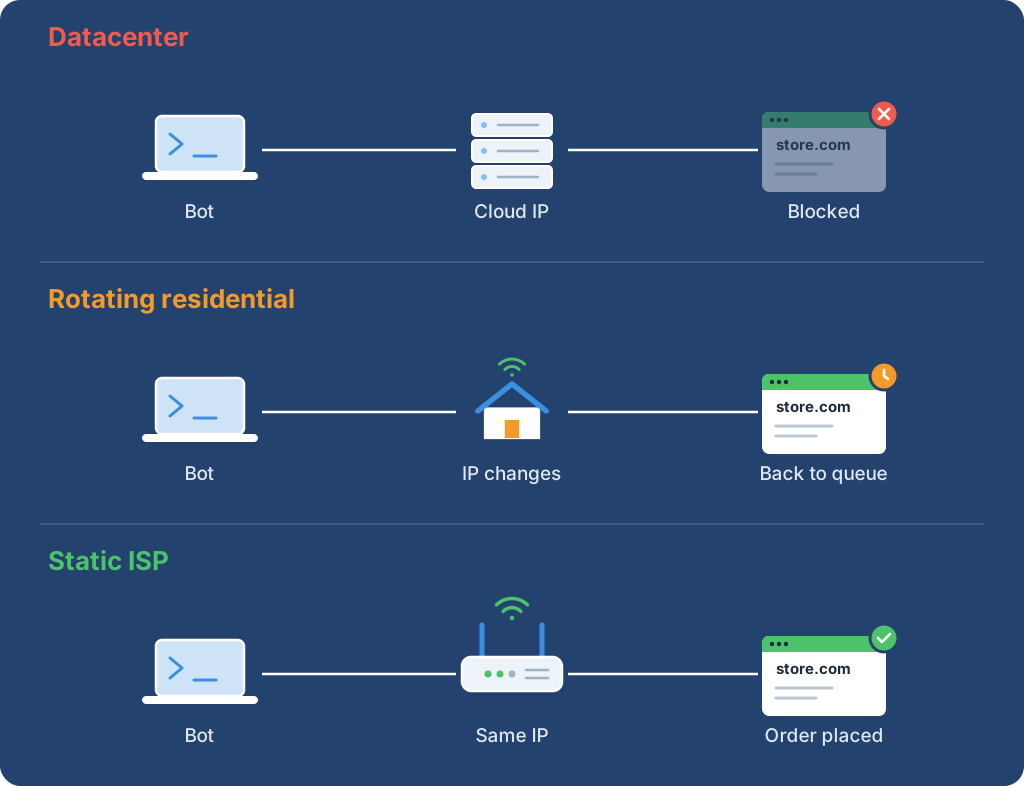
A sneaker bot runs many tasks at once, and each task needs its own IP so the store sees separate shoppers. The proxy type decides how that IP behaves during a release: whether it stays put, how fast it answers and how it is billed.
| Type | What it is | Strengths | Weak spots | Best for |
|---|---|---|---|---|
| Static ISP | An IP from a consumer carrier range, hosted on fast servers and rented to you per IP | Same IP all term, low latency, unlimited traffic | Paid per IP; a banned IP stays banned until replaced | Nike, footsites, Pokémon Center, monitors |
| Rotating residential | Traffic through real home devices, billed per GB | Huge IP variety, new IP per request or a sticky session | Slower; the IP can drop when a device goes offline; metered | Shopify stores with proxy protection |
| Datacenter | IPs from cloud and hosting providers | Cheapest and fastest | Most protected stores flag these ranges | Unprotected sites and testing |
The split matters because a sneaker release is a session, not a single request. A task joins a queue, holds a cart and submits an order. If the IP changes in the middle, many stores treat the task as a new visitor.
The people who build the bots publish their own advice, and it lines up with the table. NSB recommends ISPs for Nike and keeps residential mainly for Shopify sites with bot protection. Its FAQ also suggests picking proxies close to your server, or near New York or Chicago if you run the bot from home.
Valor's documentation calls proxies "highly recommended, and on many sites nearly required." For Pokémon Center it recommends ISP proxies and no more than one task per proxy, because a residential IP can change and send the task back to the queue, even when it is labelled static.
For Shopify, Valor's guide says drops with proxy protection need static residential proxies and notes that ISP IPs now wait longer in Shopify's queue than residential ones. NSB points the same stores to residential. The honest takeaway: test both types on Shopify before you commit a whole release to one.
Use this as a starting point, then let your own test results overrule it.
| Store | Start with | Why |
|---|---|---|
| Nike and SNKRS | Static ISP, one IP per account | NSB recommends ISPs; accounts should keep one address |
| Foot Locker, JD Sports, Champs | Static ISP | Fast, stable IPs for product, cart and checkout |
| Shopify with proxy protection | Rotating or sticky residential | Both Valor and NSB send these drops to residential |
| Pokémon Center | Static ISP, one task per IP | Valor: an IP change sends the task back to the queue |
| Restock monitors | Static ISP | Billed per IP, so a monitor running all day costs no traffic |
Nike's draw rules still apply whatever proxy you use. Its SNKRS terms allow one entry per person per product and require a verified phone number, and entries that break the rules can be cancelled.
Two lists can both be called "sneaker ISP" and behave very differently on release day. Check these five points before you buy.
A bot's built-in tester only proves the IP connects. Valor's own guide warns that testing "is not a reliable way to determine whether they are good for checkout." Check location and speed first, then run a real task.
Save your list as proxies.txt in ip:port:user:pass format and run this from the machine that runs the bot:
import time

import requests

for line in open("proxies.txt"):
    host, port, user, password = line.strip().split(":")
    proxy = f"http://{user}:{password}@{host}:{port}"
    started = time.monotonic()
    info = requests.get(
        "https://ipinfo.io/json",
        proxies={"http": proxy, "https": proxy},
        timeout=15,
    ).json()
    ms = round((time.monotonic() - started) * 1000)
    print(host, info.get("country"), info.get("org"), f"{ms} ms")
Each line should print the country you ordered, an internet provider in the org field and a response time you can live with. Then run one task per IP on the target store a day before the release, and drop any IP that fails.
ProxyLane sells dedicated sneaker ISP IPs at $3.90 per IP for 30 days, from a pool picked for Nike, Foot Locker and JD Sports. They are in stock in the US, UK, Canada, Australia and Germany, with unlimited traffic and free replacement if a line gets banned. The dashboard exports the list as ip:port:user:pass, ready for any bot.
For Shopify stores with proxy protection, our rotating residential proxies start at $6.50/GB and drop to $2.50/GB on larger packages, and traffic never expires. See the sneaker proxies page for live stock by country, or read how to add proxies to Valor and NSB.
 ProxyLaneTraffic never expires
Scale your workflows with the tools you already use. Rotating or sticky sessions up to 72 hours.
Compare seller APIs, licensed Amazon product data and proxy page checks by record, access scope and reuse rights.
Read guideChoose the right anti-detect browser proxy guide, map the shared verification steps, and keep account access separate from the network route.
Read guideOur picks for market research: ProxyLane for small, intermittent projects, plus options for regional tracking, monthly collection and managed extraction.
Read guide
