Amazon Scraper API vs Proxy: Choose a Product Data Source
Distinguish authorized Amazon APIs, licensed product data and proxy-based page checks by record quality and access rights.
Read guide
See who configures a forward or reverse proxy, which side it represents, and how to identify the right architecture for a network request.
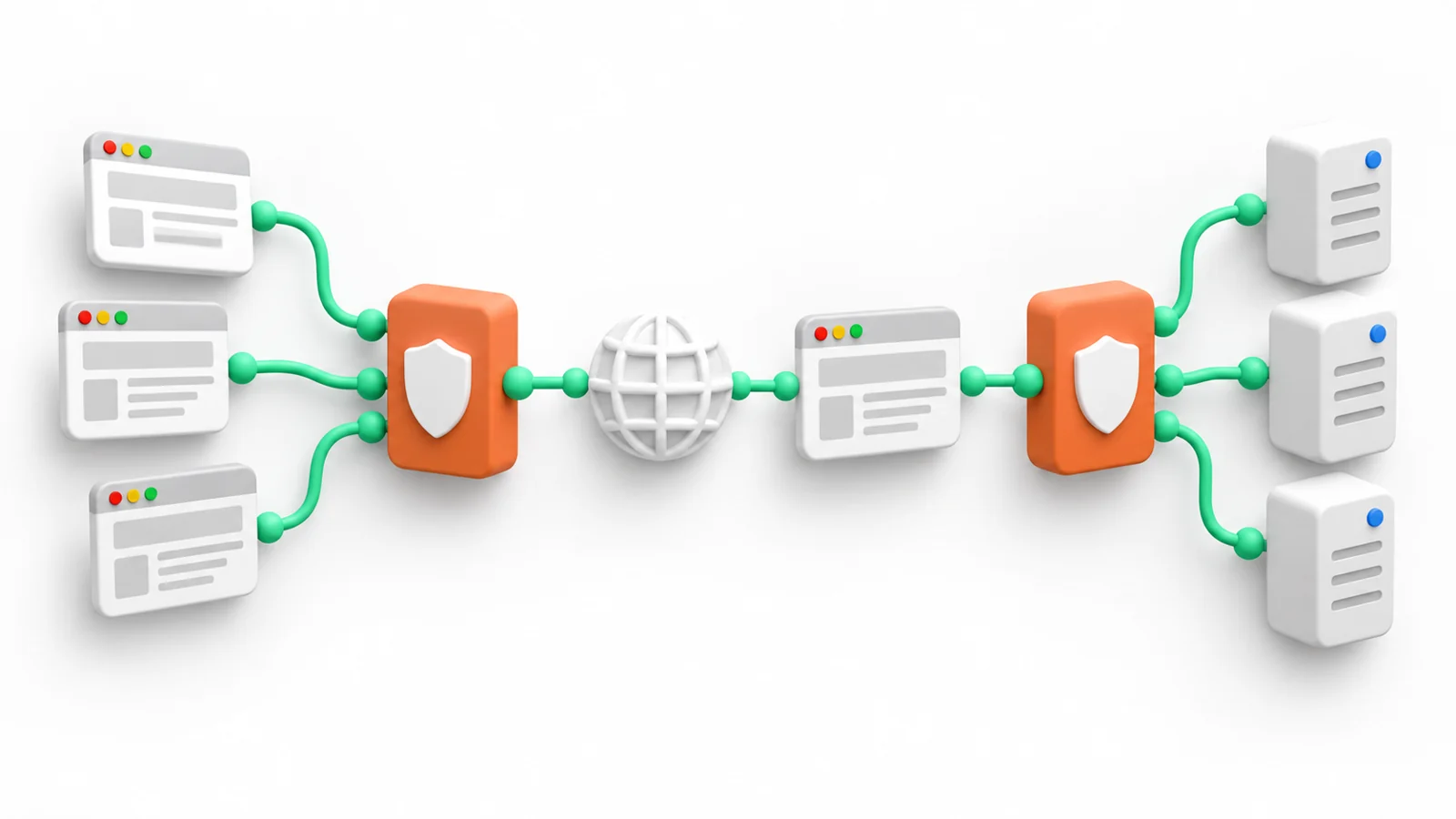
A forward proxy sits on the client side: clients send outbound requests through it to reach destinations. A reverse proxy sits on the service side: clients connect to it as the service's public entry point, and it forwards requests to backend servers. The deciding question is which side configures and operates the intermediary.
A forward proxy represents one or more clients. The client or its network administrator selects it, often through application or operating-system settings. The destination receives a connection from the proxy's egress address, subject to the protocol and any forwarded headers.
A reverse proxy represents a server service. The service operator places it in front of one or more origin servers. It can route requests to a backend and may also provide functions such as caching, load balancing, or TLS termination. These are deployment choices, not requirements for every reverse proxy.
| Question | Forward proxy | Reverse proxy |
|---|---|---|
| Whose side is represented? | Client or client network | Service or origin network |
| Who usually configures it? | Client, application, or organization | Service operator or hosting team |
| Where does it appear? | Between client and destination | Between public client and backend server |
| Typical reason | Control outbound access or use a chosen egress route | Route inbound traffic to application servers |
RFC 9110 describes a proxy as selected by a client and a gateway, often called a reverse proxy, as acting like an origin server on the outbound connection while forwarding requests inbound to other servers. This role-based definition is more reliable than judging by where the server happens to be physically hosted.
For a forward-proxy example, an analyst's workstation is configured to send an approved request to a public catalog through a company proxy. The workstation chooses the intermediary; the catalog is the destination. The team can use the proxy to enforce outbound rules or route traffic through a selected network.
For a reverse-proxy example, a retailer's public hostname points to a gateway. The gateway receives each customer request, then sends it to the relevant application server. The retailer's operations team configures the gateway because it controls the public service entry point.
The word “proxy” alone is ambiguous. A client library setting such as HTTP_PROXY usually points to a forward proxy. A reverse proxy is more likely to appear in the service's DNS, load balancer, or web-server configuration. In a larger architecture, both can exist in one end-to-end request path.
A reverse proxy may add a Forwarded or X-Forwarded-For header so a backend can learn about the original client.
RFC 7239 standardizes Forwarded, but a backend should trust such values only when they come from a configured, trusted intermediary. A direct client can supply a similarly named header, and a chain of proxies can alter or append values.
This distinction matters for access controls and logs. The socket peer seen by the backend may be the reverse proxy, while a forwarded field contains an earlier address. Configure the trusted proxy boundary explicitly; do not treat a header from any source as authenticated identity.
If the goal is to control where a client sends outbound traffic, investigate a forward proxy and the client's proxy configuration. The residential vs datacenter proxy comparison helps with the egress network choice.
If the goal is to manage requests arriving at a service, investigate a reverse proxy in the server architecture. Confirm who owns routing, TLS, logging, and trusted-header settings. The architecture becomes clear once the client-side and service-side owners are named.
 ProxyLaneFrom $2/GB at 5 TB+
Non-expiring traffic, location targeting and rotating or sticky sessions for your existing tools.
Distinguish authorized Amazon APIs, licensed product data and proxy-based page checks by record quality and access rights.
Read guideConnect a buyer-owned proxy to an Apify Actor, keep the session boundary clear, and validate records instead of counting requests.
Read guideSeparate Australian egress from en-AU content, AUD pricing, GST display, postcode validation and the state delivery context.
Read guide