

Amazon Scraper API vs Proxy: Choose a Product Data Source
Compare seller APIs, licensed Amazon product data and proxy page checks by record, access scope and reuse rights.
Read guide
Route a Puppeteer browser context through an HTTP proxy, verify its exit response and target page, and keep proxy credentials out of code.

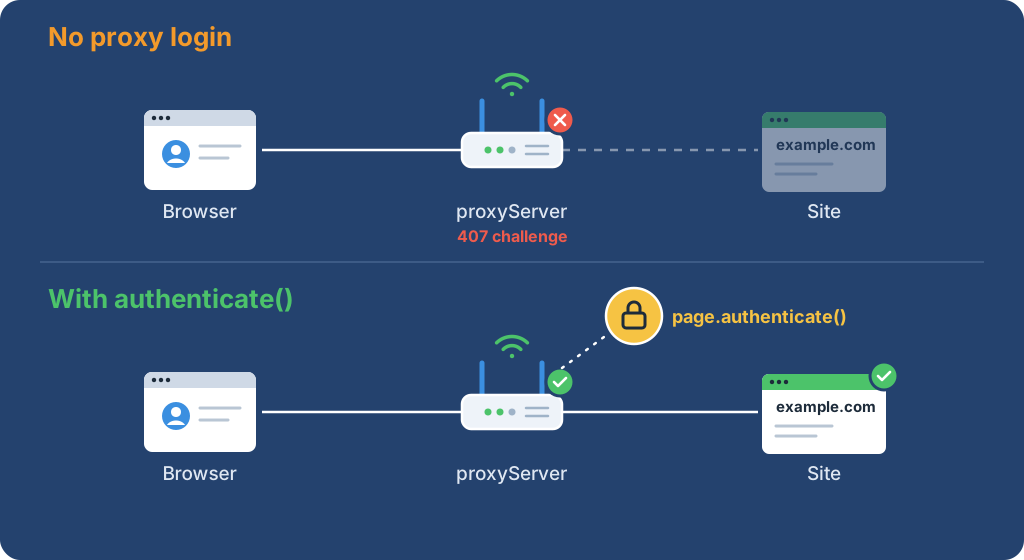
Puppeteer routes a browser context through a proxy with proxyServer; Page.authenticate() can answer HTTP authentication challenges. Check the exit response and the target’s final origin, HTTP status, and required page marker before accepting a result.
npm install --save-exact puppeteer@25.12.0.ip field, plus a permitted target page with a stable text marker.Warning: Each navigation may also load subresources, and a target’s GET route can still change state. Keep production disabled; run the probe against staging or a sandbox with a request or spend cap. It makes no application writes by design; stop the run and close the context if the destination or response is unexpected.
Save this complete example as proxy-check.mjs. Bind the named environment variables through a secrets manager or another protected runtime setting. Set PROXY_SERVER to an http://host:port or https://host:port endpoint without credentials. Set PROXY_USER and PROXY_PASSWORD together when the proxy requires HTTP authentication. Set EGRESS_URL, EXPECTED_EXIT, TARGET_URL, and EXPECTED_MARKER to approved values; the target and egress URLs must not contain user information.
import puppeteer from 'puppeteer';
import { isIP } from 'node:net';

const proxyServer = process.env.PROXY_SERVER;
const proxyUser = process.env.PROXY_USER ?? '';
const proxyPassword = process.env.PROXY_PASSWORD ?? '';
const egressUrl = process.env.EGRESS_URL;
const expectedExit = process.env.EXPECTED_EXIT;
const targetUrl = process.env.TARGET_URL;
const expectedMarker = process.env.EXPECTED_MARKER;

if (!proxyServer || !egressUrl || !expectedExit || !targetUrl || !expectedMarker) {
  throw new Error('Set proxy, egress, expected exit, target, and marker settings');
}
let proxy;
let egress;
let target;
try {
  proxy = new URL(proxyServer);
  egress = new URL(egressUrl);
  target = new URL(targetUrl);
} catch {
  throw new Error('Proxy, egress, or target URL has invalid syntax');
}
if (!['http:', 'https:'].includes(proxy.protocol) || !proxy.hostname || !proxy.port ||
    proxy.username || proxy.password || proxy.pathname !== '/' || proxy.search || proxy.hash) {
  throw new Error('PROXY_SERVER must be an HTTP(S) URL without credentials');
}
if (Boolean(proxyUser) !== Boolean(proxyPassword)) {
  throw new Error('Set both proxy credentials or neither');
}
if (!['http:', 'https:'].includes(egress.protocol) || !['http:', 'https:'].includes(target.protocol) ||
    egress.username || egress.password || target.username || target.password || isIP(expectedExit) === 0) {
  throw new Error('Use credential-free HTTP(S) URLs and a valid EXPECTED_EXIT IP address');
}

let browser;
try {
  browser = await puppeteer.launch({ headless: true });
  const context = await browser.createBrowserContext({ proxyServer: proxy.origin });
  try {
    const page = await context.newPage();
    page.setDefaultNavigationTimeout(15000);
    if (proxyUser) {
      await page.authenticate({ username: proxyUser, password: proxyPassword });
    }

    const egressResponse = await page.goto(egress.href, { waitUntil: 'domcontentloaded' });
    const egressText = await page.$eval('body', (element) => element.innerText.slice(0, 12000));
    let observedExit;
    try {
      observedExit = JSON.parse(egressText).ip;
    } catch {
      throw new Error('Egress endpoint did not return JSON with an ip field');
    }
    if (egressResponse?.status() !== 200 || observedExit !== expectedExit) {
      throw new Error('Proxy egress check did not match the expected value');
    }

    const response = await page.goto(target.href, { waitUntil: 'domcontentloaded' });
    const finalUrl = new URL(page.url());
    const body = await page.$eval('body', (element) => element.innerText.slice(0, 12000));
    if (finalUrl.origin !== target.origin) {
      throw new Error('Target navigation left the configured origin');
    }
    if (response?.status() !== 200 || !body.includes(expectedMarker)) {
      throw new Error('Target status or required page marker did not match');
    }
    console.log({ egress_match: true, target_status: response.status(), marker_match: true });
  } finally {
    await context.close();
  }
} catch (error) {
  console.error(`Probe failed (${error instanceof Error ? error.name : 'unknown error'}); check settings and local logs`);
  process.exitCode = 1;
} finally {
  if (browser) {
    await browser.close();
  }
}
Run the file with node proxy-check.mjs. Puppeteer 25.12.0 installs a compatible Chrome for Testing build with the package; this proof used Chrome for Testing 154.0.8037.57. The BrowserContextOptions API applies proxyServer to requests in that context. The Page.authenticate() API provides HTTP authentication and enables request interception internally.
The egress endpoint must return {"ip":"<address>"}. Compare that exact address with the exit expected from the proxy account. The target check uses the same page and context, and accepts only HTTP 200, the configured origin, and the required marker. The terminal output reports check results without printing the URL or credentials.
A successful fixture run prints:
{ egress_match: true, target_status: 200, marker_match: true }
egress_match means the JSON ip field exactly matched EXPECTED_EXIT; target_status is the main target response status; and marker_match means the target body contained EXPECTED_MARKER. The fixture used a reserved documentation address, so this output demonstrates the check format, not a real proxy exit.
The script inspects at most the first 12,000 characters of each rendered body, after navigation completes. Put the required marker within that prefix. This limits only the text the script reads; it does not cap response bytes, DOM size, subresource downloads, or total browser time. Keep the external request/spend cap and worker deadline in place.
Do not put proxy credentials in PROXY_SERVER, a source file, an extra Proxy-Authorization page header, or a command-line URL. The Chrome proxy guide says Chrome does not use credentials embedded in manual proxy settings and does not support authentication for SOCKS5. Page.authenticate() supplies credentials for page-level HTTP authentication challenges; Puppeteer 25.12.0’s network manager applies the configured credentials to an authentication challenge without distinguishing proxy from origin challenges. Use this example only when the target does not require a different HTTP-auth identity. For separate identities, select a browser integration or upstream route with an explicitly separate auth contract.
An HTTP proxy connection is not encrypted to the proxy. For an HTTPS target, Chrome uses CONNECT and preserves TLS between the browser and target, while the proxy can still see the target hostname. An HTTPS proxy also encrypts the browser-to-proxy connection. Confirm which hop the endpoint protects before sending credentials or sensitive traffic.
| Observed result | Likely layer | Next check |
|---|---|---|
| Browser launch fails | Local browser setup | Check Node.js, Puppeteer, and the installed Chrome for Testing build |
| Navigation fails before a response | Proxy connection or DNS | Check endpoint scheme, host, port, and runner reachability |
| Egress body or IP differs | Proxy route or egress endpoint | Check the provider’s expected exit and the endpoint’s JSON ip field |
| Target status is not 200 | Target response | Inspect the authorized staging response and redirect behavior |
| Status is 200 but marker is absent | Page content or selector | Check the permitted page’s expected text and render timing |
| Navigation stalls after adding interception | Request interception | Continue or abort every paused request, as the Puppeteer interception guide requires |
page.goto() returns the main resource response after redirects and can resolve for HTTP error statuses. Check the returned response before treating navigation as successful. The example’s navigation timeout bounds each page load, not total job duration or every subresource. Do not add retries until the target and provider retry policies are known.
Keep the same context for pages that must share cookies or a sticky proxy session. Open a new context only between independent tasks that permit a new identity. Close the context after its state is no longer needed; the BrowserContext API is the cleanup boundary. For an independent command-line route check, use the curl proxy guide.
The local proof for this article used Puppeteer 25.12.0 with a loopback-only forwarding fixture. Its JSON field contained the fixture’s reserved test address, not a public egress address. That verifies the code path and assertions; a real proxy’s exit and target acceptance still need to be measured against authorized endpoints.
 ProxyLaneTraffic never expires
Scale your workflows with the tools you already use. Rotating or sticky sessions up to 72 hours.
Compare seller APIs, licensed Amazon product data and proxy page checks by record, access scope and reuse rights.
Read guideChoose the right anti-detect browser proxy guide, map the shared verification steps, and keep account access separate from the network route.
Read guideOur picks for market research: ProxyLane for small, intermittent projects, plus options for regional tracking, monthly collection and managed extraction.
Read guide
