

Amazon Scraper API vs Proxy: Choose a Product Data Source
Compare seller APIs, licensed Amazon product data and proxy page checks by record, access scope and reuse rights.
Read guide
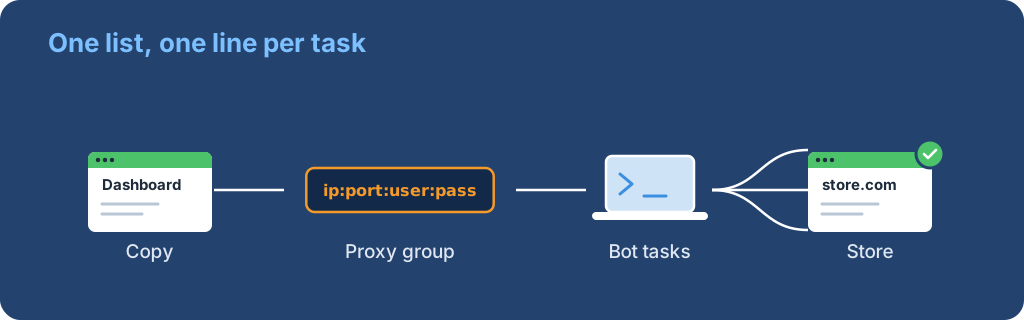
Copy an ISP list as ip:port:user:pass, paste it into Valor AIO or NSB as a proxy group, test it against the target site and give every task its own proxy.

To add proxies to a sneaker bot, copy the list in ip:port:user:pass format, one proxy per line, and paste it into the bot as a named proxy group. Then pick that group in each task so every task gets its own proxy.
Test the group against the target site inside the bot, then run one real task. A passing tester only proves the proxy connects; it does not prove checkout will work.
ip:port:user:pass format. Static ISP IPs suit Nike, footsites and Pokémon Center; see which proxy type to use if you are unsure.Run the bot close to the proxies. NSB suggests picking proxies near your server, or near New York or Chicago if you run from home.
ProxyLane exports Native ISP orders in the exact format both bots expect.
The copied text includes the full passwords even while the preview hides them. The list looks like this (example addresses):
203.0.113.24:8000:pl_7f3a:Xk2v9QeL
203.0.113.87:8000:pl_7f3a:Xk2v9QeL
198.51.100.15:8000:pl_7f3a:Xk2v9QeL
Keep the file private. Anyone with these lines can use your IPs until you change the order.
Valor groups proxies into named lists and lets each task pick one. The steps below follow Valor's proxies guide.
nike-us-isp.ip:port:user:pass format.Valor also has Import and Export buttons for one group or all groups, which helps when you move the bot to a new server.
Read the tester result carefully. Valor's guide says testing only shows whether the proxies can connect to the selected site, not whether they are good for checkout. For Pokémon Center it recommends ISP proxies and one task per proxy.
NSB calls them proxy lists and accepts IP:PORT:USERNAME:PASSWORD or IP:PORT in that exact format. The steps follow NSB's proxies and tasks guides.
NSB notes that you can't import proxies from other bots, so paste the raw list rather than an export file from another tool. Its FAQ recommends ISPs for Nike and residential mainly for Shopify sites with bot protection.
Cybersole, Wrath, Kodai and most other retail bots follow the same pattern, but their current proxy docs sit behind the customer dashboard, so we could not check their exact screens. The steps are usually:
ip:port:user:pass format, one per line.If a bot rejects the list, check whether it wants user:pass@ip:port instead. ProxyLane's Format menu also exports user:pass@ip:port and protocol://user:pass@ip:port.
A bot tester shows connection and ping. To also see which country and provider each IP belongs to, save the list as proxies.txt and run this from the bot's machine:
import time

import requests

for line in open("proxies.txt"):
    host, port, user, password = line.strip().split(":")
    proxy = f"http://{user}:{password}@{host}:{port}"
    started = time.monotonic()
    info = requests.get(
        "https://ipinfo.io/json",
        proxies={"http": proxy, "https": proxy},
        timeout=15,
    ).json()
    ms = round((time.monotonic() - started) * 1000)
    print(host, info.get("country"), info.get("org"), f"{ms} ms")
Accept a line when it prints the country you ordered, an internet provider in org and a response time that fits your setup. For a single IP, cURL does the same job:
curl -x http://USER:PASS@203.0.113.24:8000 -w "\n%{time_total}s\n" https://ipinfo.io/json
Avoid pasting real passwords into shell history on shared machines.
| Symptom | Likely cause | Fix |
|---|---|---|
407 or "auth failed" |
Wrong username or password, or a SOCKS5 list in an HTTP field | Copy the list again with Protocol: HTTP/HTTPS |
| Every proxy shows as bad | Wrong line format | Export as ip:port:user:pass and paste again |
| One site fails, others pass | That IP is banned on the site | Remove the line; on ProxyLane open a ticket for a free replacement |
| Task goes back to the queue | IP changed mid-queue, or two tasks share one IP | Use static ISP and one task per IP |
| High ping in the tester | Bot server is far from the IPs | Move the server closer to the proxy country |
Need IPs for the list? ProxyLane's sneaker ISP pool costs $3.90 per IP for 30 days, with unlimited traffic and free replacements. For Nike accounts, read proxies for SNKRS, and to size the list, see how many proxies a sneaker bot needs.
 ProxyLaneTraffic never expires
Scale your workflows with the tools you already use. Rotating or sticky sessions up to 72 hours.
Compare seller APIs, licensed Amazon product data and proxy page checks by record, access scope and reuse rights.
Read guideChoose the right anti-detect browser proxy guide, map the shared verification steps, and keep account access separate from the network route.
Read guideOur picks for market research: ProxyLane for small, intermittent projects, plus options for regional tracking, monthly collection and managed extraction.
Read guide
