
All guides
GUIDES & FIELD NOTES · 12 MIN READ

Google Search by Country: How to See Real Local SERPs From Any Region

When you run Google search by country, changing the interface or adding a parameter isn’t enough to see what locals really see. The closest you can get to true…

Google Search by Country: How to See Real Local SERPs From Any Region

When you run Google search by country, changing the interface or adding a parameter isn’t enough to see what locals really see. The closest you can get to true local SERPs from any region combines Google’s own location settings and parameters with location-aware residential proxies that place your network origin in the target city.

This guide walks through each layer—settings, parameters, and proxies—and shows how to use them for SEO monitoring, market research, and AI evaluation.


Why "Google search by country" is harder than it looks

Google does not use a single “country switch” for results. It estimates location from several signals at once and personalizes results accordingly.

According to Google’s own help docs, location can be estimated from:

  • IP address and network origin
  • Browser or device location permissions
  • Account-level location settings
  • Recent locations stored in cookies (up to ~6 hours)

That means:

  • Changing only the interface language or google.com domain is insufficient
  • IP-only tricks (like some basic VPNs) don’t fully match a real local user
  • SERPs can differ by city, ZIP code, and even by street

Semrush, Ahrefs, and BrightLocal all highlight that rankings can change:

  • Between ZIP codes inside the same city
  • Between map points a few blocks apart
  • Between devices and browser settings

If you want to see local Google SERPs from any region—faithfully—you need to control:

  1. Region and language settings in Google
  2. Location parameters (gl, uule, etc.)
  3. Actual network origin using residential proxies

Method 1: Use Google’s region and language settings

Before you touch advanced parameters, start with the official controls. Google lets you adjust the region and language used for your search experience.

How to change Google search country in the interface

On desktop Google Search:

  1. Go to google.com
  2. Click Settings at the bottom
  3. Choose Search settings
  4. Scroll to Region Settings
  5. Select the country you want (e.g., United States) and save

This “Google search by country” setting:

  • Changes how results are customized to your region
  • Influences which local packs and sites are prioritized
  • Does not fully override IP-based location or cookies

On mobile (Google app):

  • Open Settings → Search → Region (path varies by version)
  • Pick the region (country) you want

Language and Maps considerations

For a better approximation of a local user:

  • Set interface language to the local language
  • Use local Maps region when testing map packs

But keep in mind:

  • These settings mostly affect presentation and mild prioritization
  • They don’t guarantee you see the exact SERP a local device sees in that city

Method 2: Use Google’s country and location parameters

To run Google search by country programmatically—or to fine-tune testing—you can use official parameters. These are especially useful in scripts, SEO tooling, and automated workflows.

Key Google search location parameters

Google’s Custom Search and web search use several parameters:

  • gl – Geo location country code (e.g., gl=us, gl=de)
  • cr – Country restrict (limits results to pages from a given country)
  • hl – Host language / interface language (e.g., hl=en, hl=fr)
  • lr – Language restrict (filter results by content language)

In practice:

  • gl: boosts relevance for users in that country
  • cr: restricts content to originating from that country
  • hl/lr: align interface and content language

Example URL pattern:

https://www.google.com/search?q=coffee+beans&gl=us&hl=en

This issues a search tuned toward the United States, in English.

The uule parameter: city-level tuning

Third-party SERP tools document the uule parameter, which encodes a more precise location (often city-level).

  • uule can represent specific cities or areas
  • It is typically combined with gl and region settings
  • It should be used carefully; misuse can yield odd or inconsistent results

For example, a query targeting Paris might use:

https://www.google.com/search?q=bakery&gl=fr&hl=fr&uule=...encoded-location...

Limitations of parameter-based local SERPs

Parameters are powerful, but they don’t fully replicate a local user. Google’s own guidance makes this clear:

  • Location is derived from multiple signals, not just gl or uule
  • IP address, cookies, and device location still influence the SERP

So the best way to view Google SERP as a local user combines:

  • Proper region and language settings
  • gl / cr / hl / uule tuning
  • A network origin in the target city via residential proxies

Method 3: Use residential proxies to "be" in the target country or city

To see what locals actually see, your traffic needs to originate from their geography. That’s where residential proxies come in.

Why network origin matters for local SERPs

BrightLocal notes that local rankings can change "from one street to the next." Ahrefs and Semrush also stress city and ZIP-level differences.

Residential proxies help because they:

  • Route your request through an actual residential IP in the target region
  • Make your Google search request look like it comes from that city’s network
  • Reduce the mismatch between tool-based SERPs and real-device SERPs

When you combine proxies with Google’s gl and region settings:

  • gl tells Google which country to prioritize
  • The proxy IP tells Google where you are at the network level
  • You get a much closer view to what locals see in that city or neighborhood

Residential proxies vs. VPNs

Generic VPNs often use:

  • Data center IPs that are easy for Google to recognize
  • Limited city-level granularity

Residential proxies, especially large modern networks, provide:

  • Real residential IPs, often rated low risk by fraud tools
  • Targeting by country, city, and ISP
  • Rotating or sticky sessions that behave like real user sessions

For local SERP testing, residential proxies typically outperform basic VPNs because:

  • They mimic real consumer connections more closely
  • They offer fine-grained geo targeting (not just a country flag)
  • They support multiple concurrent requests and automation at scale

How to change Google search country without a VPN (using proxies)

If you want to avoid traditional VPNs but still search from Google USA or other regions, you can:

  1. Configure your browser or SEO tool to use an HTTP or SOCKS5 residential proxy
  2. Choose a proxy endpoint in the target country (e.g., US) and city
  3. Set Google Region Settings to that country
  4. Add gl and optional uule parameters for that country/city

From Google’s perspective, this looks like:

  • A user physically located in the target country (via IP)
  • Using a local Google interface
  • Searching with country-tuned parameters

This “force Google search country by IP” approach, when carefully configured, is the closest approximation to a real local user you can achieve from elsewhere.


Practical workflows: why true local SERPs matter

Seeing real local SERPs from any region isn’t just a technical challenge. It directly affects how teams run SEO, research, and AI evaluation.

1) SEO monitoring across locations

Modern rank tracking is no longer "one keyword, one rank." Tools track visibility across:

  • Multiple cities and ZIP codes
  • Desktop vs mobile
  • Classic SERPs vs map packs and AI overviews

BrightLocal’s geo-grid tooling exists because local rankings can shift from one street to the next. Semrush and Ahrefs explicitly warn that ranked positions vary by location and device.

Residential proxies help you:

  • Verify what a local user in each city actually sees
  • Check map packs and local 3-pack results by neighborhood
  • Validate that your rank-tracking tools are aligned with real-device SERPs

2) Market research and competitive intelligence

When you search from Google USA vs a European country, you’ll often see different:

  • Featured brands and marketplaces
  • Pricing and promotions
  • Local partners and resellers

BrightLocal’s consumer research shows:

  • ~70% of general online searches use Google
  • Nearly 3 in 5 consumers search multiple times a day
  • Almost a quarter say 41–60% of their searches are local-specific

If you’re doing market research:

  • You need to see the local brand mix and pricing a real user sees
  • Country-only views can hide city-level competitors and offers

True local SERP testing via proxies lets you:

  • Compare US vs EU visibility for the same queries
  • Track pricing and offers in different cities
  • Understand how localized messaging appears in search and maps

3) AI evaluation and "AI-local" visibility

AI-driven search is now part of the local visibility picture. BrightLocal reports:

  • 40% of consumers actively use generative AI within search

SOCi’s 2026 local visibility analysis found:

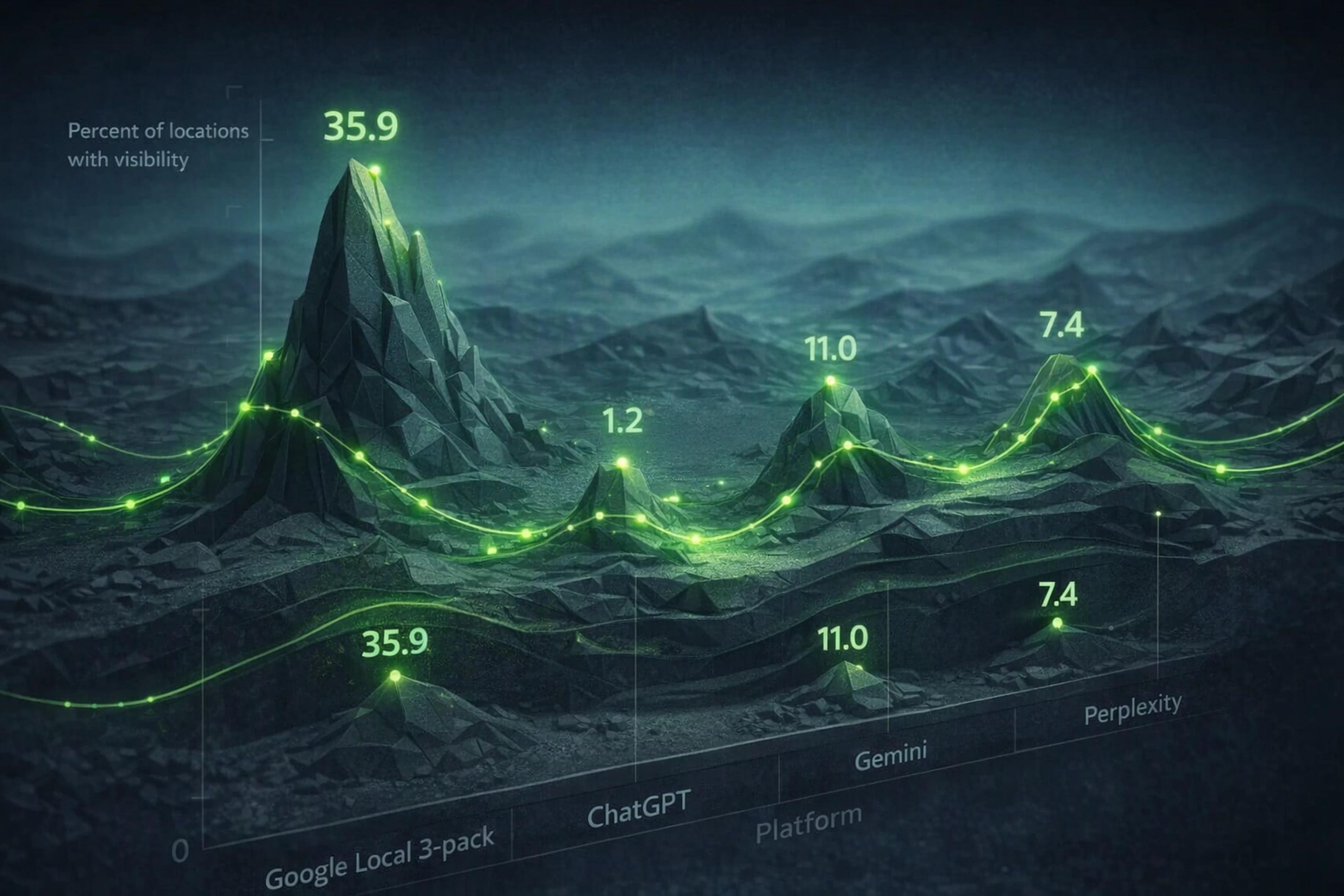
  • Only 1.2% of locations were recommended by ChatGPT
  • 11% by Gemini
  • 7.4% by Perplexity
  • Versus 35.9% appearing in Google’s local 3-pack

Chart comparing local visibility in Google local 3-pack versus ChatGPT, Gemini, and Perplexity.

This means:

  • Ranking in Google local search does not guarantee AI answer visibility
  • You need separate workflows to test AI responses and traditional SERPs

Residential proxies support AI evaluation by:

  • Letting you run location-aware prompts and searches
  • Checking whether AI systems and Google AI Overviews surface your brand similarly in different countries and cities

Where targeted residential proxies outperform "search hacks"

Attempting to see local SERPs with only parameters or settings often leads to misleading conclusions. Targeted residential proxies solve several pain points.

Problem 1: Inconsistent data from generic IP pools

Over-sold or low-quality proxy networks can cause:

  • Frequent CAPTCHAs and blocks
  • IPs mis-geolocated or flagged as risky
  • Unstable sessions that break maps and multi-step flows

A premium residential provider can mitigate this by:

  • Maintaining a large, ethically sourced residential pool
  • Validating IP location and risk (e.g., low-risk scores from fraud tools)
  • Offering city and ISP targeting with clear session behavior

Problem 2: Coarse targeting—country but not city

Country-level controls (gl=us) are too coarse for real local SEO and research. You often need to see:

  • SERPs from Chicago vs San Francisco
  • Differences between city centers and suburbs

City-targeted residential proxies allow:

  • Precise targeting for Google search in US cities
  • Testing "how to get local SERP from specific city" scenarios reliably

Problem 3: Session continuity for logged-in and maps workflows

Some tests need sticky sessions:

  • Logged-in Google accounts
  • Google Maps navigation and multi-step local queries
  • Complex flows that require cookies to persist

Session-aware residential proxies let you choose:

  • Rotating proxies for independent requests
  • Sticky sessions lasting long enough (e.g., up to tens of hours) for full flows

This yields more reliable data for:

  • Local pack tracking over time
  • Logged-in search behavior comparisons
  • AI answer testing tied to account or preference settings

Problem 4: Cost and bandwidth waste

Many proxy providers:

  • Sell fixed monthly plans with expiring bandwidth
  • Reward high-volume traffic rather than validated results

For real-world teams, the key metric is:

  • Cost per successful, validated local result, not just cost per GB

A good residential proxy setup should let you:

  • Buy bandwidth suited to discrete batches and experiments
  • Keep unused traffic for future testing runs instead of losing it

Putting it all together: a practical recipe for real local SERPs

To see local Google SERPs from any region as accurately as possible, follow this stack:

  1. Pick your target: country + city (e.g., "Google search in USA, New York")
  2. Configure proxies: point your browser/tool at a residential proxy IP in that city
  3. Set Google region: adjust Search settings to the target country
  4. Align language: set interface language (hl) and content language (lr) as needed
  5. Apply parameters: use gl and, where appropriate, uule for city-level tuning
  6. Control cookies: test in clean sessions to avoid personalization noise
  7. Compare devices: check desktop vs mobile profiles when local behavior differs

For automation and SEO monitoring:

  • Integrate proxies with Playwright, Python, cURL, or your rank-tracking tools
  • Use structured checks to validate that:
    • The IP geolocates correctly
    • Local packs match real-device screenshots from the region
    • AI answers reference the same set of local brands

When this stack is in place, you can:

  • Run repeatable, evidence-based local SERP checks
  • Monitor multi-location SEO across countries and cities
  • Evaluate AI visibility alongside traditional Google rankings

And you can do it without relying solely on fragile "search hacks" like changing domains or parameters on a non-local IP.


FAQ: Google search by country & local SERPs

How do I view Google results from another country?

Use a combination of:

  • Google Region Settings set to that country
  • Language controls (hl, lr) matching local usage
  • gl parameter for country-tuned search
  • A residential proxy whose IP is located in that country

This combination is much closer to what real local users see than changing only the domain.

Can I change my Google search country without a VPN?

Yes. You can:

  • Use HTTP/SOCKS5 residential proxies to change your apparent location
  • Adjust Google Region Settings and language
  • Add gl and cr parameters to shape country preferences and origin

This avoids traditional VPN clients while still shifting your network origin.

What is the gl parameter in Google search?

gl is a Google search parameter that sets the geo location country code. Examples:

  • gl=us – United States
  • gl=gb – United Kingdom
  • gl=de – Germany

It influences which country’s results are prioritized, but does not replace other location signals like IP and cookies.

What does the uule parameter do in Google?

uule encodes a more specific location, typically at the city or area level. It is used by some SERP tools to simulate searches from a precise point.

However:

  • It should be used alongside gl and proper region settings
  • It works best when your IP is also aligned to the target region (e.g., via proxy)

Why do my Google rankings look different from SEO tools?

Semrush and Ahrefs note that SERPs can differ because of:

  • Physical location (country, city, ZIP, even street)
  • Device type and browser settings
  • Personalization based on history and cookies

If your tools and your local device show different rankings, it usually means they’re effectively searching from different locations or profiles. Using location-aware residential proxies can help align tool-based tracking with real local SERPs.


To try these techniques with a large, ethically sourced residential IP pool that supports country, city, and ISP targeting plus both rotating and sticky sessions, you can explore the documentation at proxylane.dev.

ProxyLaneTraffic never expires

Premium residential proxies
From $2/GB

Scale your workflows with the tools you already use. Rotating or sticky sessions up to 72 hours.

Try 350 MB for $1.95 View plans

Keep reading

Amazon Scraper API vs Proxy: Choose a Product Data Source

Compare seller APIs, licensed Amazon product data and proxy page checks by record, access scope and reuse rights.

Read guide

Antidetect browser proxy setup: choose a profile guide

Choose the right anti-detect browser proxy guide, map the shared verification steps, and keep account access separate from the network route.

Read guide

Best Proxies for Market Research: Choose by Sample and Cost

Our picks for market research: ProxyLane for small, intermittent projects, plus options for regional tracking, monthly collection and managed extraction.

Read guide