

Amazon Scraper API vs Proxy: Choose a Product Data Source
Compare seller APIs, licensed Amazon product data and proxy page checks by record, access scope and reuse rights.
Read guide
Set Crawlee ProxyConfiguration and SessionPool correctly. Run a local proxy fixture, verify exit IP, and test failure cases.
To configure Crawlee proxies, pass a ProxyConfiguration to PlaywrightCrawler and enable useSessionPool for session identity. Validate the target content, then check the exit Internet Protocol (IP) address through the same browser page. The local example produces one JavaScript Object Notation (JSON) result and a screenshot without a provider account; it does not prove remote routing or a stable provider IP.
Audience: JavaScript developers comfortable running Node.js programs and setting shell environment variables. This guide covers Crawlee JavaScript 3.14, not Crawlee Python or the separately configured Apify Proxy service.
SessionPool manages identities and cookies. ProxyConfiguration selects the proxy URL. Associating a URL with a session does not control how a provider rotates IPs behind that URL. For a multi-step task, configure the provider's sticky-session option separately and verify its behavior.
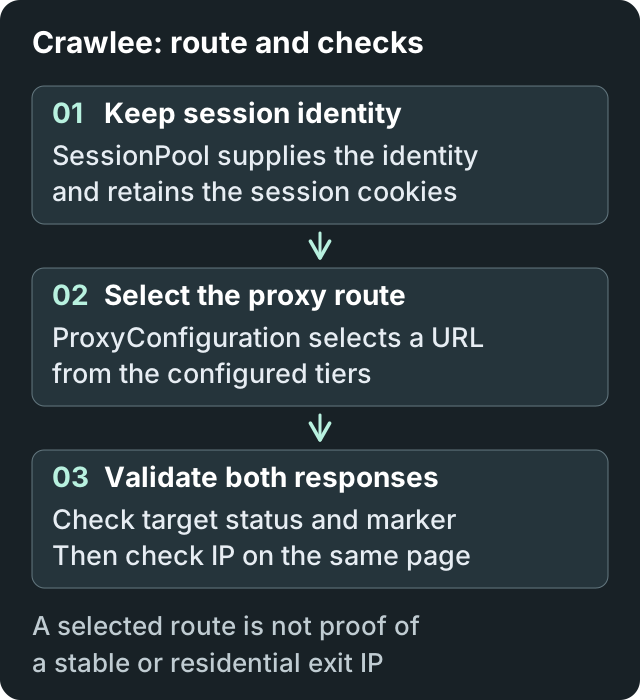
The session supplies its identity to proxy selection. The browser then validates the target and the IP response separately; selecting a proxy URL does not guarantee a stable provider IP.
The browser uses the selected route for both checks. The IP result describes that connection, not the location or permanence of every subsequent connection.
| Task | Session choice | Verification |
|---|---|---|
| Stateless page collection | Short sessions under an explicit policy | Required fields on each accepted page |
| Multi-step workflow | Reuse the task's session and provider route | Cookies, route observations, and final result |
| Localized quality assurance | Keep the selected region consistent | Exit observation plus the target's locale output |
| Rate-limited source | Follow the source's delay policy | Request rate and accepted output; do not rotate to bypass limits |
The example was run on macOS with Node.js 22.18.0, Crawlee 3.14.1, Playwright 1.63.0, and Chrome Headless Shell 153.0.8010.12. The commands below use a POSIX-compatible shell, such as Bash or Zsh. Windows users need an equivalent shell or adapted environment-variable commands.
Setup sequence (follow the commands in the sections below):
crawlee-proxy-lab, installs the packages and downloads Chromium.proxy-lab.mjs in terminal one and wait for Local lab ready.crawl-proxy.mjs. Leave terminal one running until the check finishes.Install Node.js if needed. The local lab needs free loopback ports 18481–18483 and permission to download the Playwright browser. In a new directory, run:
mkdir crawlee-proxy-lab
cd crawlee-proxy-lab
npm init -y
npm install --save-exact crawlee@3.14.1 playwright@1.63.0
npx playwright install chromium --only-shell
For the shortest setup, download the starter bundle and extract its two .mjs files into crawlee-proxy-lab. The fixture and crawler are the same files shown below; no dependency folder is bundled.
Alternatively, download the local proxy fixture as proxy-lab.mjs and the complete crawler as crawl-proxy.mjs into that directory. The .mjs extension lets Node.js run the program directly; no TypeScript compiler is required. Keep the generated package lock for subsequent runs.
Run the fixture in the first terminal:
node proxy-lab.mjs
Expected startup output:
Local lab ready on target 18481 and proxies 18482, 18483
The fixture serves a page and an IP response on port 18481. Two HTTP proxy listeners forward only to that local target.
It does not accept external destinations or HTTPS tunnels. Its IP response deliberately reports the loopback address; that is useful for testing the parser, not for measuring public egress.
In a second terminal, open the same directory and configure the crawler:
export PROXY_URL='http://127.0.0.1:18482'
export FALLBACK_PROXY_URL='http://127.0.0.1:18483'
export TARGET_URL='http://127.0.0.1:18481/'
export EXIT_CHECK_URL='http://127.0.0.1:18481/ip'
export EXPECTED_MARKER='Crawlee proxy lab'
export CAPTURE_SCREENSHOT=1
node crawl-proxy.mjs
CAPTURE_SCREENSHOT=1 saves the synthetic local page. Screenshot capture is off unless explicitly enabled. These values contain no credentials. PROXY_URL and FALLBACK_PROXY_URL populate two ordered tiers. TARGET_URL is the page to accept; EXPECTED_MARKER is its required text. EXIT_CHECK_URL must return a JSON object with an ip field.
The downloaded crawl-proxy.mjs contains the following program:
import { PlaywrightCrawler, ProxyConfiguration, Configuration, log, NonRetryableError } from 'crawlee';
import { isIP } from 'node:net';

const TARGET_URL = process.env.TARGET_URL;
const EXIT_CHECK_URL = process.env.EXIT_CHECK_URL;
const EXPECTED_MARKER = process.env.EXPECTED_MARKER;
const PROXY_URLS = [process.env.PROXY_URL, process.env.FALLBACK_PROXY_URL];
const NAVIGATION_TIMEOUT_SECONDS = 10;
const HANDLER_TIMEOUT_SECONDS = 30;
const MAX_REQUEST_RETRIES = 0;
const MAX_SESSION_ROTATIONS = 0;
const SCREENSHOT_PATH = 'crawler-result.png';
const CAPTURE_SCREENSHOT = process.env.CAPTURE_SCREENSHOT === '1';
let accepted = false;
let failurePhase = 'configuration';

delete process.env.PROXY_URL;
delete process.env.FALLBACK_PROXY_URL;

try {
    if (!TARGET_URL || !EXIT_CHECK_URL || !EXPECTED_MARKER || PROXY_URLS.some((value) => !value)) {
        throw new Error('Missing configuration');
    }
    for (const value of [TARGET_URL, EXIT_CHECK_URL, ...PROXY_URLS]) {
        const url = new URL(value);
        if (!['http:', 'https:'].includes(url.protocol) || !url.hostname) throw new Error('Invalid URL');
    }
    for (const value of [TARGET_URL, EXIT_CHECK_URL]) {
        const url = new URL(value);
        if (url.username || url.password) throw new Error('Target credentials are not allowed');
    }

    log.setLevel(log.LEVELS.OFF);
    const proxyConfiguration = new ProxyConfiguration({
        tieredProxyUrls: PROXY_URLS.map((url) => [url]),
    });
    const crawler = new PlaywrightCrawler({
        proxyConfiguration,
        useSessionPool: true,
        sessionPoolOptions: { maxPoolSize: 1 },
        persistCookiesPerSession: true,
        maxConcurrency: 1,
        maxRequestsPerCrawl: 1,
        maxRequestRetries: MAX_REQUEST_RETRIES,
        maxSessionRotations: MAX_SESSION_ROTATIONS,
        navigationTimeoutSecs: NAVIGATION_TIMEOUT_SECONDS,
        requestHandlerTimeoutSecs: HANDLER_TIMEOUT_SECONDS,
        launchContext: {
            launchOptions: { args: ['--proxy-bypass-list=<-loopback>'] },
        },
        async requestHandler({ page, response, session, proxyInfo }) {
            page.setDefaultTimeout(5_000);
            failurePhase = 'target-status';
            if (response?.status() !== 200 || page.url() !== TARGET_URL) {
                throw new NonRetryableError('Unexpected target status or redirect');
            }
            failurePhase = 'target-marker';
            const validRecord = (await page.locator('body').innerText()).includes(EXPECTED_MARKER);
            if (!validRecord) throw new NonRetryableError('Required marker absent');
            if (CAPTURE_SCREENSHOT) {
                failurePhase = 'screenshot';
                await page.screenshot({ path: SCREENSHOT_PATH });
            }
            failurePhase = 'exit-navigation';
            const exitResponse = await page.goto(EXIT_CHECK_URL, { timeout: 10_000, waitUntil: 'domcontentloaded' });
            failurePhase = 'exit-status';
            if (exitResponse?.status() !== 200 || page.url() !== EXIT_CHECK_URL) {
                throw new NonRetryableError('Exit check failed');
            }
            failurePhase = 'exit-body';
            const { ip } = JSON.parse(await page.locator('body').innerText());
            if (typeof ip !== 'string' || isIP(ip) === 0) throw new NonRetryableError('Invalid exit IP');
            console.log(JSON.stringify({ status: response.status(), validRecord, exitIp: ip, proxyTier: proxyInfo?.proxyTier ?? null, sessionId: session.id }));
            accepted = true;
        },
        async failedRequestHandler() {
            console.error(`Crawl failed at ${failurePhase}; inspect that phase without logging secrets`);
        },
    }, new Configuration({ persistStorage: false }));
    try {
        failurePhase = 'browser-navigation';
        await crawler.run([{ url: TARGET_URL }]);
    } finally {
        failurePhase = 'cleanup';
        await crawler.teardown();
    }
    if (!accepted) process.exitCode = 1;
} catch {
    console.error(`Crawl failed at ${failurePhase}; check inputs without logging secrets`);
    process.exitCode = 1;
}
tieredProxyUrls must be connected to a crawler instance. Calling newUrl() alone does not exercise the crawler's tier selection. For a simple list without tiers, use proxyUrls. For custom selection, newUrlFunction receives a session ID and optional request information; account for the request being absent.
useSessionPool enables the session and persistCookiesPerSession preserves its cookies. The example uses one session and one concurrent request to make the route trace easy to inspect.
Both maxRequestRetries and maxSessionRotations are zero for this first check. A failure stops instead of sending another attempt. The second tier is configured but is not proof of automatic fallback in this run.
In a longer permitted crawl, enable bounded retries only after distinguishing target blocking, parser failures, and proxy authentication. Crawlee can promote tiers after recognized blocking and periodically probe a lower tier; tier order is configuration, not a price or performance ranking.
The navigationTimeoutSecs and requestHandlerTimeoutSecs settings bound individual phases. They do not promise a wall-clock deadline for process startup, browser launch, and cleanup. Use the job runner's deadline when the entire task needs a cutoff. NonRetryableError marks validation failures that another identical request cannot repair.
The loopback bypass argument makes Chromium send the local target through the fixture proxy. Remove that lab-specific argument when adapting the code to a remote target.
Configuration disables persistent Crawlee storage for this disposable check. A production job needs its own queue and session persistence policy.
A successful run prints a record with this shape; the generated session ID varies:
{"status":200,"validRecord":true,"exitIp":"127.0.0.1","proxyTier":0,"sessionId":"session_EXAMPLE"}
Confirm all three observations:
validRecord: true after checking the target status and required text./ and /ip through port 18482. That trace establishes that the local proxy forwarded both requests.crawler-result.png contains the accepted target page. It is saved before the IP-check navigation; do not mistake an old screenshot for proof of a later failed run.Open the generated crawler-result.png and confirm that its page heading reads Crawlee proxy lab. The screenshot records the accepted page; the fixture forwarding log supplies the separate route evidence.
An HTTP 200 response alone is insufficient. Replace the text marker with the actual fields and stable record key needed by the task. Store timestamps, parser version, attempt count, session ID, validation outcome, and a safe route label. Measure transferred bytes and provider charges separately.
Failures print a fixed phase label such as configuration, browser-navigation, target-marker, or exit-body. The label distinguishes setup, routing, and validation failures without exposing raw exceptions, credentials, or page content.
Stop the fixture with Ctrl+C, then restart it in one of these modes before rerunning the same crawler command:
LAB_MODE=wrong-body node proxy-lab.mjs
The page still returns 200, but the required marker is absent. The crawler must exit with code 1 and print a generic failure. This catches a sign-in page or unexpected document that passes a status-only check.
LAB_MODE=auth-failure node proxy-lab.mjs
The local proxy returns 407. The crawl must fail without an accepted record. This test exercises rejection handling; it does not demonstrate successful provider authentication. Restart the fixture without LAB_MODE to restore the success case.
| Symptom | First check |
|---|---|
| Fixture cannot bind a port | Stop the previous fixture or select unused ports consistently in both files |
| Missing inputs | Set all five environment variables in the terminal running the crawler |
| Proxy or browser navigation failure | Verify host, port, protocol, runner network, and browser installation |
Authentication or HTTP CONNECT tunnel rejection |
Check the provider credential format; use the 407 guide |
| Status passes but marker fails | Inspect the actual document and parser; changing the route may not help |
| Exit result has no valid IP | Check the endpoint's JSON format and redirects |
| Session changes during a workflow | Inspect session retirement and the provider's sticky-session policy |
If a required field comes from an XMLHttpRequest (XHR) response, inspect network responses and resource-blocking or request-interception rules before changing the proxy or session. The local fixture does not exercise this diagnostic.
Warning: A provider URL can contain credentials, and remote requests can consume paid traffic. The local fixture is a sandbox.
For the remote test, use a disposable test worker, a test allocation, and an authorized target; production workers need a separate queue and session persistence policy. Inject provider URLs through the worker's secret manager, never a pasted shell command.
Keep URLs, proxy objects, raw exceptions, and screenshots containing private data out of logs. Revoke exposed credentials and stop the worker if the route or spend is unexpected.
Before changing to a remote target, disable the local screenshot capture:
unset CAPTURE_SCREENSHOT
Enable screenshots only for designated non-sensitive test data. A screenshot can contain private account or user information even when it is never logged.
Replace the five connection and validation values with the provider routes, authorized target, required marker, and a trusted IP-check URL. Percent-encode a username or password when the provider's URL format requires it.
The program removes proxy variables from its environment before launching child processes and prints only selected result fields. Library logs are disabled because raw exceptions may expose inputs.
Keep Transport Layer Security (TLS) verification enabled. For an HTTPS target, use a proxy that supports the required tunnel; the HTTP-only local fixture cannot validate that path.
Confirm the exit observation from the same page and compare it with a provider-side connection record when available. A valid IP string establishes neither residential origin nor geographic accuracy.
For multi-step tasks, keep session and provider settings fixed while checking cookies and accepted output. For a route comparison, freeze the target sample, parser, resource rules, and retry policy. Compare accepted records and cost per successful request, not the number of pages that returned a status.
Stop the local fixture with Ctrl+C when finished. The crawler tears down browser resources after success or failure. The next useful check is one permitted remote request with the same acceptance rules and separately recorded provider evidence.
 ProxyLaneTraffic never expires
Scale your workflows with the tools you already use. Rotating or sticky sessions up to 72 hours.
Compare seller APIs, licensed Amazon product data and proxy page checks by record, access scope and reuse rights.
Read guideChoose the right anti-detect browser proxy guide, map the shared verification steps, and keep account access separate from the network route.
Read guideOur picks for market research: ProxyLane for small, intermittent projects, plus options for regional tracking, monthly collection and managed extraction.
Read guide
