IP ban meaning: the short answer
In scraping and automation, “IP ban” means the target website is deliberately refusing access from your IP address — not that your proxy is broken.
From the scraper’s perspective, an IP ban looks like:
- HTTP errors such as 403 Forbidden, 429 Too Many Requests, or 503 Service Unavailable
- CAPTCHA walls, empty or fake pages, or “access denied” screens
- Normal-looking 200 OK responses that still contain block pages instead of real content
The ban is a target-side decision, driven by request volume, behavior, reputation, or geography. To deal with it, data teams need to detect it quickly, confirm what’s happening in logs, and then adjust their scraping setup — rotating residential IPs, pacing requests, and enforcing compliance so crawlers look more like well-behaved users.
What is an IP ban in scraping and automation?
At a protocol level, an IP ban is an access control decision made by the target:
- The server decides that traffic from a given IP (or IP range) should be blocked, throttled, or challenged.
- The proxy tunnel often remains healthy — you can still connect — but the application-layer response is hostile.
Common ways targets express IP banning:
- 403 Forbidden – the server understands the request but refuses to authorize it.
- 429 Too Many Requests – rate limiting; you hit a traffic threshold.
- 503 Service Unavailable – the server is not ready to handle the request, often used for overload or deliberate throttling.
- CAPTCHAs and block pages – sometimes returned with status 200 so they look successful at a transport layer.
From your scraper’s point of view, an IP ban is any situation where:
- You can reach the server, but
- You cannot reliably retrieve the target content you need at acceptable success rates.
Throttling vs blocking: understanding 429, 403, and 503
To design safer scraping setups, teams must distinguish throttling from outright blocking:
429 Too Many Requests (throttling)
- Meaning: You’re sending requests too quickly for the site’s policies.
- MDN notes 429 is specifically about rate limiting.
- Targets may include a Retry-After header indicating when you can safely retry.
Operational takeaway:
- 429 usually signals “slow down or space out your requests”, not a permanent ban.
- Good pacing and backoff logic can often fully recover from 429.
403 Forbidden (blocking)
- Meaning: The server understands the request but refuses to authorize it.
- Often tied to IP reputation, behavioral rules, or anti-bot systems.
Operational takeaway:
- Repeated 403s from one IP usually mean a true IP-level block.
- Rotating to new IPs and changing behavioral signals is often required.
503 Service Unavailable (overload or defensive throttling)
- Meaning: The server isn’t ready to handle the request.
- Can be genuine overload or part of an anti-bot mitigation strategy.
- May also carry Retry-After guidance.
Operational takeaway:
- Treat persistent 503s at high request rates as a warning that your traffic pattern is stressing the target.
- Implement exponential backoff with jitter (as AWS recommends) to avoid retry storms.
How to detect an IP ban in practice
You don’t need to guess. IP bans can be detected via response patterns and proxy metrics.
1. Watch HTTP status codes and content
First line of detection is what the target sends back:
- Spike in 403, 429, 503 responses from a subset of IPs
- Sudden appearance of CAPTCHA pages, even when status is 200
- Normal status codes, but empty, fake, or “access denied” content instead of expected HTML or JSON
Concrete detection steps:
- Log status codes per IP.
- Hash or fingerprint expected page content and alarm when response deviates.
- Maintain a small set of “canary” URLs that should be stable; differences there often indicate blocking.
2. Use two-layer observability: target + proxy
Robust teams use two layers of observability:
- Target-side: behavior of the website, status codes, latency, content.
- Proxy-side: tunnel health, connection resets, throughput.
Cloud providers illustrate this pattern:
- Cloudflare Bot Analytics shows bot scores (1–99) and security events; scores below 30 often indicate automated traffic.
- Google Cloud proxy logs expose fields like status, latency, remoteIp, requestSize, responseSize — useful to distinguish transport errors vs bans.
For your own stack, track at least:
- Per-IP success rate (valid content / total requests)
- Error distribution by status code
- Average latency; bans sometimes come with deliberate slowdowns
3. Proxy metrics that signal bans
You can spot IP bans by correlating target behavior with proxy metrics:
- Drop in success rate for a particular IP while the proxy tunnel remains healthy
- Stable connection metrics (no TLS errors, no timeouts) but rising 403/429/503
- Individual IPs suddenly hitting CAPTCHAs or fake pages while others still work
When this happens, the proxy is doing its job. The target has classified that IP as risky and is defending against it.
How to confirm if an IP is actually banned
Informal heuristics are helpful, but teams need a repeatable confirmation workflow.
Step 1: Compare with a clean control
Use three perspectives on the same URL:
- Your scraper via the suspect IP
- Your scraper via a different IP (same provider)
- A regular browser from your normal office/home network
If the suspect IP consistently sees 403/CAPTCHA while the others see normal content, you’re dealing with IP-specific blocking.
Step 2: Manual check from the banned IP
When possible, reproduce the issue in a browser configured to use that exact proxy IP:
- Configure a browser to route traffic through the suspect IP.
- Load the target URL.
- Observe whether:
- Pages load normally
- You hit CAPTCHAs or “access denied” messages
- You’re redirected to a block page
This confirms whether the ban applies to all traffic from that IP, not just your crawler.
Step 3: Review time-series logs
Audit logs over time to see the ban progression:
- Hour-by-hour 429 then 403 often indicates escalating defenses.
- Sudden drop to near-zero success rate in one region or ISP can mean a localized block.
If your proxy pool supports geo and ISP granularity, compare:
- Per-country success rates
- Per-ISP success rates
Blocks are often regional rather than global.
Common IP ban triggers in scraping
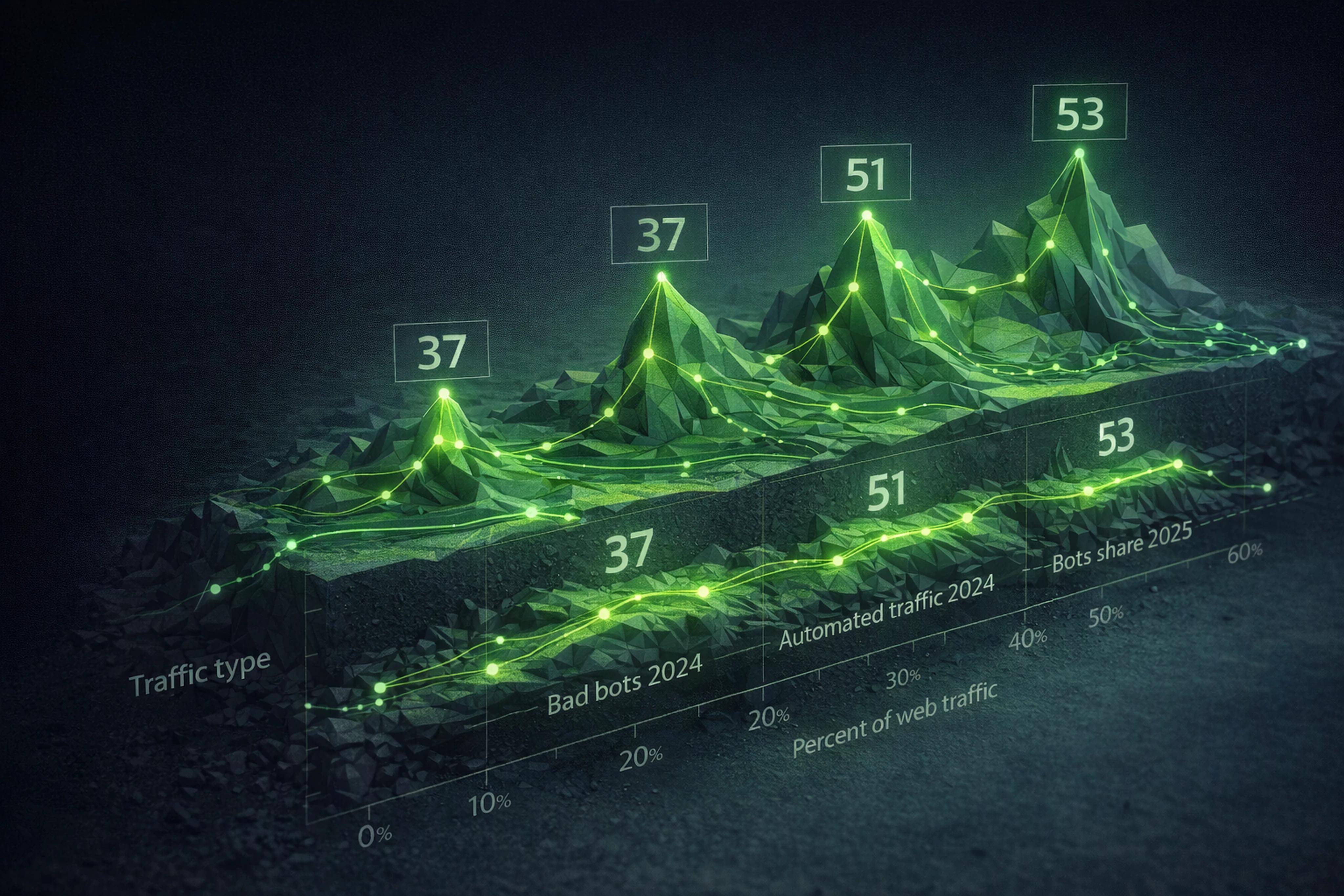
Anti-bot pressure has become mainstream: reports from Imperva and Thales show automated traffic reached 51% of all web traffic, and bad bots were 37% of all internet traffic in 2024.
Websites respond by monitoring:
- IP address and reputation
- User-agent and browser parameters
- Behavioral patterns: request rate, navigation sequences, resource types
According to Oxylabs, ZenRows, and other providers, bans typically follow from:
- High request rates without breaks
- Parallel scraping from too few IPs
- Ignoring robots.txt directives
- Identical or obviously fake user-agents
- Suspicious navigation flow (e.g., jumping directly to deep detail pages)
- Long-lived sessions with unrealistic behavior
Understanding these triggers is key to designing safer scraping setups.
Designing safer scraping setups: core principles
Safer scraping isn’t about magic bypass tricks; it’s about reducing risk and respecting constraints.
Four pillars:
- Right-sized proxy pools and rotation
- Request pacing and backoff
- Session design: rotating vs sticky residential IPs
- Compliance and ethical practices
1. Rotate residential IPs for high-churn scraping
High-volume collection is risky when traffic comes from a small set of IPs.
Apify’s heuristic suggests:
- Roughly 10 IPs can handle about 10,000 pages per month when spread out.
- Around 5,000 IPs may be needed for 5,000,000 pages per month on popular sites.
Practical guidelines:
- Use rotating residential IPs for bulk scraping:
- Each request (or small batch) uses a different IP.
- Reduce per-IP request rate.
- Spread traffic across countries and ISPs that match real user populations.
Residential pools with country, city, and ISP targeting help you:
- Align traffic with localized user profiles.
- Avoid over-concentrating on a single network that might get flagged.
2. Request pacing best practices
429 and 503 responses often carry Retry-After headers — use them.
Best practices, echoing AWS guidance on safe retries:
- Implement exponential backoff:
- Increase delay after each failure.
- Cap retries to avoid infinite loops.
- Add jitter (randomness) to retry intervals:
- Prevent synchronized retry storms.
- Respect per-target rate limits:
- Configure per-IP “max requests per minute”.
- Lower concurrency for sensitive sites.
What this looks like in code:
- On 429 or 503:
- If
Retry-After is present, wait that long.
- Else, start with a small delay, then increase.
- On repeated 403 from one IP:
- Mark IP as cooldown or retired.
- Switch to a fresh residential IP.
3. Rotate vs sticky: choosing session behavior
Modern residential proxy networks offer two modes:
- Rotating sessions:
- New IP per request or per small batch.
- Ideal for single-step, high-churn scraping.
- Sticky sessions (up to many hours):
- Same IP across a multi-step flow.
- Ideal for logged-in or cart/checkout workflows.
A good rule of thumb:
- Use rotating IPs when you don’t need cookies or long-lived logins.
- Use sticky IPs when your workflow mimics a typical user session:
- Login
- Browse multiple pages
- Add items to cart
Designing sessions this way:
- Respects how real users behave.
- Reduces anomaly signals in anti-bot systems.
4. Compliance and ethical scraping practices
Compliance isn’t just legal risk management; it’s a ban-prevention tool.
Key controls:
- Robots.txt:
- RFC 9309 standardizes robots exclusion.
- Honor disallow rules; they signal what site owners accept.
- Terms of service and local laws:
- Understand acceptable use.
- Avoid scraping sensitive personal data without legal basis.
- Ethical residential networks:
- IPs from informed participants, not malware.
- Clear opt-out and abuse-response processes.
Teams that bake compliance into their workflows see fewer bans and are better positioned to justify their operations internally.
How to recover from an IP ban
Recovery from an IP ban is both tactical (short-term) and architectural (long-term).
Short-term recovery steps
When you detect an IP ban:
-
Retire or cool down the banned IP
- Stop sending requests from it.
- Optionally, set a cooldown window (hours or days).
-
Switch to fresh residential IPs
- Prefer IPs from different subnets or ISPs.
- Keep per-IP request rates modest.
-
Throttle traffic to the target
- Reduce concurrency and overall throughput.
- Honor any Retry-After guidance.
-
Adjust headers and behavior
- Rotate realistic user-agents.
- Emulate normal navigation paths.
Long-term architectural changes
Use each ban incident as a design feedback loop:
- Add anomaly detection on success rates and status codes.
- Codify per-target rate limits and backoff policies.
- Segment workloads by risk:
- High-risk sites get more conservative pacing.
- Low-risk sites can run faster.
Over time, this shifts the proxy budget conversation from cost per GB to cost per successful, validated result — the metric that really matters.
Residential proxy pool size and quality: why they matter
Pool size helps, but it isn’t everything.
What matters most:
- Enough IPs for your volume, distributed across regions and ISPs.
- Verifiable location and reputation:
- Tools like Scamalytics can rate IP risk; some providers publish benchmarks (e.g., pools where about 98.7% of sampled IPs are low risk).
- Session stability:
- Ability to hold sticky sessions for hours when workflows need them.
Modern buyers increasingly:
- Use 2–3 proxy providers (43.1% of pros, per Apify’s 2026 report).
- Increase proxy budgets year over year (58.3% did so in 2025).
This reflects a shift toward reliability and success rate rather than just “cheap bandwidth.”
For workloads tuned around non-expiring traffic, granular geo/ISP targeting, and explicit session controls, residential networks like those described on proxylane.dev illustrate how infrastructure can be shaped around “the next working request” instead of raw bytes.
FAQ: IP bans and safer scraping
What does IP ban mean in web scraping?
In web scraping, IP ban means the target site is deliberately blocking or throttling traffic from your IP.
You still reach the server, but you get 403/429/503 responses, CAPTCHAs, or fake pages instead of the real content.
How do I detect if my IP is banned?
To detect an IP ban:
- Monitor status codes per IP for spikes in 403/429/503.
- Check response bodies for CAPTCHAs or block pages, even when status is 200.
- Compare behavior with a control IP and a normal browser session.
If only one IP consistently sees blocks, it’s likely banned.
How can I confirm if my IP is banned vs my proxy being broken?
Confirm by separating transport from application behavior:
- If the proxy shows healthy connections but the target returns consistent 403/429/503, the proxy is fine and the IP is blocked.
- Test the same IP in a browser; if you see CAPTCHAs or access denied pages, it’s a true IP-level ban.
How long do IP bans last?
IP ban duration varies:
- Some bans are temporary, tied to rate limiting.
- Others are long-lived, especially when IP reputation is damaged.
You should treat banned IPs as unusable for that target until logs show recovery or manual tests confirm access is restored.
How can I prevent IP bans when scraping?
To prevent IP bans:
- Use rotating residential IPs for high-volume scraping.
- Implement request pacing with exponential backoff and jitter.
- Respect robots.txt and site terms.
- Design realistic session behavior using sticky IPs for multi-step flows.
Over time, optimize around cost per successful result, not just bandwidth.
 ProxyLaneTraffic never expires
Scale your workflows with the tools you already use. Rotating or sticky sessions up to 72 hours.