

Amazon Scraper API vs Proxy: Choose a Product Data Source
Compare seller APIs, licensed Amazon product data and proxy page checks by record, access scope and reuse rights.
Read guide
How a sneaker monitor polls product pages, why static ISP IPs suit always-on monitors better than per-GB residential traffic, a small Shopify monitor in Python, and how to poll without getting blocked.

A sneaker monitor requests the same product page every few seconds and alerts you when stock appears. Because it runs all day, put monitors on static ISP proxies billed per IP, so the traffic costs nothing extra, and give each store its own monitor IPs.
Poll at a steady interval, back off when the store answers 429 or 403, and keep monitor IPs separate from the IPs your tasks use on release day.
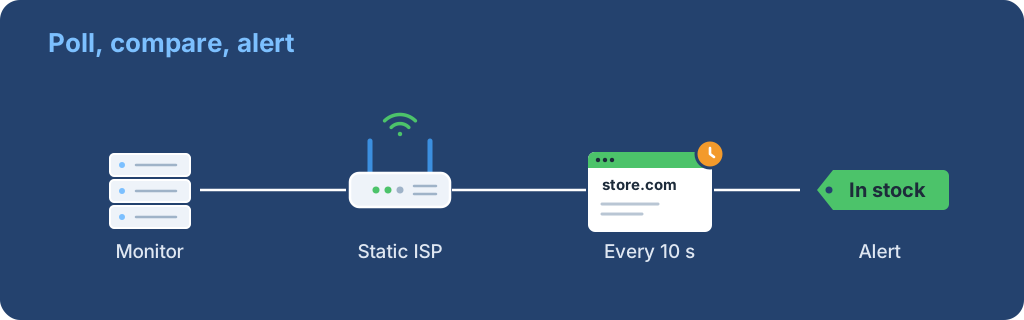
A monitor is a loop: request the product, compare it with the last answer, alert on change. The change can be a new product, a size coming back in stock or a price drop. Alerts usually go to Discord, Telegram or the bot itself, which then starts tasks.
Many sneaker stores run on Shopify. Shopify's Ajax API documents a read endpoint, GET /{locale}/products/{product-handle}.js, that returns a product with its variants and an available flag. Shopify says there are no hard rate limits on the Ajax API, but requests are subject to its standard abuse-prevention measures.
A monitor's traffic adds up because it never stops. Polling one product every 5 seconds is 17,280 requests a day. At an example response size of 50 KB, that is about 0.86 GB a day for a single product, before retries.
| Proxy type | How it is billed | One monitor running all day |
|---|---|---|
| Static ISP | Per IP per month | No traffic cost; the IP stays the same |
| Rotating residential | Per GB | Every poll uses paid traffic |
| No proxy | Free | Your server's IP takes every block |
The 50 KB figure is illustrative; measure your own target. Valor's Shopify guide suggests spreading monitors across routes: one monitor with no proxy, one on residential and 2 to 3 on ISP, so one blocked route does not blind you.
This script polls one product through one proxy, prints when availability changes and slows down when the store pushes back. Replace the store, handle and proxy values with your own.
import os
import time

import requests

STORE = "https://example-store.com"
HANDLE = "example-sneaker"
PROXY = os.environ["MONITOR_PROXY"]  # http://user:pass@ip:port
INTERVAL = 10  # seconds between polls

session = requests.Session()
session.proxies = {"http": PROXY, "https": PROXY}
last = None
delay = INTERVAL

while True:
    response = session.get(f"{STORE}/products/{HANDLE}.js", timeout=15)
    if response.status_code in (403, 429):
        delay = min(delay * 2, 300)  # back off up to 5 minutes
        print(response.status_code, "backing off", delay, "s")
    else:
        response.raise_for_status()
        product = response.json()
        sizes = [v["title"] for v in product["variants"] if v["available"]]
        if sizes != last:
            print(time.strftime("%H:%M:%S"), "in stock:", sizes or "none")
            last = sizes
        delay = INTERVAL
    time.sleep(delay)
Set the proxy as an environment variable so the password stays out of the code:
export MONITOR_PROXY="http://USER:PASS@203.0.113.24:8000"
python monitor.py
Expected output is one line per change, for example 14:02:10 in stock: ['9', '10']. If you see 403 or 429 lines, the store is limiting that IP; slow the interval or move the monitor to another IP.
Plan 1 to 3 IPs per store you watch, more if you track many products on one store. Our guide to how many proxies a sneaker bot needs covers the full list, including tasks and spares.
ProxyLane's sneaker ISP IPs cost $3.90 per IP for 30 days with unlimited traffic, so a monitor can run around the clock on one IP without a traffic bill.
 ProxyLaneTraffic never expires
Scale your workflows with the tools you already use. Rotating or sticky sessions up to 72 hours.
Compare seller APIs, licensed Amazon product data and proxy page checks by record, access scope and reuse rights.
Read guideChoose the right anti-detect browser proxy guide, map the shared verification steps, and keep account access separate from the network route.
Read guideOur picks for market research: ProxyLane for small, intermittent projects, plus options for regional tracking, monthly collection and managed extraction.
Read guide
