

Amazon Scraper API vs Proxy: Choose a Product Data Source
Compare seller APIs, licensed Amazon product data and proxy page checks by record, access scope and reuse rights.
Read guide
Use Axios Node proxy configuration with secret-safe authentication, response limits, phase-aware errors, and a bounded GET retry policy.

For an HTTP or HTTPS proxy, give Axios a proxy object with protocol, host, port, and auth; Axios 1.20.0, the tested version, opens a CONNECT tunnel to HTTPS targets. For a SOCKS5 proxy, the proxy object is the wrong tool: pass a SocksProxyAgent as httpAgent and httpsAgent and set proxy: false. Accept a response only when the status is 200 and the body contains an expected marker.
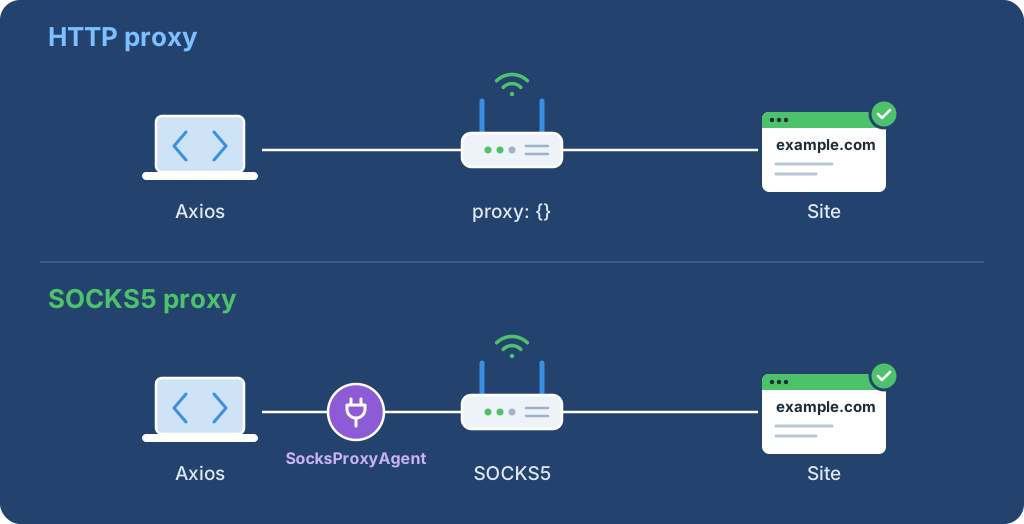
In a local test, a proxy object with protocol: "socks5" never settled, even with a timeout of 8 seconds, until the process was stopped. The agent-based example below completed through local SOCKS5 test proxies with and without authentication.
Install the tested packages in the task directory. socks-proxy-agent is needed only for SOCKS5:
npm install --no-save axios@1.20.0 socks-proxy-agent@10.1.0
Warning: Send one bounded request to a permitted test target and confirm its status and content before enabling production jobs. Keep credentials in a secret manager, rotate them if exposed, and check usage after unexpected traffic.
With Basic authentication over a plain HTTP proxy, the username and password cross the client-to-proxy hop without TLS. TLS inside the CONNECT tunnel does not protect that earlier proxy login, so set PROXY_PROTOCOL=https when the endpoint supports it and keep certificate verification on.
Important: Pin the Axios version. The local test proxy logged the HTTPS request from Axios 1.20.0 as a CONNECT tunnel to example.com:443. Check how an older Axios release handles HTTPS through an HTTP proxy before reusing this setup with it.
Save the complete example as proxy_get.mjs. Set PROXY_PROTOCOL, PROXY_HOST, and PROXY_PORT; add both PROXY_USER and PROXY_PASSWORD when authentication is required. The defaults use https://example.com/ and Example Domain; set TARGET_URL and EXPECTED_MARKER for another permitted target.
import axios from "axios";

const target = process.env.TARGET_URL ?? "https://example.com/";
const expectedMarker = process.env.EXPECTED_MARKER ?? "Example Domain";
const targetUrl = new URL(target);
if (!["http:", "https:"].includes(targetUrl.protocol) || !targetUrl.hostname || targetUrl.username || targetUrl.password || expectedMarker.length === 0) {
  throw new Error("target or expected marker is invalid");
}
const proxyProtocol = process.env.PROXY_PROTOCOL ?? "http";
const proxyHost = process.env.PROXY_HOST;
const proxyPort = Number(process.env.PROXY_PORT);
const proxyUser = process.env.PROXY_USER;
const proxyPassword = process.env.PROXY_PASSWORD;

if (
  !["http", "https"].includes(proxyProtocol)
  || !proxyHost
  || !Number.isInteger(proxyPort)
  || proxyPort < 1
  || proxyPort > 65_535
) {
  throw new Error("proxy configuration is invalid");
}

const proxy = {
  protocol: proxyProtocol,
  host: proxyHost,
  port: proxyPort,
  ...(proxyUser !== undefined && proxyPassword !== undefined
    ? { auth: { username: proxyUser, password: proxyPassword } }
    : {}),
};

if ((proxyUser === undefined) !== (proxyPassword === undefined)
  || (proxyUser !== undefined && (!proxyUser || !proxyPassword))) {
  throw new Error("PROXY_USER and PROXY_PASSWORD must be supplied together");
}

const client = axios.create({
  timeout: 15_000,
  maxContentLength: 1_000_000,
  maxBodyLength: 1_000_000,
  maxRedirects: 0,
  validateStatus: () => true,
});

try {
  const response = await client.get(target, {
    proxy,
    responseType: "text",
  });
  if (response.status === 407) {
    throw new Error("proxy authentication or CONNECT negotiation failed");
  }
  if (response.status !== 200) {
    throw new Error(`target returned HTTP ${response.status}`);
  }
  if (!response.data.includes(expectedMarker)) {
    throw new Error("accepted status, but the expected marker was absent");
  }
  console.log(`status=${response.status} marker=present`);
} catch (error) {
  if (
    error instanceof Error
    && (error.message.startsWith("target returned HTTP")
      || error.message.startsWith("proxy authentication"))
  ) {
    if (error.message.startsWith("proxy authentication")) {
      throw new Error("request failed (proxy_auth_or_407)");
    }
    throw error;
  }
  throw new Error("request failed");
}
Run it with the environment bindings in place:
node proxy_get.mjs
Expected output for a successful response, also captured through local test proxies with and without authentication:
status=200 marker=present
The sample accepts only a target 200 OK, rejects a proxy 407, and checks the marker. Keep proxy settings and full Axios errors out of logs.
Axios also reads http_proxy, https_proxy, and no_proxy. An explicit proxy object keeps the route reviewable; proxy: false disables proxy use and ignores those variables when that is the intended policy.
Save this program as socks_get.mjs. Set SOCKS_HOST and SOCKS_PORT, and add PROXY_USER and PROXY_PASSWORD through the secret manager when the endpoint needs them. The socks5h:// scheme sends the target hostname to the proxy for resolution; the SOCKS5 vs SOCKS5h guide explains the difference.
import axios from "axios";
import { SocksProxyAgent } from "socks-proxy-agent";

const target = process.env.TARGET_URL ?? "https://example.com/";
const expectedMarker = process.env.EXPECTED_MARKER ?? "Example Domain";
const socksHost = process.env.SOCKS_HOST;
const socksPort = Number(process.env.SOCKS_PORT);
const proxyUser = process.env.PROXY_USER;
const proxyPassword = process.env.PROXY_PASSWORD;

if (!socksHost || !Number.isInteger(socksPort) || socksPort < 1 || socksPort > 65_535) {
  throw new Error("SOCKS_HOST and SOCKS_PORT are required");
}
if ((proxyUser === undefined) !== (proxyPassword === undefined)) {
  throw new Error("PROXY_USER and PROXY_PASSWORD must be supplied together");
}

// socks5h:// sends the target hostname to the proxy for DNS resolution.
const socksUrl = new URL(`socks5h://${socksHost}:${socksPort}`);
if (proxyUser !== undefined) {
  socksUrl.username = proxyUser;
  socksUrl.password = proxyPassword;
}
const agent = new SocksProxyAgent(socksUrl);

const client = axios.create({
  httpAgent: agent,
  httpsAgent: agent,
  proxy: false,
  timeout: 15_000,
  maxContentLength: 1_000_000,
  maxRedirects: 0,
  validateStatus: () => true,
});

try {
  const response = await client.get(target, { responseType: "text" });
  if (response.status !== 200 || !response.data.includes(expectedMarker)) {
    throw new Error(`target check failed with HTTP ${response.status}`);
  }
  console.log(`status=${response.status} marker=present`);
} catch (error) {
  if (error instanceof Error && error.message.startsWith("target check failed")) {
    throw error;
  }
  throw new Error("request failed before a target response; check SOCKS settings");
}
node socks_get.mjs
Expected output, captured through a local SOCKS5 test proxy:
status=200 marker=present
A closed port or rejected password ends with the error "request failed before a target response; check SOCKS settings". proxy: false matters: without it, an https_proxy variable can still change the route.
The examples use a 15-second per-request timeout. Axios's timeout is in milliseconds and aborts one request that runs longer; it is not a deadline for a whole job with several attempts. The proxy connection timeout guide shows how to find the phase that waits.
maxContentLength caps response data and maxBodyLength caps request data in the Node adapters. Both default to unlimited, so set an explicit cap for any untrusted target. Axios also accepts an AbortSignal through signal for cancellation by a parent task.
Not runnable alone: place this partial helper after the HTTP setup in proxy_get.mjs. It reuses axios, client, and proxy. Use it only for an idempotent GET inside a job deadline.
// Not runnable: uses axios, client, and proxy from the complete example.
const RETRY_STATUSES = new Set([502, 503, 504]);
const RETRY_CODES = new Set(["ECONNABORTED", "ETIMEDOUT", "ECONNRESET", "ECONNREFUSED"]);

function boundedRetryDelay(value, attempt) {
  if (value === undefined) {
    return Math.min(500 * 2 ** attempt, 2_000);
  }
  const seconds = Number(value);
  if (!Number.isFinite(seconds) || seconds < 0 || seconds > 2) {
    return null;
  }
  return seconds * 1_000;
}

async function getWithRetries(url, proxy, maxAttempts = 3) {
  for (let attempt = 0; attempt < maxAttempts; attempt += 1) {
    let response;
    try {
      response = await client.get(url, {
        proxy,
        responseType: "text",
      });
    } catch (error) {
      if (!axios.isAxiosError(error) || !RETRY_CODES.has(error.code) || attempt + 1 === maxAttempts) {
        throw new Error("request failed");
      }
      await new Promise((resolve) => setTimeout(resolve, Math.min(500 * 2 ** attempt, 2_000)));
      continue;
    }

    if (RETRY_STATUSES.has(response.status) && attempt + 1 < maxAttempts) {
      const delay = boundedRetryDelay(response.headers["retry-after"], attempt);
      if (delay === null) {
        return response;
      }
      await new Promise((resolve) => setTimeout(resolve, delay));
      continue;
    }
    if (response.status === 407) {
      return { phase: "proxy_auth_or_407", status: response.status, data: null };
    }
    return response;
  }
  throw new Error("request exhausted its bounded retries");
}
The helper retries selected connection codes and 502, 503, or 504 at most twice after the first attempt. It returns a 407 as proxy_auth_or_407, because a 407 during CONNECT comes from the proxy, not the target.
It never retries 429. Handle 429 in the scheduler and follow the rate-limit and Retry-After guide. Do not change proxy exits to evade a target rate limit.
| Observation | Layer | Next check |
|---|---|---|
| Connection refused or timeout | Client-to-proxy route | Proxy host, port, reachability, and timeout phase |
HTTP 407 during CONNECT |
Proxy authentication | Credentials or entitlement; do not retry the same secret |
| SOCKS request never settles | Wrong proxy type | Use the SOCKS agent with proxy: false |
401 or 403 after CONNECT |
Usually target policy | Target credentials, permissions, and access rules; confirm the proxy gateway did not send it |
| HTTP 429 | Target rate limit | Honor Retry-After and lower the request rate |
| 3xx response | Target redirect | Inspect Location and permit the destination first |
| HTTP 200 without the marker | Application validation | Reject the result and inspect the content or parser |
Never serialize error.config, error.request, or the full response into an unredacted log: those objects can contain proxy configuration or target credentials. Record a phase, status, attempt number, and stable target identifier instead.
To check the exit IP, call a trusted IP endpoint through the same client and route, send no target credentials, and compare the result with the assigned exit. That observation covers this request path only.
For Python, compare the aiohttp proxy guide and the Python Requests proxy guide. For Node.js without Axios, use the Node.js fetch proxy guide.
 ProxyLaneTraffic never expires
Scale your workflows with the tools you already use. Rotating or sticky sessions up to 72 hours.
Compare seller APIs, licensed Amazon product data and proxy page checks by record, access scope and reuse rights.
Read guideChoose the right anti-detect browser proxy guide, map the shared verification steps, and keep account access separate from the network route.
Read guideOur picks for market research: ProxyLane for small, intermittent projects, plus options for regional tracking, monthly collection and managed extraction.
Read guide
