
Amazon Scraper API vs Proxy: Choose a Product Data Source
Compare seller APIs, licensed Amazon product data and proxy page checks by record, access scope and reuse rights.
Read guide
Modern Python web scraping stacks are strongest when they combine three layers: lightweight HTTP clients (Requests + BeautifulSoup), headless browsers…

Modern Python web scraping stacks are strongest when they combine three layers: lightweight HTTP clients (Requests + BeautifulSoup), headless browsers (Playwright), and resilient access infrastructure (ScraperAPI or high‑quality residential proxies such as ProxyLane).
This article shows how those tools fit together, how to plug in proxies for geo‑specific and anti‑bot‑resistant targets, and how to verify that your pipeline really reaches the "local web" you care about.
As of November 2026, ProxyLane positions itself as a premium residential proxy provider built around verifiable quality and non‑expiring bandwidth.
Vendor‑reported highlights (from public pages as of 2026‑11):
For resilient scraping, the key strengths are:
The rest of this article assumes a ProxyLane‑style configuration (city/ISP targeting, rotating vs sticky modes, HTTP/SOCKS5) as the proxy layer behind Python tools.
ProxyLane uses per‑GB pricing with non‑expiring traffic.
From public pricing pages as of 2026‑11 (vendor‑reported):
A simplified pricing snapshot (illustrative based on public ranges, not a binding quote):
Because traffic never expires, teams can:
Feature‑wise, ProxyLane’s pricing emphasizes:
For AI‑driven and Python‑based scraping in 2026, engineers typically compare residential proxy providers on:
Below is a high‑level comparison using vendor‑reported numbers as of November 2026. Always confirm on each provider’s site before buying; details change frequently.
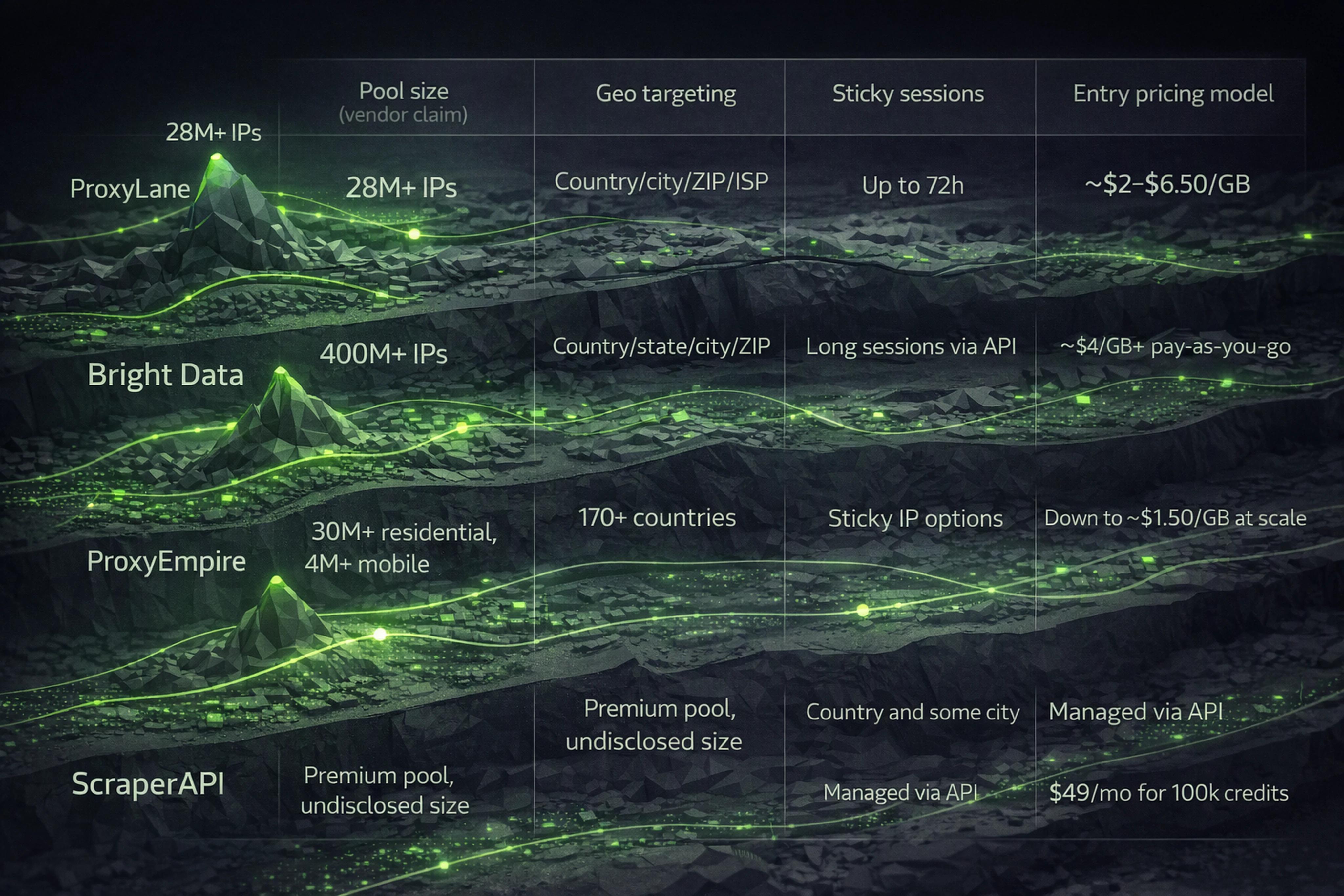
| Provider | Pool (residential, vendor claim) | Geo targeting | Sticky sessions (vendor claim) | Pricing model | Approx. entry price (as of 2026‑11) |
|---|---|---|---|---|---|
| ProxyLane | 28M+ IPs | Country, city, ZIP, ISP | Up to 72 hours | Per GB, non‑expiring | ~ $2–$6.50/GB depending on package |
| Bright Data | 400M+ IPs | Country, state, city, ZIP | Long sessions via API | Per GB, pay‑as‑you‑go | ~ $4/GB+ (pay‑as‑you‑go) |
| ProxyEmpire | 30M+ residential, 4M+ mobile | 170+ countries | Sticky IP options | Per GB, rollover | Down to ~$1.50/GB at high volumes |
| ScraperAPI | Undisclosed (premium proxies) | Country, some city | Managed sessions via API | Per request credit | $49/mo for 100k credits (Hobby) |
Notes (as of 2026‑11):
For most Python teams, a practical pattern is:
Google Maps is a clear example of the "local web": results depend heavily on:
A Google Maps scraping pipeline often needs:
A generic ProxyLane‑style username pattern for geo and ISP targeting looks like:
username: country=DE;city=Berlin;zip=10115;isp=Telekom;session=my-maps-run
password: <your_proxy_password>
Or in query‑param style when supported:
http://username:password@proxyhost:port?country=DE&city=Berlin&zip=10115&isp=Telekom
Core steps for verification:
https://ipinfo.io/json.We’ll see Playwright examples later in the article.
TikTok’s feed, trending sounds, and search results are heavily localized.
Common needs:
A ProxyLane‑style username for a TikTok profile might be:
username: country=US;city=Austin;isp=Comcast;session=tiktok-profile-42
password: <proxy_password>
Operational tips:
Requests is still the baseline HTTP client for Python scraping.
As of 2026‑11, PyPI reports Requests under requests with official docs confirming:
requests.Session).proxies argument.A basic proxy configuration:
import requests

proxies = {
    "http": "http://username:password@proxyhost:port",
    "https": "http://username:password@proxyhost:port",
}

resp = requests.get("https://example.com", proxies=proxies, timeout=30)
print(resp.status_code)
BeautifulSoup (package beautifulsoup4) is an HTML/XML parser, not a browser.
PyPI stats as of 2026‑11 report recent versions like 4.15.x with heavy usage, and official docs emphasize:
.select().Example with Requests + BeautifulSoup:
import requests
from bs4 import BeautifulSoup

resp = requests.get("https://example.com", timeout=30)
soup = BeautifulSoup(resp.text, "html.parser")

for item in soup.select(".product-card"):
    title = item.select_one(".title").get_text(strip=True)
    price = item.select_one(".price").get_text(strip=True)
    print(title, price)
This stack works best when:
Playwright is the go‑to open‑source browser automation layer for JS‑heavy sites.
As of 2026‑11, playwright on PyPI lists support for:
You can configure HTTP or SOCKS5 proxies in Playwright at browser launch.
Basic HTTP proxy with authentication:
from playwright.sync_api import sync_playwright

proxy_server = "http://proxyhost:port"
proxy_username = "country=DE;city=Berlin;session=test-1"
proxy_password = "your_proxy_password"

with sync_playwright() as p:
    browser = p.chromium.launch(
        headless=True,
        proxy={
            "server": proxy_server,
            "username": proxy_username,
            "password": proxy_password,
        },
    )

    page = browser.new_page()
    page.goto("https://ipinfo.io/json", timeout=60000)
    print(page.text_content("pre"))
    browser.close()
SOCKS5 example:
from playwright.sync_api import sync_playwright

proxy_server = "socks5://proxyhost:port"
proxy_username = "country=US;city=Chicago;session=socks-demo"
proxy_password = "your_proxy_password"

with sync_playwright() as p:
    browser = p.firefox.launch(
        headless=True,
        proxy={
            "server": proxy_server,
            "username": proxy_username,
            "password": proxy_password,
        },
    )
    page = browser.new_page()
    page.goto("https://ipinfo.io/json", timeout=60000)
    print(page.text_content("pre"))
    browser.close()
Rotation is useful for independent requests (e.g., list pages, non‑logged‑in scrapes).
A common pattern:
Example rotation across contexts:
from playwright.sync_api import sync_playwright

proxy_hosts = [
    "http://username1:password1@proxyhost:port",
    "http://username2:password2@proxyhost:port",
    "http://username3:password3@proxyhost:port",
]

urls = [
    "https://example.com/page1",
    "https://example.com/page2",
    "https://example.com/page3",
]

def parse_page(page):
    return page.title()

with sync_playwright() as p:
    browser = p.chromium.launch(headless=True)

    results = []
    for proxy_url, url in zip(proxy_hosts, urls):
        # Extract server/credentials from proxy URL if needed; simple example:
        server = proxy_url

        context = browser.new_context(
            proxy={
                "server": server,
                # For providers like ProxyLane you would pass username/password
                # via separate fields rather than embedding in the URL if required.
            }
        )
        page = context.new_page()

        # Backoff-friendly timeout
        try:
            page.goto(url, timeout=70000)  # ScraperAPI recommends ~70s for hard targets
            results.append(parse_page(page))
        except Exception as e:
            print("Error fetching", url, e)
        finally:
            context.close()

    browser.close()

print(results)
Operational guidance:
ScraperAPI is a managed scraping API that bundles:
As of 2026‑11, ScraperAPI’s docs and pricing report:
In Python, ScraperAPI looks like:
import requests

API_KEY = "your_scraperapi_key"
url = "https://example.com/hard-target"

params = {
    "api_key": API_KEY,
    "url": url,
    "render": "true",  # JS rendering
}

resp = requests.get("https://api.scraperapi.com/", params=params, timeout=70)
print(resp.status_code)
print(resp.text)
When to prefer ScraperAPI:
When to prefer residential proxies like ProxyLane:
Any claim about geo targeting, residential IP quality, or low risk should be validated.
Here is a concise checklist you can run manually or in Python.
If your provider offers an API or "sample IP" endpoint, pull 1,000–2,000 IPs.
Example (generic curl):
curl -u "username:password" "https://proxy-provider.example.com/sample-ips?limit=2000" > ips.json
Use services like MaxMind, ipinfo, or ipapi.
Example with ipinfo.io in Python:
import requests

ips = ["1.2.3.4", "5.6.7.8"]  # from your sample

for ip in ips:
    data = requests.get(f"https://ipinfo.io/{ip}/json", timeout=10).json()
    print(ip, data.get("city"), data.get("region"), data.get("country"), data.get("org"))
Check that:
org/ASN suggests consumer ISPs rather than data centers.Use tools like Scamalytics or abuse databases to sample risk ratings:
Measure end‑to‑end latency to targets via the proxy.
Example using time and curl:
for i in {1..50}; do
  time curl -x "http://username:password@proxyhost:port" \
       -o /dev/null -s "https://example.com/health"
done
Compute:
Use Playwright to see what the target believes your location is.
from playwright.sync_api import sync_playwright
import json

proxy_server = "http://proxyhost:port"
proxy_username = "country=GB;city=London;session=verify-geo"
proxy_password = "your_proxy_password"

with sync_playwright() as p:
    browser = p.chromium.launch(
        headless=True,
        proxy={
            "server": proxy_server,
            "username": proxy_username,
            "password": proxy_password,
        },
    )
    page = browser.new_page()
    page.goto("https://ipinfo.io/json", timeout=60000)
    data = json.loads(page.text_content("pre"))

    assert data["country"] == "GB"
    assert data["city"] in {"London", "Greater London"}

    print("Verified location:", data)
    browser.close()
This assertion‑style check ensures that geo parameters in your proxy credentials match what downstream sites actually see.
To tie everything together for modern targets like Maps and TikTok:
Classification layer
Proxy strategy
Tooling integration
proxies in Requests.Verification and monitoring
Ethics and compliance
The Imperva/Thales Bad Bot report (2026 edition) notes that automated traffic reached about 53% of all web traffic in 2025, with 27% of bot attacks targeting APIs (as of their public report). That environment makes resilience and responsible behavior non‑optional.
When you’re ready to assemble a stack like this, a provider that offers HTTP/SOCKS5 proxies, city/ISP targeting, sticky sessions, and non‑expiring bandwidth — like ProxyLane at proxylane.dev — fits naturally into Python and Playwright workflows without needing proprietary SDKs.
ProxyLane uses per‑GB pricing with non‑expiring bandwidth, plus fine‑grained geo targeting and sticky sessions.
As of 2026‑11 (vendor‑reported):
Always check current pricing on the site before purchase.
Yes, you can buy 1 GB packages of residential proxies from providers like ProxyLane, where unused traffic does not expire (as of their public pages in 2026‑11).
This model is well suited to:
In 2026, the “best” residential proxies for ethical web scraping are those that can demonstrate:
ProxyLane’s trust‑center messaging (as of 2026‑11) explicitly highlights informed participation and user responsibility for legal compliance.
ScraperAPI:
Residential proxies (ProxyLane‑style):
In Python, ScraperAPI is a single endpoint call, while residential proxies integrate directly into Requests, Playwright, and your own stack.
To "go spider" and scrape web data in Python responsibly:
 ProxyLaneTraffic never expires
Scale your workflows with the tools you already use. Rotating or sticky sessions up to 72 hours.
Compare seller APIs, licensed Amazon product data and proxy page checks by record, access scope and reuse rights.
Read guideChoose the right anti-detect browser proxy guide, map the shared verification steps, and keep account access separate from the network route.
Read guideOur picks for market research: ProxyLane for small, intermittent projects, plus options for regional tracking, monthly collection and managed extraction.
Read guide