

Amazon Scraper API vs Proxy: Choose a Product Data Source
Compare seller APIs, licensed Amazon product data and proxy page checks by record, access scope and reuse rights.
Read guide
Set a proxy for each Scrapy request, validate the observed exit and extracted title, and keep retries, body size, and credentials bounded.

Set Request.meta["proxy"] to route a Scrapy request, then validate the exit response and the target record in callbacks. This example sends one IP check followed by one authorized page request, with retries disabled and a response-size cap. A successful download is not a valid item until its required field passes.
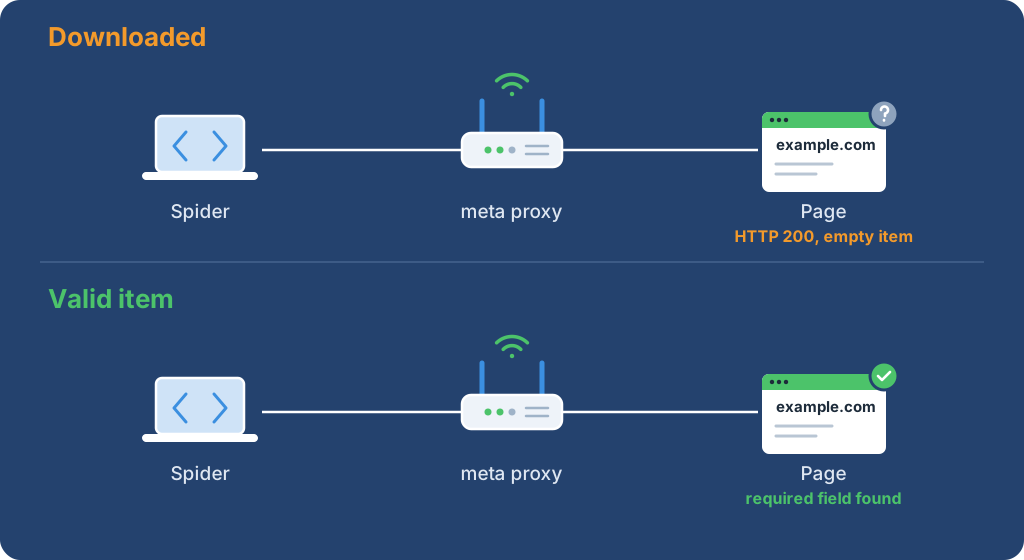
Install the tested version in a virtual environment:
python -m pip install 'Scrapy==2.19.0'
Load PROXY_URL from a runtime secret binding. Use the form http://<PROXY_USER>:<PROXY_PASSWORD>@<PROXY_HOST>:<PROXY_PORT> for an authenticated proxy, percent-encoding reserved characters. Do not commit the value or include it in a shell command or log. The built-in HTTP proxy middleware accepts proxy credentials in the URL and adds proxy authentication for the request.
Warning: Proxy credentials can expose account access if they reach logs or source control, and requests can consume metered traffic. Use a secret binding and an authorized test target. Rotate credentials if exposed, then remove the logged or committed copy.
The example uses an HTTP proxy URL, so Basic proxy credentials are not encrypted between the crawler and proxy. HTTPS on the target does not protect this hop. Send credentials only through a trusted network path. Scrapy's default HTTP/1.1 handler documents a narrower HTTPS-proxy case, so check handler support before changing the proxy scheme.
Save this spider as scrapy-proxy-probe.py:
import ipaddress
import json
import os
from urllib.parse import urlsplit

import scrapy
from scrapy.exceptions import CloseSpider

EXIT_CHECK_URL = os.environ.get("EXIT_CHECK_URL", "https://api.ipify.org?format=json")
TARGET_URL = os.environ.get("TARGET_URL", "https://example.com/")
PROXY_URL = os.environ["PROXY_URL"]
TIMEOUT_SECONDS = 10
MAX_RESPONSE_BYTES = 65_536
ROUTED_HOSTS = {
    urlsplit(value).hostname
    for value in (EXIT_CHECK_URL, TARGET_URL)
    if urlsplit(value).hostname
}


def validate_proxy_url(proxy_url):
    parsed = urlsplit(proxy_url)
    if parsed.scheme not in {"http", "https"} or not parsed.hostname or not parsed.port:
        raise ValueError("PROXY_URL must include an HTTP proxy scheme, host, and port")


class ProxyRouteMiddleware:
    def process_request(self, request, spider):
        if urlsplit(request.url).hostname in ROUTED_HOSTS:
            request.meta["proxy"] = PROXY_URL


class ProxyProbe(scrapy.Spider):
    name = "proxy_probe"
    custom_settings = {
        "CONCURRENT_REQUESTS_PER_DOMAIN": 1,
        "DOWNLOADER_MIDDLEWARES": {
            f"{__name__}.ProxyRouteMiddleware": 740,
        },
        "DOWNLOAD_MAXSIZE": MAX_RESPONSE_BYTES,
        "DOWNLOAD_TIMEOUT": TIMEOUT_SECONDS,
        "FEED_EXPORT_ENCODING": "utf-8",
        "LOG_LEVEL": "CRITICAL",
        "RETRY_ENABLED": False,
        "ROBOTSTXT_OBEY": True,
    }

    async def start(self):
        validate_proxy_url(PROXY_URL)
        self.exit_ip = None
        yield scrapy.Request(
            EXIT_CHECK_URL,
            callback=self.parse_exit,
            errback=self.request_failed,
            meta=self.proxy_meta("exit check"),
        )

    def proxy_meta(self, phase):
        return {
            "download_maxsize": MAX_RESPONSE_BYTES,
            "download_timeout": TIMEOUT_SECONDS,
            "probe_phase": phase,
            "proxy": PROXY_URL,
        }

    def parse_exit(self, response):
        if response.status != 200:
            raise CloseSpider(f"exit check returned HTTP {response.status}")
        try:
            self.exit_ip = str(ipaddress.ip_address(json.loads(response.body)["ip"]))
        except (KeyError, ValueError, TypeError, json.JSONDecodeError):
            raise CloseSpider("exit check returned an invalid IP response") from None

        yield scrapy.Request(
            TARGET_URL,
            callback=self.parse_target,
            errback=self.request_failed,
            meta=self.proxy_meta("target"),
        )

    def parse_target(self, response):
        title = response.css("title::text").get()
        if response.status != 200:
            raise CloseSpider(f"target returned HTTP {response.status}")
        if not title or "Example Domain" not in title:
            raise CloseSpider("target content validation failed")
        yield {
            "exit_ip": self.exit_ip,
            "source_url": response.url,
            "title": title.strip(),
        }

    def request_failed(self, failure):
        request = getattr(failure, "request", None)
        phase = request.meta.get("probe_phase", "request") if request is not None else "request"
        response = getattr(failure.value, "response", None)
        status = getattr(response, "status", None)
        if status is not None:
            raise CloseSpider(f"{phase} returned HTTP {status}")
        raise CloseSpider(f"{phase} request failed ({failure.type.__name__})")

    def closed(self, reason):
        print(f"Spider closed ({reason}); verify the feed before accepting results.")
The sample allows 1 request per host at a time, disables automatic retry, waits no more than 10 seconds per download, and limits each response to 65,536 bytes. ROBOTSTXT_OBEY stays enabled. Scrapy's RobotsTxtMiddleware creates a separate /robots.txt request that does not inherit the original request metadata, so the small downloader middleware applies the proxy only to the configured exit and target hosts. Its order (740) runs just before the built-in HttpProxyMiddleware (750), covering the generated robots request as well as the spider's requests. The per-request proxy setting also ignores no_proxy; requests to hosts outside the allowlist are left alone. If you change TARGET_URL, also replace the hard-coded "Example Domain" title marker in parse_target() with the expected title for that page.
An empty feed can also mean that robots.txt disallowed the target path. Check the site's policy before changing crawl behavior.
Run from a fresh temporary directory so -O writes to a new file instead of replacing existing crawl output. PROBE_DIR is local scratch output and can be removed after inspection:
PROBE_DIR="$(mktemp -d)"
scrapy runspider scrapy-proxy-probe.py -O "$PROBE_DIR/results.jsonl"
Scrapy can exit with status 0 after a CloseSpider failure, so validate the feed before accepting the run. This check exits nonzero for an empty, malformed, or multi-record feed; blank lines are ignored. It accepts exactly one JSON object:
python - "$PROBE_DIR/results.jsonl" <<'PY'
import json
import sys

feed_path = sys.argv[1]
try:
    with open(feed_path, encoding="utf-8") as feed:
        records = [json.loads(line) for line in feed if line.strip()]
    if len(records) != 1 or not isinstance(records[0], dict):
        raise ValueError("expected exactly one object")
except (OSError, json.JSONDecodeError, UnicodeDecodeError, ValueError):
    print("Probe failed: expected exactly one valid JSONL item.")
    raise SystemExit(1)
print("Accepted one valid JSONL item.")
PY
One valid record has this shape. The address and URL are values from the run:
{"exit_ip":"<OBSERVED_EXIT_IP>","source_url":"https://example.com/","title":"Example Domain"}
Treat an empty output file as a failed probe, even if the spider process exits with code 0. Scrapy handles CloseSpider as a normal spider close; closed() prints its safe reason, and the feed must contain exactly one item before accepting a result.
| Observation | Boundary | Next check |
|---|---|---|
| Proxy URL validation fails | Spider input | Check the scheme, host, port, and encoded credentials |
| Timeout or connection failure | Proxy reachability or worker network | Check the endpoint from the crawler host and the 10-second download setting |
407 status |
Proxy authentication | Confirm account credentials and proxy protocol; 407 is defined by RFC 9110 |
| Non-200 target response | Origin policy or target authentication | Check the permitted URL and record the status separately from parser results |
| Empty result after a 200 response | Parser or content validation | Inspect a redacted response sample and verify the selector against the current target |
DOWNLOAD_TIMEOUT and download_timeout limit a download request, not the elapsed time for an entire crawl. DOWNLOAD_MAXSIZE limits the response body through the configured handler; confirm custom download handlers enforce the same setting. Scrapy's built-in handlers do not make every proxy protocol interchangeable: its documented handler support differs for HTTPS proxy URLs and SOCKS.
Use HTTP 407 troubleshooting for proxy authentication failures. If the target requires a rendered browser page, use the Playwright proxy guide.
 ProxyLaneTraffic never expires
Scale your workflows with the tools you already use. Rotating or sticky sessions up to 72 hours.
Compare seller APIs, licensed Amazon product data and proxy page checks by record, access scope and reuse rights.
Read guideChoose the right anti-detect browser proxy guide, map the shared verification steps, and keep account access separate from the network route.
Read guideOur picks for market research: ProxyLane for small, intermittent projects, plus options for regional tracking, monthly collection and managed extraction.
Read guide
