

Amazon Scraper API vs Proxy: Choose a Product Data Source
Compare seller APIs, licensed Amazon product data and proxy page checks by record, access scope and reuse rights.
Read guide
Read one bounded curl transfer’s DNS, connect, TLS, first-byte, and total timings to choose the next check before changing routes.
A proxy timeout names no single failure. Find the last phase that finished: Domain Name System (DNS) lookup, the Transmission Control Protocol (TCP) connection to the proxy, the proxy CONNECT tunnel, the Transport Layer Security (TLS) handshake, the target's first byte, or the body. One bounded curl request with --write-out timings shows that phase in a single line; fix that hop before changing routes or raising limits.
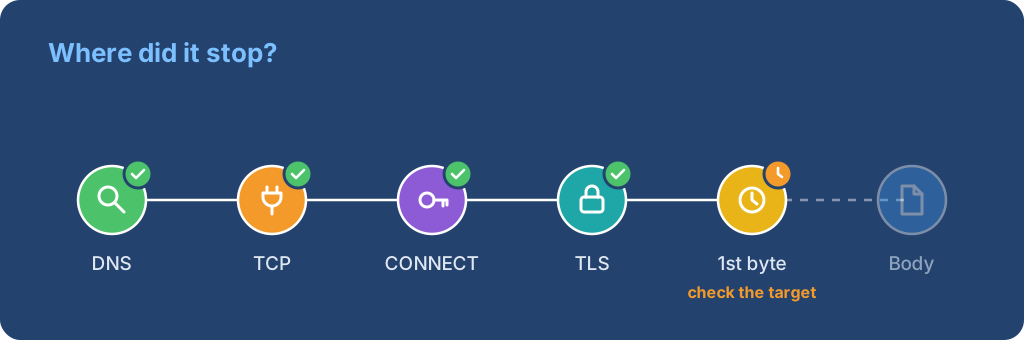
One request is a diagnosis, not an availability measurement. Repeat with the same target, route, and limits before drawing a conclusion.
Some proxies return their own error page, for example: "The proxy failed to connect to the web server, due to TCP connection timeout". The proxy wrote that page, so the client reached the proxy. The hop that timed out is the proxy's connection to the target.
Check in this order:
If the target answers through other routes, send the proxy operator the time in UTC, the target host, and the exact error text through a proxy support ticket.
Use curl 8.7.1, tested on macOS 26.5.2. The command assumes a no-auth or IP-allowlisted route. Set PROXY_URL to the proxy scheme, host, and port without credentials, and TARGET_URL to one permitted HTTPS URL. Load any credentials through a private runtime binding rather than the URL or command line.
: "${PROXY_URL:?Set PROXY_URL without credentials}"
: "${TARGET_URL:?Set TARGET_URL to one permitted HTTPS URL}"

curl --disable --proxy "$PROXY_URL" --noproxy '' \
  --connect-timeout 5 --max-time 20 \
  --silent --show-error --output /dev/null \
  --write-out 'status=%{response_code} proxy=%{http_connect} dns=%{time_namelookup}s connect=%{time_connect}s appconnect=%{time_appconnect}s pretransfer=%{time_pretransfer}s first_byte=%{time_starttransfer}s total=%{time_total}s\n' \
  "$TARGET_URL"
--connect-timeout caps connection setup, including DNS and the TCP and TLS handshakes; --max-time caps the whole transfer. The values are diagnostic bounds, not provider recommendations or a job deadline.
Two lines captured through a local test proxy show both outcomes. A completed transfer:
status=200 proxy=200 dns=0.000054s connect=0.000281s appconnect=0.148282s pretransfer=0.148346s first_byte=0.230357s total=0.230488s
A proxy address that never answers:
curl: (28) Failed to connect to 10.255.255.1 port 3128 after 5004 ms: Timeout was reached
status=000 proxy=000 dns=0.001954s connect=0.000000s appconnect=0.000000s pretransfer=0.000000s first_byte=0.000000s total=5.004832s
In the second run, connect stayed at zero and total equals the 5-second connect limit: the TCP connection to the proxy never completed. Those timings come from a local test and are not a provider baseline.
curl's --write-out fields are cumulative times from the start of the transfer, so read them as ordered milestones.
| Last useful field | What finished | First check |
|---|---|---|
time_namelookup |
Name resolution | Which hostname resolves locally and which at the proxy |
time_connect |
TCP connection to the proxy | Proxy scheme, hostname, port, firewall, and route |
http_connect |
Proxy's reply to CONNECT |
Proxy authentication and tunnel acceptance |
time_appconnect |
TLS handshake | Which endpoint was in TLS, certificate trust, and name |
time_starttransfer |
First response byte | Target queue, rate policy, or application response |
time_total |
Whole transfer | Body size, stalled stream, or overall deadline |
The route scheme matters: with an HTTPS proxy, TLS can happen with the proxy, with the target after CONNECT, or at both boundaries. time_starttransfer - time_pretransfer estimates the wait after setup and before the first byte. It includes network delay, proxy work, and target queues, so it is not a direct measure of server processing.
A zero or absent field can mean the phase did not apply or never completed; do not name a failed hop from that alone. An HTTP 407 is a proxy authentication response, and a 429 comes from whichever HTTP layer sent it. Identify that layer before waiting, stopping, or changing configuration.
| Result | Next action |
|---|---|
| Name lookup is the last completed phase | Check the proxy hostname and local resolver; see whether target DNS is delegated |
| TCP connect hits its limit | Check scheme, host, port, firewall, and endpoint reachability |
| TLS fails before an HTTP response | Identify the TLS peer and follow the certificate trust guide |
CONNECT returns 407 |
Follow the proxy authentication guide; stop blind retries |
CONNECT succeeds but the first byte is late |
Check target policy, rate limits, and service response time |
| First byte arrives but the body stalls | Bound the body read; compare response size and the last received byte |
| curl succeeds but the browser fails | Compare browser proxy and bypass settings, DNS mode, and the awaited condition |
Change one factor at a time and keep the target, method, route, and timeouts the same, so the next result stays comparable. Stop when the target asks clients to slow down or denies access; switching exits to evade that changes the measurement and can break the source's access terms.
A Playwright timeout applies to the awaited operation. A page.goto() timeout does not show whether connection setup, the target response, page scripts, or the readiness condition used the time. Record the operation, URL host, last request or response event, and timeout setting, without tokens or credential-bearing URLs.
| Browser observation | It establishes | It does not establish |
|---|---|---|
| Navigation missed its readiness state | The awaited condition was unmet before the deadline | Which network hop failed |
| A request failed before a response | The browser reported a request failure | That the proxy was the only cause |
| A response arrived but an assertion timed out | The expected page state was not seen | That transport was slow |
| One image or script is pending | That resource has not completed | That the document or proxy is down |
Reduce the reproduction to one context, one target, one route, and one awaited action. A clean profile removes extension and cache effects but does not turn a browser timeout into a provider measurement.
The same words describe a different setup: Nginx as a reverse proxy in front of an application. There, Nginx is the waiting client. It stops waiting for the upstream application and can return a 504 Gateway Timeout.
A 504 alone does not separate the cases, because a forward proxy can return it too. Check which server wrote the error. The Nginx error log records "upstream timed out" and names the waiting phase; the Nginx upstream module source defines those strings.
| Error log entry contains | Nginx directive | What it limits |
|---|---|---|
| "while connecting to upstream" | proxy_connect_timeout |
Connecting to the upstream server; default 60 s, usually at most 75 s |
| "while sending request to upstream" | proxy_send_timeout |
The gap between two writes of the request; default 60 s |
| "while reading response header from upstream" or "while reading upstream" | proxy_read_timeout |
The gap between two reads of the response; default 60 s |
For an endpoint that should answer quickly, raising these values hides the slow response instead of locating it. Check the upstream application first: its log, the duration of the affected request, and whether it accepts connections. Long polling and streaming endpoints can need a longer proxy_read_timeout; set it for that location only.
 ProxyLaneTraffic never expires
Scale your workflows with the tools you already use. Rotating or sticky sessions up to 72 hours.
Compare seller APIs, licensed Amazon product data and proxy page checks by record, access scope and reuse rights.
Read guideChoose the right anti-detect browser proxy guide, map the shared verification steps, and keep account access separate from the network route.
Read guideOur picks for market research: ProxyLane for small, intermittent projects, plus options for regional tracking, monthly collection and managed extraction.
Read guide
