AI agents are quickly becoming the main users of the web, and most of the valuable data now sits behind a login. If your bots book, shop, test local flows, or turn websites into APIs, your choice of proxy type determines how many tasks finish successfully—and how much you pay per successful result.
This guide ranks the top 6 proxy types for AI agents, scraping, and QA teams, explains when each shines or fails, and shows how a ProxyLane-style setup can blend them into resilient workflows.
How we ranked the 6 proxy types
Before we rank residential, mobile, ISP, static residential, datacenter, and mixed pools, we need clear criteria.
For AI agents and automation teams, the best proxy type is the one that produces finished work at the lowest real cost—not just the lowest $/GB.
We evaluated each type on six weighted criteria:
-
Session persistence
- Can an agent stay logged in across many actions?
- Do sessions survive hours, days, or only minutes?
-
Site acceptance / IP trust
- How likely is the first request to load instead of being challenged or blocked?
- Are IPs seen as home, office, carrier, or hosting?
-
Geo precision
- Can you target country, city, ZIP, ISP, and ASN?
- Does the city in your antidetect browser match the city sites see?
-
Speed / latency
- Typical response times, jitter, and stability.
- Are proxies fast enough for interactive agents and QA?
-
Cost per successful result
- Not just price per GB, but GB per finished page.
- Fewer blocks means fewer retries and lower real cost.
-
Workflow fit & orchestration
- How easily does the proxy type fit Playwright/Puppeteer/Selenium, RAG crawlers, QA runs, and multi-account setups?
- Does it support rotation, sticky, static IPs, and policy-based routing?
With these criteria, we rank static residential first for persistent accounts, then ISP, residential, mobile, mixed pools, and datacenter.
For an in-depth taxonomy of providers and routes, see our related guide: best proxy servers across residential, mobile, ISP and datacenter options for data teams.
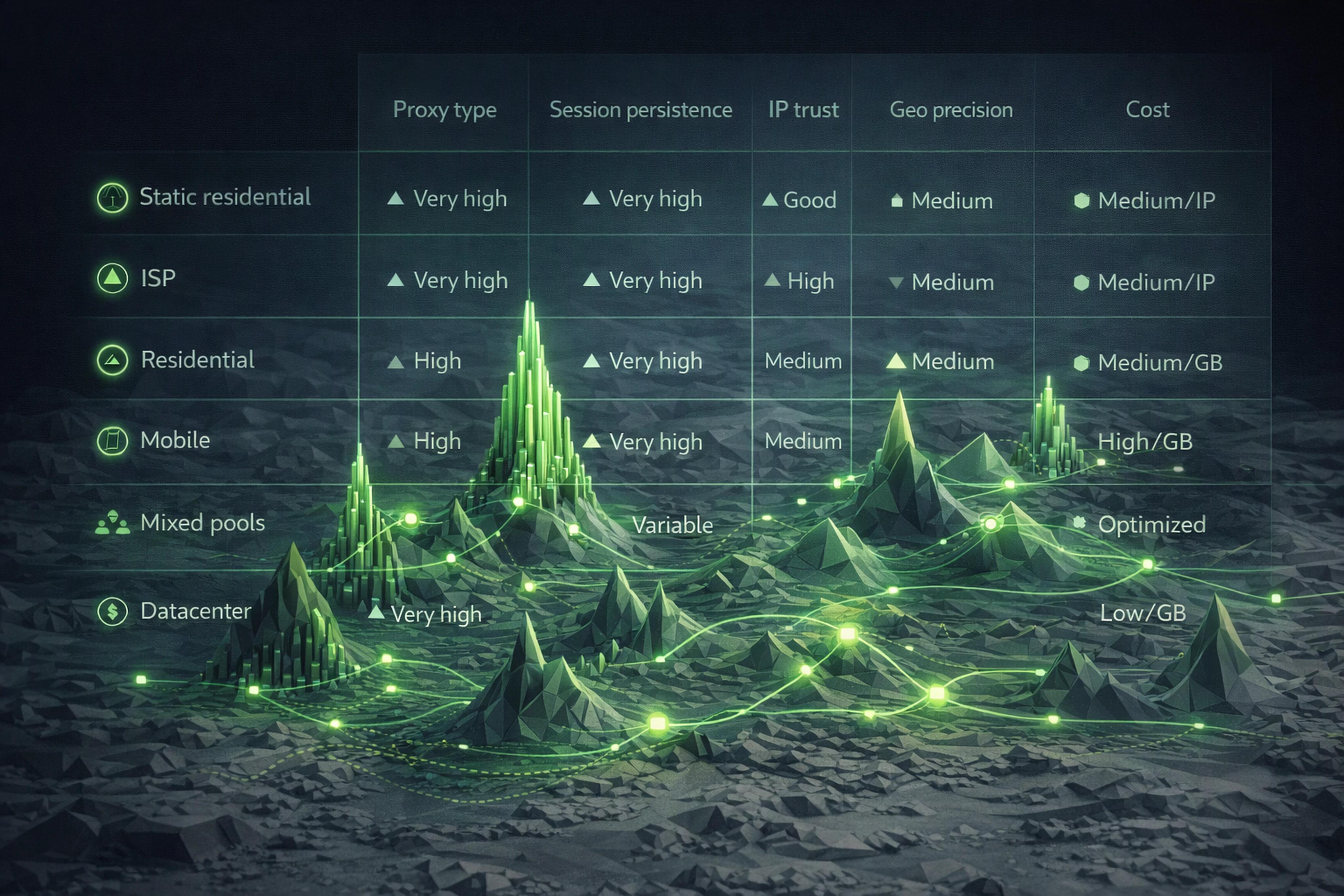
Comparison table: 6 proxy types at a glance
Here’s a quick summary before we dive into each type.
| Rank |
Proxy type |
Best for |
Session persistence |
IP trust level |
Geo precision |
Typical cost profile |
| 1 |
Static residential |
Long-lived logged-in agents, persistent profiles |
Very high (months+) |
Very high (home-like) |
Good (country, often city) |
Per IP / month, unlimited |
| 2 |
ISP |
Stable accounts, allowlists, long sessions |
Very high (months+) |
High (residential-ish) |
Medium (mostly country) |
Per IP / month |
| 3 |
Residential |
All-round scraping, local QA, agent workflows |
High (hours) |
Very high (home/office) |
Very high (city/ZIP/ASN) |
Per GB traffic |
| 4 |
Mobile |
Strict sites, mobile-first flows, ads & app QA |
High (up to a day) |
Very high (carrier) |
Medium (carrier/country) |
Highest $/GB |
| 5 |
Mixed pools |
Policy routing, failover, blended workloads |
Depends on mix |
Variable |
Variable |
Optimized by orchestration |
| 6 |
Datacenter |
Cheap, fast, permissive public workloads |
Very high |
Low (hosting company) |
Low–medium (country) |
Lowest $/GB |
1. Static residential proxies — best for long-lived logged-in agents
Static residential (often sold as static ISP-style lines) sit at the top of this ranking for accounts and browser profiles that must look identical every day.
What static residential proxies are
A static residential proxy is:
- A fixed, home-like IP dedicated to one customer.
- The same IP on renewal, often for months.
- Unlimited traffic, no rotation.
ProxyLane’s Native ISP product is a concrete example: each static home IP line is 100% dedicated to one account, optimized for AI service accounts (ChatGPT, Claude, Gemini, Grok) and long-lived automation.
Who they suit
Static residential proxies are ideal for:
- AI agents running one human’s account day after day.
- Personal-assistant agents that log in to banking, travel, utilities.
- Agents managing AI accounts or subscription services.
- Multi-account browser profiles in tools like AdsPower, Dolphin Anty, GoLogin, Multilogin.
- Each profile gets one static IP that doesn’t change.
- Antidetect fingerprints stay consistent with the IP’s location.
- High-risk or high-value accounts that need maximum stability.
- Ticketing, limited-edition drops, or anything where losing the account is costly.
Where static residential shine
On our six criteria, static residential shine by:
- Session persistence:
- Same IP for months, so cookies, device IDs and IP reputation align.
- Best fit for agents that must survive long-term scrutiny.
- IP trust:
- Residential-looking IPs tied to consumer ASNs.
- Very high acceptance for login-heavy flows.
- Cost per successful result:
- You pay per IP, not per GB.
- If you run the same account every day, this is often the cheapest way to ensure it works.
Honest limitation
Static residential fall short when:
- You need large-scale rotation or many geo variants.
- Workloads are bursty or exploratory, where you don’t know your volume yet.
- You need thousands of locations for QA or SERP scraping; static lines don’t scale as easily.
Static residential IPs are best treated as anchor lines for specific accounts, alongside more flexible residential or mobile traffic.
2. ISP proxies — best for stable, high-trust accounts and allowlists
ISP proxies rank second. They overlap with static residential, but are usually framed as server-grade, fixed monthly IPs that look residential enough for accounts and long sessions.
What ISP proxies are
ProxyEmpire describes ISP proxies as:
- Fixed IPs bought per month per IP.
- Hosted on ISP-owned ranges, not classic datacenter ASNs.
- Fast, stable, and suitable for accounts and allowlists.
In practice, many providers market them as static residential. Buyers still compare them separately because ISP lines often target country-level only and emphasize speed and stability.
Who they suit
ISP proxies are best for:
- Accounts tied to allowlists or IP-based security controls.
- Admin dashboards, B2B apps, or internal QA tools.
- Bots that must be both fast and consistent.
- Real-time monitoring, trading, or operational dashboards.
- Hybrid workloads that mix API access and browser automation on the same IP.
Where ISP shine
ISP proxies score well on:
- Session persistence:
- Same IP for the month, often beyond.
- Long-lived cookies and JWT sessions work reliably.
- Speed / latency:
- Server-grade connections, often lower latency than consumer residential.
- Workflow fit:
- Strong fit for QA and engineering workflows that expect stable IPs.
Honest limitation
ISP proxies fall short on:
- Geo precision:
- Often only country-level targeting, not ZIP or neighborhood.
- Pricing flexibility:
- Sold per IP, not per GB; less ideal for small, intermittent workloads.
If you need a handful of very stable, high-trust lines, ISP proxies are excellent. For broad localized scraping or AI agents that need city-accurate locations, residential pools still win.
3. Residential proxies — best all-rounder for AI agents, scraping and local QA
Residential proxies take the third slot, but they are the default choice for many AI agents and data teams because they balance trust, geo control, and flexibility.
What residential proxies are
Apify defines residential proxies as:
- IPs assigned to homes and offices of real users.
- Indistinguishable from legitimate users in most anti-bot systems.
- Support both rotation and session persistence via session IDs.
A ProxyLane-style residential product includes:
- 28M+ IPs in 195 countries.
- Six targeting levels: country, region, city, ZIP, ISP, ASN.
- Rotating, sticky and timed sessions from 1 second to 72 hours.
- 98.7% of a 1,000-IP sample rated low risk by Scamalytics.
- 0.35 s average response time, 99.5% success in network-partner samples.
- Traffic sold as one-time packages that never expire, from around $1.95 / 350 MB to $2–3/GB at scale.
Who they suit
Residential proxies are ideal for:
- AI agents acting behind logins in one country.
- Booking travel, ordering groceries, price-checking local retailers.
- Web scraping & RAG retrieval on e-commerce, SERP, marketplaces, and local sites.
- Localized QA:
- Testing sign-up, payments, and user flows as if from a specific city or ISP.
Where residential shine
Residential proxies score high on:
- Site acceptance / IP trust:
- Home/office IPs are hard to distinguish from normal users.
- Lower block and challenge rates than datacenter.
- Geo precision:
- City and ZIP targeting, plus ISP/ASN filters.
- ProxyLane also re-rolls exits until IP2Location, MaxMind and ipinfo agree, so the city antidetect browsers show matches what sites see.
- Workflow fit:
- Excellent support in Playwright, Puppeteer, Selenium, Scrapy, Crawlee, CloakBrowser, Camoufox, Browser Use, and Stagehand via HTTP(S) and SOCKS5.
- Sticky sessions up to 72 hours for logged-in flows; rotation for broad crawls.
Honest limitation
Residential proxies fall short when:
- Host devices go offline, which can destroy residential sessions mid-flow. Apify notes default sessions persist ~30 minutes, but can be cut unexpectedly.
- You need very large downloads (bulk exports, large file pulls), where datacenter routes may be cheaper and more stable.
For AI agents and logged-in scraping, residential proxies are often the primary lane, with static or ISP lines backing key accounts and mobile reserved for the strictest sites.
4. Mobile proxies — best for strict sites, mobile-first flows and ads QA
Mobile proxies route traffic through 4G/5G carrier networks. They rank fourth because they are the most trusted, but also the most expensive per GB.
What mobile proxies are
ProxyEmpire describes mobile IPs as:
- Addresses that belong to carrier networks, shared among many real users.
- Among the most trusted IPs on the internet, since blocking them affects real mobile subscribers.
A ProxyLane-style Mobile Lane adds:
- Real 4G/5G carrier IPs in 150+ countries.
- Sticky sessions up to 24 hours while the phone stays online.
- Carrier-level targeting and 98.7% low-risk sampling in its tests.
- 99.5% request success in network-partner sampling, traffic that never expires, and pricing from about $3/GB.
Who they suit
Mobile proxies are the best fit for:
- Strict, mobile-first sites with aggressive anti-bot policies.
- Social apps, ticketing, niche marketplaces.
- Ads and app QA where you must see what a mobile user in one carrier or region sees.
- AI agents mimicking a phone user booking services or interacting with mobile-only flows.
Where mobile shine
Mobile proxies excel in:
- IP trust / acceptance:
- Carrier IPs are shared by thousands of real users.
- Blocking them causes collateral damage, so sites are more careful.
- Session persistence:
- When the phone stays online, sessions can run for many hours.
- Best proxies for scraping behind strict login:
- When residential is getting challenged, mobile often still passes.
Honest limitation
Mobile proxies fall short on:
- Cost per GB:
- ProxyEmpire explicitly calls mobile the highest-cost network type per GB.
- Fine-grained geo:
- You can target carriers and countries; precise city-level targeting is less common than in large residential pools.
Mobile lanes work best as a specialized route for problem sites and critical QA scenarios, not as your everyday default.
5. Mixed proxy pools — best for routing strategies and failover
Mixed proxy pools take the fifth spot. They’re a routing strategy, not a single proxy label.
SOAX’s proxy mesh is a good example: it lets you choose residential or mobile and preserve context, while many teams combine residential, mobile, and datacenter by job.
What mixed pools are
In practice, a mixed pool setup means:
- You maintain multiple lanes: static/ISP, residential, mobile, and datacenter.
- A controller or orchestrator decides which lane to use per request based on:
- Site type (public vs strict).
- Logged-in vs anonymous.
- Required geo and latency.
- Cost sensitivity.
Who they suit
Mixed pools are ideal for teams who:
- Run large, diverse workloads across many sites.
- Need policy-based routing and failover:
- Use residential by default; fall back to mobile for blocked routes.
- Use datacenter for allowed public pages and load testing.
- Want to optimize cost per successful result across a portfolio of bots.
Where mixed pools shine
Mixed pools score well on:
- Workflow fit & orchestration:
- You can route each URL or job to the cheapest acceptable lane.
- Resilience:
- When one lane gets noisy or blocked, another takes over.
- Cost optimization:
- Datacenter for cheap public scraping; residential for authenticated flows; mobile for the strictest pages; static/ISP for anchor accounts.
Honest limitation
Mixed pools fall short if:
- You need deterministic behavior for one specific account, like a bank login that must always originate from one home IP.
- Your orchestration is immature; misrouting can erode IP reputation or cause inconsistent behavior.
A ProxyLane-style setup makes mixed pools practical by exposing all lanes through HTTP/SOCKS5 gateways, plus a REST API and MCP tools so agents and controllers can switch routes without relying on custom SDKs.
6. Datacenter proxies — best for cheap, fast public workloads and load tests
Datacenter proxies rank sixth. They matter, but mostly for cheap, fast access to public pages and some QA—not for strict, login-heavy sites.
What datacenter proxies are
Apify describes datacenter proxies as:
- IPs hosted in data centers and cloud platforms.
- Cheap, fast, and stable.
- Easily identifiable by anti-bot systems as belonging to hosting companies.
ProxyEmpire’s pricing shows datacenter from about $0.35/GB, much lower than residential or mobile.
Who they suit
Datacenter proxies are suitable for:
- Public pages without heavy IP-based defenses.
- Documentation sites, blogs, some B2B pages.
- Load testing and QA for performance, not production-like IP reputation.
- High-volume, low-risk scraping where blocks are acceptable.
Where datacenter shine
Datacenter proxies are strong on:
- Speed / latency:
- Server-grade links built for throughput.
- Session persistence:
- Apify notes datacenter sessions can persist ~26 hours and reset the timer with each request.
- Price per GB:
- Often the lowest-cost option.
Honest limitation
Datacenter proxies fall short on:
- IP trust and acceptance:
- Hosting ASNs are easy to spot; strict sites tend to challenge or block them.
- Best proxies for scraping behind login:
- Not recommended where account survival matters.
For AI agents, datacenter is primarily a supporting lane: good for health checks, static asset fetching, and non-sensitive pages, but not for long-lived account work.
How a ProxyLane-style setup blends these types for resilient workflows
A practical system for AI agents and scraping teams rarely uses just one proxy type. Instead, you:
-
Anchor critical accounts with static or ISP lines
- Each AI service account or high-value login gets one static residential / Native ISP IP.
- Same IP on renewal; consistent reputation and geo.
-
Use residential as the default lane for logged-in web automation
- City/ZIP targeting for local workflows.
- Sticky sessions up to 72 hours for login persistence.
- Rotating routes for inventory scraping and RAG crawlers.
-
Reserve mobile for strict or mobile-first targets
- Carrier IPs for social apps, mobile-only sites, and ads QA.
- Used sparingly because of higher $/GB.
-
Keep datacenter for public pages and load tests
- Bulk asset fetching, documentation, permissive APIs.
- Avoid using it for delicate logins.
-
Let agents orchestrate the mix themselves
- With something like ProxyLane’s MCP tools, agents can:
- Request a residential or mobile IP in the right city/carrier.
- Switch routes when a site starts challenging a lane.
- Human operators still approve paid traffic via checkout links.
-
Measure cost per successful result, not just price per GB
- Compare lanes with one permitted workload (such as scraping a known set of pages).
- Track:
- Success rate (e.g., ProxyLane measured 99.5% on-partner samples).
- GB used per successful page.
- Favor lanes where clean IPs and strong sessions mean fewer retries.
A provider with clean residential IPs (98.7% low risk by Scamalytics in a 1,000-IP sample), verified city mapping, and traffic that never expires—like proxylane.dev—makes it simpler to adopt this blended strategy without vendor lock-in or custom SDKs.
Recommendations by use case
Instead of naming a single winner, here’s how to pick the best proxy type by workflow:
Long-lived accounts & AI service logins
- Primary: Static residential or ISP (Native ISP-style home IPs).
- Backup: Residential sticky sessions.
- Avoid: Datacenter, mixed pools that rotate mid-session.
AI personal-assistant agents (booking, shopping, local tasks)
- Primary: Residential proxies with precise geo targeting.
- Anchor accounts: Static residential for billing and identity-heavy sites.
- Fallback: Mobile for strict or mobile-only flows.
Web scraping & RAG retrieval
- Primary: Residential rotating proxies.
- Strict targets: Mobile for difficult pages.
- Cheap public pages: Datacenter.
- Manage via mixed pools and policy routing.
QA teams (local web & app testing)
- Primary: Residential for location-specific behavior.
- Mobile-first flows & ads QA: Mobile.
- Performance/load tests: Datacenter.
Multi-account media buying and e-commerce profiles
- Primary: Static residential / ISP per browser profile.
- Auxiliary tasks (scraping, research): Residential rotating proxies.
If your agents must stay signed in, live behind a login, and act like a consistent person, prioritize static residential or ISP for anchor accounts, add residential for most flows, and mobile only where trust needs to be maximal.
FAQ: Best proxy types for AI agents, scraping and QA
1. Which proxy type is best for AI agents acting behind a login?
For AI agents that sign in and act on behalf of a user, the best setup is:
- A static residential or ISP IP per long-lived account (for consistency).
- Residential sticky sessions for general logged-in tasks.
- Mobile only when the site is unusually strict or mobile-first.
This combination maximizes session persistence and IP trust while keeping costs manageable.
2. Are residential proxies better than datacenter proxies for scraping?
Yes, for most authenticated or protected targets, residential proxies are better:
- They look like real home/office users, so block rates are lower.
- They support rotation plus sticky sessions, which matters for logged-in scrape flows.
Datacenter proxies are cheaper and faster but are best reserved for public pages and load testing, where IP reputation is less critical.
3. When should I pay for more expensive mobile proxies?
Use mobile proxies when:
- Sites have harsh blocking or rate limits that reject residential and datacenter.
- You’re running mobile-first flows or ads QA, and need traffic to look like mobile carrier users.
Given that mobile has the highest $ per GB, it works best as a specialized lane, not as the default for every job.
4. How do I maintain session persistence with proxies?
To maintain session persistence:
- Use static residential or ISP for accounts that must always appear from the same IP.
- Use sticky residential or mobile sessions for multi-request flows; configure session IDs and duration (e.g., up to 72 hours on ProxyLane’s Prime Lane).
- Avoid mid-session rotation for login flows; rotate between sessions instead.
Also monitor when sessions break; residential sessions can be cut if the host device disconnects, so critical workflows should anchor key accounts on static lines.
5. How should QA and scraping teams combine multiple proxy types?
A practical pattern is:
- Static/ISP: Anchor long-lived accounts and admin logins.
- Residential: Default for authenticated scraping, local QA, SERP and e-commerce data.
- Mobile: Strict sites, mobile-only flows, and ad verification.
- Datacenter: Public, non-sensitive pages and load testing.
Use a mixed-pool controller or routing logic to pick the cheapest acceptable lane per endpoint, and always measure cost per successful result, not just price per GB.
 ProxyLaneTraffic never expires
Scale your workflows with the tools you already use. Rotating or sticky sessions up to 72 hours.